2

I would like to create the following where I have circles that "straddle" the \hline between rows in a table. I'm not sure how to do this. I would also like to be able to put a number in the circles. Should this be a tikzpicture instead of a tabular? I really don't know where to start.

table with circles

The following is what I came up with.

\documentclass{article}
\usepackage[utf8]{inputenc}
\usepackage{multirow}

\begin{document}
Multiply input by 4 and add 3

\begin{center}
\begin{tabular}{ |c|c|c|c| } 
\hline
col1 & Input & Output \\
\hline
\multirow{3}{4em}{Multiple row} & 1 & 7 \\ 
& 2 & 11 & Gap of "4" between rows in a circle\\ 
& 3 & 15 \\ 
\hline
\end{tabular}
\end{center}

\end{document}

I guess I'm asking how to do this. Tikz matrix was suggested.
I'm also using Overleaf so as was suggested, I had to use an ampersand replacement.

E.Yu
  • 337
  • 2
    If table is so simple, as you show on image, you may consider draw it with TikZ picture using library matrix. – Zarko Apr 01 '20 at 23:33
  • I'm not familiar with the matrix library. Can you point to where I can find out about it. Or show a little example. – E.Yu Apr 01 '20 at 23:49
  • Meanwhile you got nice solution using TikZ matrix libraries :-) – Zarko Apr 02 '20 at 00:20

2 Answers2

4

Here is a matrix which emulates the c column with eqparbox. The style center align per column is (more or less) taken from here.

\documentclass{article}
\usepackage[utf8]{inputenc}
\usepackage{tikz}
\usetikzlibrary{matrix}
\usepackage{eqparbox}
\newbox\matrixcellbox
\tikzset{center align per column/.style={column #1/.style={nodes={execute at begin
 node={\setbox\matrixcellbox=\hbox\bgroup\strut},
 execute at end
 node={\egroup\eqmakebox[\tikzmatrixname\the\pgfmatrixcurrentcolumn][c]{\copy\matrixcellbox}}}}},
}


\begin{document}
Multiply input by 4 and add 3

\begin{center}
\begin{tikzpicture}
\matrix[matrix of nodes,inner sep=0pt,outer sep=0pt,
    nodes={draw,inner sep=2pt,font=\sffamily,inner xsep=1ex},
    column sep=-\pgflinewidth/2,row sep=-\pgflinewidth/2,
    center align per column/.list={1,2}] (mat) {
        Input & Output\\
          1 & 7 \\
          2 & 11 \\ 
          3 & 15 \\ 
};
\path[nodes={circle,anchor=west,inner sep=1ex,draw,semithick,midway}] 
    (mat-2-2.south-|mat.east) -- (mat-3-2.north-|mat.east) node{}
    (mat-3-2.south-|mat.east) -- (mat-4-2.north-|mat.east) node{};
\end{tikzpicture}
\end{center}

\end{document}
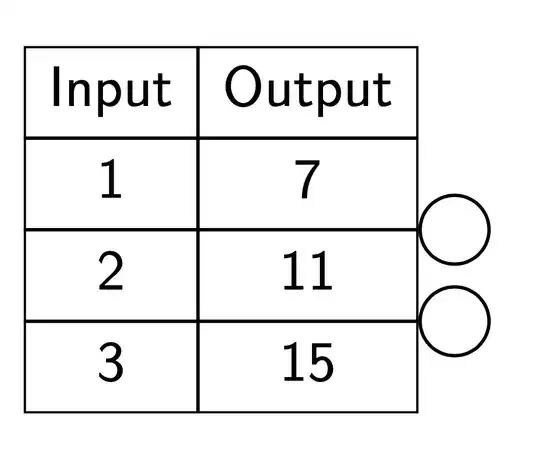
enter image description here

Or with ampersand replacement for usage in beamer etc.

\documentclass{article}
\usepackage[utf8]{inputenc}
\usepackage{tikz}
\usetikzlibrary{matrix}
\usepackage{eqparbox}
\newbox\matrixcellbox
\tikzset{center align per column/.style={column #1/.style={nodes={execute at begin
 node={\setbox\matrixcellbox=\hbox\bgroup\strut},
 execute at end
 node={\egroup\eqmakebox[\tikzmatrixname\the\pgfmatrixcurrentcolumn][c]{\copy\matrixcellbox}}}}},
}


\begin{document}
Multiply input by 4 and add 3

\begin{center}
\begin{tikzpicture}
\matrix[matrix of nodes,inner sep=0pt,outer sep=0pt,
    nodes={draw,inner sep=2pt,font=\sffamily,inner xsep=1ex},
    column sep=-\pgflinewidth/2,row sep=-\pgflinewidth/2,
    center align per column/.list={1,2},
    ampersand replacement=\&] (mat) {
        Input \& Output\\
          1 \& 7 \\
          2 \& 11 \\ 
          3 \& 15 \\ 
};
\path[nodes={circle,anchor=west,inner sep=1ex,draw,semithick,midway}] 
    (mat-2-2.south-|mat.east) -- (mat-3-2.north-|mat.east) node{}
    (mat-3-2.south-|mat.east) -- (mat-4-2.north-|mat.east) node{};
\end{tikzpicture}
\end{center}

\end{document}
  • This compiles by itself but I'm trying to place it in examdesign class I get an ampersand error. Package pgf Error: Single ampersand used with wrong catcode. – E.Yu Apr 02 '20 at 01:00
  • 2
    @E.Yu Well, this is why you are usually asked to provide us with a minimal working example. Try adding ampersand replacement=\& to the options of the matrix, and replace all & by \& in the matrix. –  Apr 02 '20 at 01:13
  • Yes. Sorry. Lesson learned. I'll try to make the MWE be in the correct class next time. Thank you. – E.Yu Apr 02 '20 at 01:36
  • If I make a new table, the column widths seem to affect every other table in the document. For example if I create a longer first column, all columns of every tikzpicture has the same width. I don't know how to fix this. Can you help? – E.Yu Apr 07 '20 at 21:44
  • @E.Yu This is because it was not clear to me that you want to have several of those. One can make the labels unique per matrix in order to avoid that. The simplest way would be if you give the matrices unique names, e.g. mat1 and mat2 instead of mat. –  Apr 07 '20 at 21:46
1

You can do that with nicematrix:

\documentclass{article}
\usepackage{nicematrix,tikz}

\begin{document}

\renewcommand{\arraystretch}{1.6}

$\begin{NiceMatrix}[hvlines] \text{Input} & \text{Ouput} \ 1 & 7 \ 2 & \ 3 &
\CodeAfter \tikz \draw ([xshift=3mm]3-|3) circle (3mm) ([xshift=3mm]4-|3) circle (3mm) ; \end{NiceMatrix}$

\end{document}

Result of the above code

F. Pantigny
  • 40,250