5

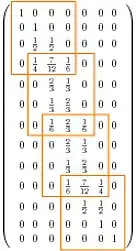
I would like to draw frameworks around certain submatrices of a large matrix, like described in this question: Highlight elements in the matrix.

I tried some of the provided solutions and ended up using this one:

\documentclass{article}
\usepackage{amsmath}
\usepackage{tikz}
\usepackage{color}
\definecolor{orange}{RGB}{255,127,0}
\usetikzlibrary{arrows,matrix,positioning}
\usepackage{xfrac}
\begin{document}

\begin{tikzpicture}
\matrix [matrix of math nodes,left delimiter=(,right delimiter=)] (m)
{
1 & 0 & 0 & 0 & 0 & 0 & 0\\ 
0 & 1 & 0 & 0 & 0 & 0 & 0\\ 
0 & \frac{1}{2} & \frac{1}{2} & 0 & 0 & 0 & 0\\ 
0 & \frac{1}{4} & \frac{7}{12} & \frac{1}{6} & 0 & 0 & 0\\ 
0 & 0 & \frac{2}{3} & \frac{1}{3} & 0 & 0 & 0\\ 
0 & 0 & \frac{1}{3} & \frac{2}{3} & 0 & 0 & 0\\ 
0 & 0 & \frac{1}{6} & \frac{2}{3} & \frac{1}{6} & 0 & 0\\ 
0 & 0 & 0 & \frac{2}{3} & \frac{1}{3} & 0 & 0\\ 
0 & 0 & 0 & \frac{1}{3} & \frac{2}{3} & 0 & 0\\ 
0 & 0 & 0 & \frac{1}{6} & \frac{7}{12} & \frac{1}{4} & 0\\ 
0 & 0 & 0 & 0 & \frac{1}{2} & \frac{1}{2} & 0\\ 
0 & 0 & 0 & 0 & 0 & 1 & 0\\ 
0 & 0 & 0 & 0 & 0 & 0 & 1\\
};  
\draw[color=orange,line width=1pt] (m-1-1.north west) -- (m-1-4.north east) -- (m-4-4.south east) -- (m-4-1.south west) -- cycle;
\draw[color=orange,line width=1pt] (m-4-2.north west) -- (m-4-5.north east) -- (m-7-5.south east) -- (m-7-2.south west) -- cycle;
\draw[color=orange,line width=1pt] (m-7-3.north west) -- (m-7-6.north east) -- (m-10-6.south east) -- (m-10-3.south west) -- cycle;
\draw[color=orange,line width=1pt] (m-10-4.north west) -- (m-10-7.north east) -- (m-13-7.south east) -- (m-13-4.south west) -- cycle;
\end{tikzpicture}            

\end{document}

The thing is, when in a certain row there are both plain numbers and fractions, the frameworks are skewed like this:
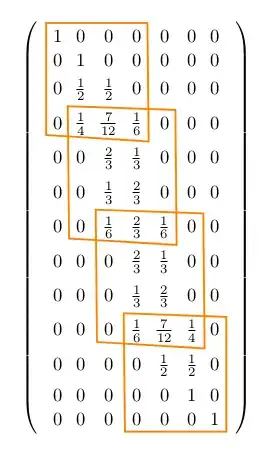
enter image description here

How can I fix this? I tried to replace each \frac by \sfrac (that's why I added the package xfrac), but this makes the problem even worse.

Moriambar
  • 11,466
Ailurus
  • 1,163

3 Answers3

10

With fit. (update) I added a new style rec.

\documentclass{article}
\usepackage{amsmath}
\usepackage{tikz}
\usepackage{color}
\definecolor{orange}{RGB}{255,127,0}
\usetikzlibrary{arrows,matrix,positioning,fit}
\usepackage{xfrac}
\begin{document}

\begin{tikzpicture}[rec/.style={draw=orange,thick,inner sep=0}]
\matrix [matrix of math nodes,left delimiter=(,right delimiter=)] (m)
{
  1 & 0 & 0 & 0 & 0 & 0 & 0\\ 
  0 & 1 & 0 & 0 & 0 & 0 & 0\\ 
  0 & \sfrac{1}{2} & \sfrac{1}{2} & 0 & 0 & 0 & 0\\ 
  0 & \sfrac{1}{4} & \sfrac{7}{12} & \sfrac{1}{6} & 0 & 0 & 0\\ 
  0 & 0 & \sfrac{2}{3} & \sfrac{1}{3} & 0 & 0 & 0\\ 
  0 & 0 & \sfrac{1}{3} & \sfrac{2}{3} & 0 & 0 & 0\\ 
  0 & 0 & \sfrac{1}{6} & \sfrac{2}{3} & \sfrac{1}{6} & 0 & 0\\ 
  0 & 0 & 0 & \sfrac{2}{3} & \sfrac{1}{3} & 0 & 0\\ 
  0 & 0 & 0 & \sfrac{1}{3} & \sfrac{2}{3} & 0 & 0\\ 
  0 & 0 & 0 & \sfrac{1}{6} & \sfrac{7}{12} & \sfrac{1}{4} & 0\\ 
  0 & 0 & 0 & 0 & \sfrac{1}{2} & \sfrac{1}{2} & 0\\ 
  0 & 0 & 0 & 0 & 0 & 1 & 0\\ 
  0 & 0 & 0 & 0 & 0 & 0 & 1\\
};  
\node[fit=(m-1-1)(m-4-4),  rec] {}; 
\node[fit=(m-4-2)(m-7-5),  rec] {};  
\node[fit=(m-7-3)(m-10-6), rec] {};  
\node[fit=(m-10-4)(m-13-7),rec] {};  
\end{tikzpicture}            

\end{document}

enter image description here

Moriambar
  • 11,466
Alain Matthes
  • 95,075
4

The beta package matrixcells eats this sort of thing for breakfast. Here's your code with a modicum of changes - I'm tempted to set this as a "spot the difference" between the original code and this.

\documentclass{article}
%\url{http://tex.stackexchange.com/q/53938/86}
\usepackage{amsmath}
\usepackage{tikz}
\usepackage{matrixcells}
\usepackage{color}
\definecolor{orange}{RGB}{255,127,0}
\usetikzlibrary{arrows,matrix,positioning}
\usepackage{xfrac}
\begin{document}

\begin{tikzpicture}
\matrix [matrix of math nodes,left delimiter=(,right delimiter=),label cells] (m)
{
1 & 0 & 0 & 0 & 0 & 0 & 0\\ 
0 & 1 & 0 & 0 & 0 & 0 & 0\\ 
0 & \frac{1}{2} & \frac{1}{2} & 0 & 0 & 0 & 0\\ 
0 & \frac{1}{4} & \frac{7}{12} & \frac{1}{6} & 0 & 0 & 0\\ 
0 & 0 & \frac{2}{3} & \frac{1}{3} & 0 & 0 & 0\\ 
0 & 0 & \frac{1}{3} & \frac{2}{3} & 0 & 0 & 0\\ 
0 & 0 & \frac{1}{6} & \frac{2}{3} & \frac{1}{6} & 0 & 0\\ 
0 & 0 & 0 & \frac{2}{3} & \frac{1}{3} & 0 & 0\\ 
0 & 0 & 0 & \frac{1}{3} & \frac{2}{3} & 0 & 0\\ 
0 & 0 & 0 & \frac{1}{6} & \frac{7}{12} & \frac{1}{4} & 0\\ 
0 & 0 & 0 & 0 & \frac{1}{2} & \frac{1}{2} & 0\\ 
0 & 0 & 0 & 0 & 0 & 1 & 0\\ 
0 & 0 & 0 & 0 & 0 & 0 & 1\\
};  
\draw[color=orange,line width=1pt] (m-cell-1-1.north west) -- (m-cell-1-4.north east) -- (m-cell-4-4.south east) -- (m-cell-4-1.south west) -- cycle;
\draw[color=orange,line width=1pt] (m-cell-4-2.north west) -- (m-cell-4-5.north east) -- (m-cell-7-5.south east) -- (m-cell-7-2.south west) -- cycle;
\draw[color=orange,line width=1pt] (m-cell-7-3.north west) -- (m-cell-7-6.north east) -- (m-cell-10-6.south east) -- (m-cell-10-3.south west) -- cycle;
\draw[color=orange,line width=1pt] (m-cell-10-4.north west) -- (m-cell-10-7.north east) -- (m-cell-13-7.south east) -- (m-cell-13-4.south west) -- cycle;
\end{tikzpicture}            

\end{document}

Here's the result:

Matrix with cells outlined

The matrixcells package puts rectangular nodes over each of the cells of a TikZ matrix in such a way that they tile the matrix. This ensures that their edges line up and so forth. Thus they are better designed for outlining regions of a matrix than the individual cells themselves. For example, if one of the non-corner nodes happens to be extra tall then Altermundus' code won't adapt to this whereas the above will. Here's the comparison with Altermundus' code producing the orange lines and mine producing the green.

Comparison of methods

Moriambar
  • 11,466
Andrew Stacey
  • 153,724
  • 43
  • 389
  • 751
  • you are right but the mixt of different styles of fractions are not very elegant. But in this case, you have several options but \node[fit=(m-4-2)(m-4-3)(m-7-5), rec] {}; is efficient . – Alain Matthes May 01 '12 at 19:01
  • @Altermundus Of course it's not elegant - it was a quite hack to demonstrate the issue. And you can, as you point out, add the tallest node to the fit to make that work. But this method works automatically. It's an alternative, that's all. – Andrew Stacey May 01 '12 at 19:24
  • @AndrewStacey, thanks for this alternative solution! – Ailurus May 01 '12 at 21:05
2

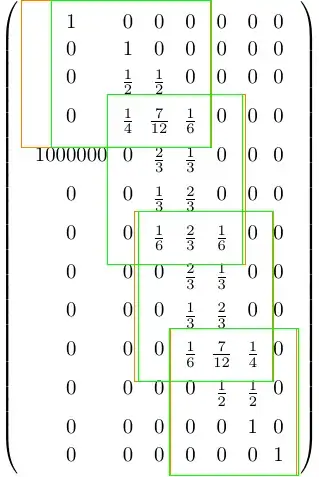
The two answers provided have some limitation. illustrated in the following variation of the MWE:

\documentclass[tikz]{standalone}
%\url{https://tex.stackexchange.com/q/53938/86}
\usepackage{amsmath}
\usepackage{matrixcells}
\usetikzlibrary{matrix, fit}
\usepackage{xfrac}
\begin{document}

\begin{tikzpicture}
\matrix [matrix of math nodes,left delimiter=(,right delimiter=),label cells, nodes={anchor=north}] (m)
{
1 & 0 & 0 & 0 & 0 & 0 & 0\\
0 & 1 & 0 & 0 & 0 & 0 & 0\\
0 & \frac{1}{2} & \frac{1}{2} & 0 & 0 & 0 & 0\\
0 & \frac{1}{4} & \frac{7}{12} & \frac{1}{6} & 0 & 0 & 0\\
1000000 & 0 & \frac{2}{3} & \frac{1}{3} & 0 & 0 & 0\\
0 & 0 & \frac{1}{3} & \frac{2}{3} & 0 & 0 & 0\\
0 & 0 & \frac{1}{6} & \frac{2}{3} & \frac{1}{6} & 0 & 0\\
0 & 0 & 0 & \frac{2}{3} & \frac{1}{3} & 0 & 0\\
0 & 0 & 0 & \frac{1}{3} & \frac{2}{3} & 0 & 0\\
0 & 0 & 0 & \frac{1}{6} & \frac{7}{12} & \frac{1}{4} & 0\\
0 & 0 & 0 & 0 & \frac{1}{2} & \frac{1}{2} & 0\\
0 & 0 & 0 & 0 & 0 & 1 & 0\\
0 & 0 & 0 & 0 & 0 & 0 & 1\\
};
\draw[color=orange,line width=1pt] (m-cell-1-1.north west) -- (m-cell-1-4.north east) -- (m-cell-4-4.south east) -- (m-cell-4-1.south west) -- cycle;
\draw[color=orange,line width=1pt] (m-cell-4-2.north west) -- (m-cell-4-5.north east) -- (m-cell-7-5.south east) -- (m-cell-7-2.south west) -- cycle;
\draw[color=orange,line width=1pt] (m-cell-7-3.north west) -- (m-cell-7-6.north east) -- (m-cell-10-6.south east) -- (m-cell-10-3.south west) -- cycle;
\draw[color=orange,line width=1pt] (m-cell-10-4.north west) -- (m-cell-10-7.north east) -- (m-cell-13-7.south east) -- (m-cell-13-4.south west) -- cycle;

\node[draw=green, fit=(m-1-1)(m-4-4)] {};
\node[draw=green, fit=(m-4-2)(m-7-5)] {};
\node[draw=green, fit=(m-7-3)(m-10-6)] {};
\node[draw=green, fit=(m-10-4)(m-13-7)] {};
\end{tikzpicture}

\end{document}

output

The green boxes correspond to @AlainMatthes 's answer and the orange to @AndrewStacey 's answer.

The orange contours are off due to the change of anchor (full explanation in this answer).

The green contours are off because the dimension of the contour cannot be determined only by the nodes it contain. This is an extension of @AndrewStacey 's comment about which nodes to include in the fit.

As mentioned in this same answer, I have fixed the anchor problem in matrixcells in matrix.skeleton. The following example shows the proper contours in orange:

\documentclass[tikz]{standalone}
%\url{https://tex.stackexchange.com/q/53938/86}
\usepackage{amsmath}
\usetikzlibrary{matrix.skeleton}
\usepackage{xfrac}
\begin{document}

\begin{tikzpicture}
\matrix [matrix of math nodes,left delimiter=(,right delimiter=),label skeleton, nodes={anchor=north}] (m)
{
1 & 0 & 0 & 0 & 0 & 0 & 0\\
0 & 1 & 0 & 0 & 0 & 0 & 0\\
0 & \frac{1}{2} & \frac{1}{2} & 0 & 0 & 0 & 0\\
0 & \frac{1}{4} & \frac{7}{12} & \frac{1}{6} & 0 & 0 & 0\\
1000000 & 0 & \frac{2}{3} & \frac{1}{3} & 0 & 0 & 0\\
0 & 0 & \frac{1}{3} & \frac{2}{3} & 0 & 0 & 0\\
0 & 0 & \frac{1}{6} & \frac{2}{3} & \frac{1}{6} & 0 & 0\\
0 & 0 & 0 & \frac{2}{3} & \frac{1}{3} & 0 & 0\\
0 & 0 & 0 & \frac{1}{3} & \frac{2}{3} & 0 & 0\\
0 & 0 & 0 & \frac{1}{6} & \frac{7}{12} & \frac{1}{4} & 0\\
0 & 0 & 0 & 0 & \frac{1}{2} & \frac{1}{2} & 0\\
0 & 0 & 0 & 0 & 0 & 1 & 0\\
0 & 0 & 0 & 0 & 0 & 0 & 1\\
};

\node[draw=orange, fit=(m-cell-1-1)(m-cell-4-4)] {};
\node[draw=orange, fit=(m-cell-4-2)(m-cell-7-5)] {};
\node[draw=orange, fit=(m-cell-7-3)(m-cell-10-6)] {};
\node[draw=orange, fit=(m-cell-10-4)(m-cell-13-7)] {};

\node[draw=green, fit=(m-1-1)(m-4-4)] {};
\node[draw=green, fit=(m-4-2)(m-7-5)] {};
\node[draw=green, fit=(m-7-3)(m-10-6)] {};
\node[draw=green, fit=(m-10-4)(m-13-7)] {};
\end{tikzpicture}

\end{document}

correct output