You need to ad float posioning options. The good choise is htb which means h for here, t at top nad b and p for page.
In MWE belwo I also sugest some small improvements for your table design. Fro this are needed packages caption, multirow and siunitx.
Edit:
with use of the \tablenum macro from siunitx package column is fixed numbers aligning at decimal separator.
\documentclass[12pt,a4paper]{article}
\usepackage[margin=2cm]{geometry}
\usepackage[skip=1ex]{caption}
\usepackage{multirow}
\usepackage{siunitx}
\newcommand{\mrte}[3][1]{%
    \multirow{#1}{*}{\tablenum[table-format=#2,
                               group-four-digits,
                               group-separator={,}]{#3}}} % <---

\title{Tutorial on Tables and Figures}
\author{Me}
\date{\today}

\begin{document}
\maketitle

\begin{table}[htb]
    \centering
    \renewcommand\arraystretch{1.1} % for more vertical space in cells
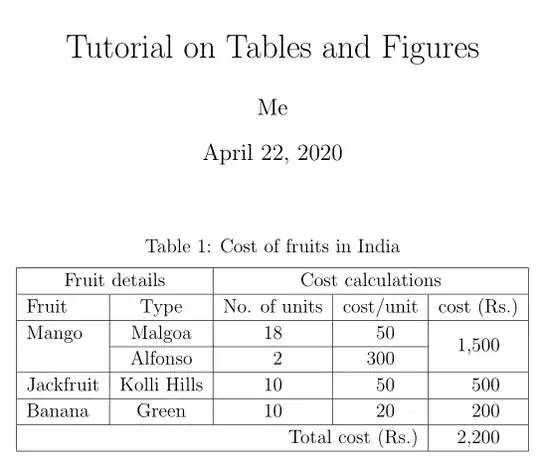
\caption{Cost of fruits in India}
\begin{tabular}{|l|c|S[table-format=2.0]|
                     S[table-format=3.0]|
                     c|}\hline
\multicolumn{2}{|c|}{Fruit details} &
\multicolumn{3}{c|}{Cost calculations} \\ \hline
Fruit       & Type          & {No. of units} & {cost/unit} & {cost (Rs.)} \\ \hline
Mango       & Malgoa        & 18    & 50    &                       \\ \cline{2-4}
            & Alfonso       & 2     & 300   & \mrte[-2]{4.0}{1500}  \\ \hline
Jackfruit   & Kolli Hills   & 10    & 50    & \mrte{4.0}{500}       \\ \hline
Banana      & Green         & 10    & 20    & \mrte{4.0}{200}       \\ \hline
\multicolumn{4}{|r|}{Total cost (Rs.)}      & \mrte{4.0}{2200}      \\ \hline
\end{tabular}
\end{table}
\end{document}
Addendum:
a table without vertical lines and with horizontal rules defined in the booktabs package has a more professional appearance:
\documentclass[12pt,a4paper]{article}
\usepackage[margin=2cm]{geometry}
\usepackage[skip=1ex]{caption}
\usepackage{booktabs,   % for the second example
            multirow}
\usepackage{siunitx}
\newcommand{\mrte}[3][1]{%
    \multirow{#1}{*}{\tablenum[table-format=#2,
                               group-four-digits,
                               group-separator={,}]{#3}}} % <---

\title{Tutorial on Tables and Figures}
\author{Me}
\date{\today}

\begin{document}
\maketitle

\begin{table}[htb]
    \centering
    \renewcommand\arraystretch{1.1} % for more vertical space in cells
\caption{Cost of fruits in India}
\begin{tabular}{ l l S[table-format=2.0]
                     S[table-format=3.0]
                     c}
    \toprule
\multicolumn{2}{c}{Fruit details} &
\multicolumn{3}{c}{Cost calculations} \\
    \cmidrule(r){1-2}
    \cmidrule(l){3-5}
Fruit       & Type          & {No. of units} & {cost/unit} & {cost (Rs.)} \\
    \midrule
\multirow{2}{*}{Mango}
            & Malgoa        & 18    & 50    &                       \\
            & Alfonso       & 2     & 300   & \mrte[-2]{4.0}{1500}  \\
    \addlinespace
Jackfruit   & Kolli Hills   & 10    & 50    & \mrte{4.0}{500}       \\
Banana      & Green         & 10    & 20    & \mrte{4.0}{200}       \\
    \midrule
\multicolumn{4}{r}{Total cost (Rs.)}        & \mrte{4.0}{2200}      \\
    \bottomrule
\end{tabular}
\end{table}
\end{document}


