I'm trying to replicate the ARGUMENT section pictured below.
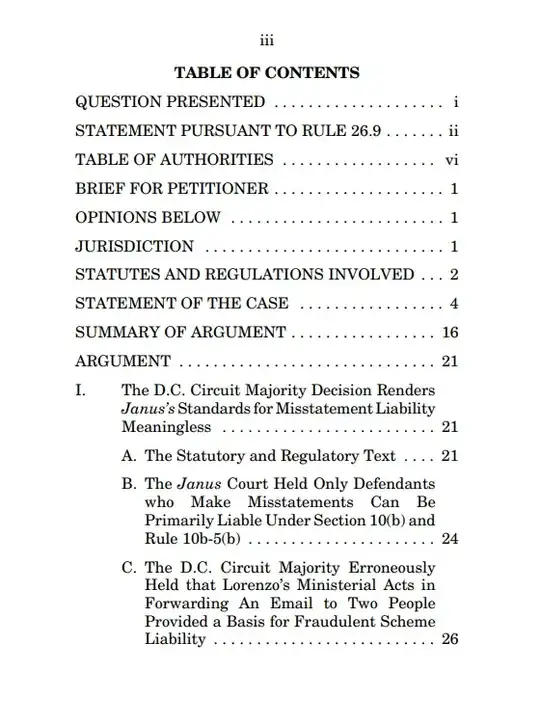
I tried adapting the code from here for the letters but I found that when I suppress the section numbers the subsection numbers do not properly print.
I'm trying to replicate the ARGUMENT section pictured below.
I tried adapting the code from here for the letters but I found that when I suppress the section numbers the subsection numbers do not properly print.


Fixed, with the following working code:
\renewcommand{\thesection}{}
\renewcommand{\thesubsection}{\Roman{subsection}}
\renewcommand{\thesubsubsection}{\Alph{subsubsection}}

\let \savenumberline \numberline
\def \numberline#1{\savenumberline{#1.}}
Later code from here.
\section* and add it in \addcontentsline because the dot from the last two lines of code will print before the section even though there is no numbering, not sure how to fix that in the "correct" way.
– Soro
May 09 '20 at 18:01
\section* does not reset the subsection counter. :)
– Circumscribe
May 09 '20 at 18:50
\renewcommand*\numberline[1]{\ifx\relax#1\relax\else\savenumberline{#1.}\fi} would do it. The \ifx\relax#1\relax bit tests if #1 is empty, see e.g. here.
– Circumscribe
May 09 '20 at 19:11
\renewcommand{\thesection}{} \renewcommand{\thesubsection}{\Roman{subsection}} \renewcommand{\thesubsubsection}{\Alph{subsubsection}}This does everything except the dot after the number. – Soro May 09 '20 at 05:35