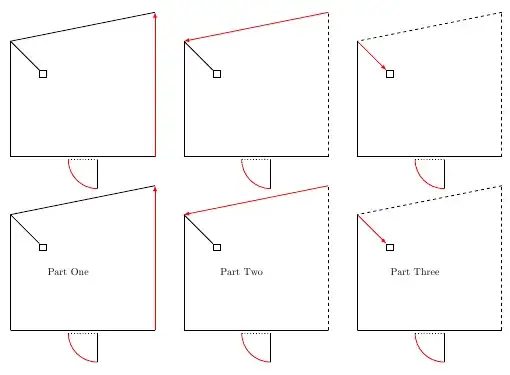
I want to shift the lines specification through a polygon. My current code looks like this (not DRY at all):
\documentclass{article}
\usepackage{tikz}
\begin{document}

\usetikzlibrary{shapes,arrows}
\usetikzlibrary{calc}
\usetikzlibrary{shapes,arrows}

\newcommand{\door} {
\begin{scope}[yshift=-0.1cm,xshift=2cm]
\draw[red] (0,0) arc (180:270:1cm);
\draw[black] (1,-1) -- (1,-0) node[right,  near start]{};
\draw[black,dotted] (0,-0) -- (1,-0)node(doorstepcenter)[pos=0.5]{} ;
\end{scope}
}

 \newcommand{\room} {
 \coordinate (a) at  (0,0) ;
 \coordinate (b) at (5,0);
 \coordinate (c) at (5,5);
 \coordinate (d) at     (0,4);
 \coordinate (e) at     (1,3)   ;
}

\tikzstyle{seed}=[-latex,red];

\begin{tikzpicture}[node distance =4.5cm,thick]
 \tikzstyle{door} = [red,thick];

\room;
\draw (a) -- (b);
\draw[seed] (b)--(c);
\draw  (c)--(d);
\draw (d)--(e) node[draw,anchor=north west]{} ;
\draw (d) --(a);
\door;


\begin{scope}[xshift=6cm]
    \room;
    \draw (a) -- (b);
    \draw[dashed] (b)--(c);
    \draw[seed]  (c)--(d);
    \draw (d)--(e) node[draw,anchor=north west]{} ;
    \draw (d) --(a);
    \door;
\end{scope}

\begin{scope}[xshift=12cm]
    \room;
    \draw (a) -- (b);
    \draw[dashed] (b)--(c);
    \draw[dashed]  (c)--(d);
    \draw[seed] (d)--(e) node[draw=black,anchor=north west]{} ;
    \draw (d) --(a);
    \door;
\end{scope}
\end{tikzpicture}
\end{document}
There are more polygons to treat as well so this will get pretty ugly. How can I compact this example to something more neat ?
EDIT:
So after learning a lot tikz in the last days here the version I'm aiming at (thanks to many different answers here)
\begin{document}

\usetikzlibrary{shapes,arrows}
\usetikzlibrary{calc}

\newcommand{\door}[1] {
\begin{scope}[shift={#1}]
\draw[red] (-0.5,0) arc (180:270:1cm);
\draw[black] (0.5,-1) -- (0.5,-0) node[right,  near start]{};
\draw[black,dotted] (-0.5,0) -- (0.5,-0)node(doorstepcenter)[pos=0.5]{} ;
\end{scope}
};

\tikzstyle{seed}=[-latex,red, thick];

 \newcommand{\room} { %[2]
 \coordinate (a1) at  (4.5,0.5);
 \coordinate (a2) at  (4.5,4.5);
 \coordinate (a3) at  (0,4);
 \coordinate (a4) at  (1,3);
 \coordinate (a5) at  (1.4,3)  ;
 \coordinate (a6) at  (1.4,2.6)  ;
 \coordinate (a7) at  (1,2.6)  ;
 \coordinate (a8) at  (1,3);
 \coordinate (a9) at  (0,4);
 \coordinate (a10) at  (0,0.5) ;
 \coordinate (a11) at  (4.5,0.5);
}

\newcommand{\makerow}[3]{
 \pgfmathsetmacro{\rows}{#1}
 \pgfmathsetmacro{\rowe}{#2}
 \pgfmathsetmacro{\ys}{#3}
 \pgfmathsetmacro{\n}{10}
\foreach \i in {\rows,...,\rowe}{
    \pgfmathsetmacro{\li}{\i+1}
    \pgfmathsetmacro{\si}{6*(\i-\rows)}
    \begin{scope}[xshift=\si cm, ,yshift=\ys cm]
        \room;
        \door{ ($ (a10)!0.5! (a1) -(0,0.1)  $) };
        \foreach \k in {1,...,\n}{
            \pgfmathsetmacro{\hk}{\k+1}
            \draw[solid] plot coordinates{(a\k) (a\hk)};
        }
        \foreach \k in {1,...,\i}{
            \pgfmathsetmacro{\hk}{\k+1}
            \draw[dashed,white,thick] plot coordinates{(a\k) (a\hk)};
        }
        \draw[seed] plot coordinates{(a\i) (a\li)};
    \end{scope}
}
}


\begin{tikzpicture}%[node distance =4.5cm,thick]
\makerow{1}{5}{0};
\makerow{6}{10}{-6};
\end{tikzpicture}
\end{document}

While this is very close to the figure I wanted to achieve it has still some defects. I have to draw white over black to get the dashes since any approach I tried with a nested foreach having a variable start and end failed. I think I have to read some more about foreach, but at least this solution has far less spaghetti code than before. If you have further suggestions I would be glad to learn more.



\foreachloop -- you might need to enclose the text within a{}. – Peter Grill May 04 '12 at 17:00\foreachalong with style will work best for you. – Peter Grill May 05 '12 at 17:25