3

I've been trying to make these symbols to use in math mode:

I tried modifying the explanations from

but I don't really have any idea what I'm doing. The closest I've got is

f\mkern-6.5mu\mathchar'204\mkern-2mu

I'm using the following packages

  • \usepackage[utf8]{inputenc}
  • \usepackage[T1]{fontenc}
  • \usepackage{libertine}
  • \usepackage{libertinust1math}
bEPIK
  • 323
  • 1
    Just you could adapt this answer for your question: https://tex.stackexchange.com/questions/96479/how-can-i-type-lambda-bar – Sebastiano Jun 27 '20 at 12:13

2 Answers2

4

You can do this with fontspec and Unicode combining accents, adjusting the positioning of the combining bar with \kern.

\tracinglostchars=2
\documentclass{article}
\usepackage{unicode-math}
\usepackage{libertinus} % Loads unicode-math and Libertinus Math.

\pagestyle{empty}

\newcommand\pstroke{\mathord{\mathit{p\kern -0.1em ^^^^0332}}} \newcommand\tstroke{\mathord{\mathit{t^^^^0335}}} \newcommand\fstroke{\mathord{\mathit{f^^^^0335}}}

\begin{document} [ \pstroke \neq \tstroke \neq \fstroke ] \end{document}

Libertinus sample

Davislor
  • 44,045
3

Using the bar that's found in position "84 of libertinust1-mathrm. Fine tune the parameters if you want more precise positioning.

The first parameter is the vertical shift, the second parameter is the horizontal shift, the third parameter is the horizontal scaling. The bar is always vertically scaled at 80%.

\documentclass{article}
\usepackage{amsmath,graphicx}
\usepackage{libertinus}
\usepackage{libertinust1math}

\makeatletter

\DeclareRobustCommand{\tbar}{\text{\addbar@{-0.35ex}{0.07em}{1}}t} \DeclareRobustCommand{\fbar}{\text{\addbar@{-0.35ex}{0.07em}{1.1}}f} \DeclareRobustCommand{\pbar}{\text{\addbar@{-1.25ex}{-0.01em}{1}}p} \newcommand{\addbar@}[3]{% \makebox[0pt][l]{% \raisebox{#1}[0pt][0pt]{% \kern#2 \scalebox{#3}[0.8]{$\m@th\mathchar"84$}% }% }% }

\makeatother

\begin{document}

$\tbar\ \fbar\ \pbar$

$\scriptstyle\tbar\ \fbar\ \pbar$

$\scriptscriptstyle\tbar\ \fbar\ \pbar$

\end{document}
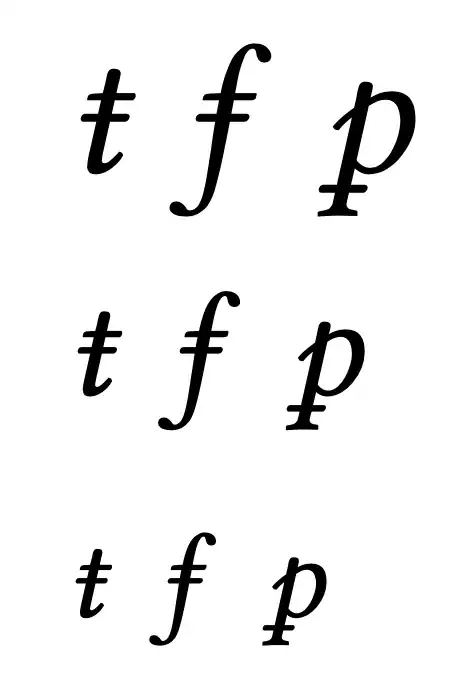
enter image description here

egreg
  • 1,121,712