Solution: You can use the same long pdf file and clip it with the following technique.
Let us say that we have this picture:

We set out to clip this picture. Here is the full code. Hope the code explains it all.
\documentclass{article}
\usepackage{graphicx,fullpage}
\begin{document}

\begin{figure}[htb]
\centering
\includegraphics[width=3cm]{chick}
\caption{A chick in full}
\end{figure}

\section{\texttt{trim}}
\texttt{trim=l b r t} $\rightarrow$ This option will crop the imported image by l from the left, b from the bottom, r from the right, and t from the top. Where l, b, r and t are lengths.

\texttt{clip} $\rightarrow$     For the \texttt{trim} option to work, you must set \verb|clip=true|.

\begin{figure}[htb]
\centering
\includegraphics[trim = 5mm 25mm 5mm 2mm, clip, width=3cm]{chick}
\caption{A chick not in full using \texttt{trim}}
\end{figure}

\section{\texttt{viewport}}
\texttt{viewport=lx ly ux uy} $\rightarrow$ This option will crop the imported image by a box (rectangular/square) determined by the points with co-ordinates (lx,ly) (measured from south west point) and (ux,uy) (measured from north east point). Here I used `l' for lower and `u` for upper.

\texttt{clip} $\rightarrow$     For the \texttt{viewport} option to work, you must set \verb|clip=true|.

\begin{figure}[htb]
\centering
\includegraphics[viewport = 5mm 25mm 40mm 55mm, clip, width=3cm]{chick}
\caption{A chick not in full using \texttt{viewport}}
\end{figure}

\end{document}
The output is:
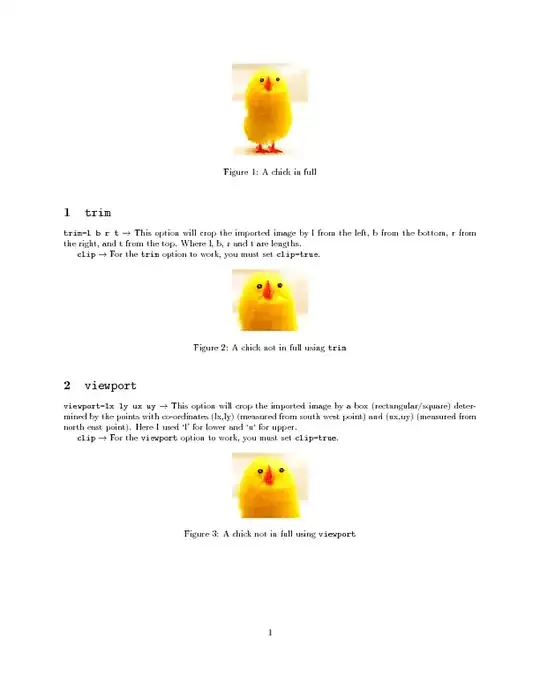
I have used fullpage package so as to bring every thing in one page (personal preference).


clipfunction ofgraphicxpackage withviewportoption. Will these be useful?pdfcropis described in this question. there are some drawbacks -- if there is a page number on the pdf file, that will be included in the cropped area. – barbara beeton May 10 '12 at 13:10