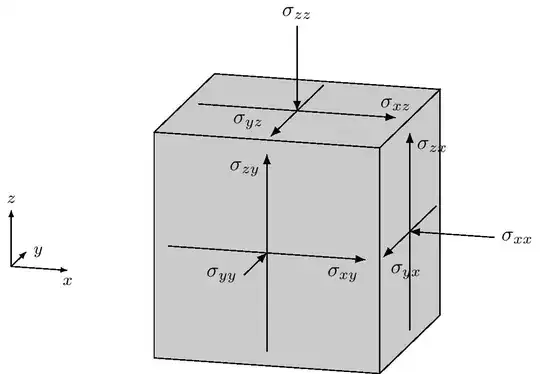
Here is an example of what you can achieve with the perspective and the 3d libraries.
To change the perspective, just change the angles in the 3d view key.
\documentclass{standalone}
\usepackage{tikz}
    \usetikzlibrary{perspective}
    \usetikzlibrary{3d}
    \usetikzlibrary{arrows.meta}
\begin{document}
\begin{tikzpicture}[%
    3d view = {15}{15}
]

    \draw[-{Latex[scale = 0.7]}] (-4, -4, 0) -- (-3, -4, 0)
        node[below] {\footnotesize$x$};
    \draw[-{Latex[scale = 0.7]}] (-4, -4, 0) -- (-4, -3, 0)
        node[right] {\footnotesize$y$};
    \draw[-{Latex[scale = 0.7]}] (-4, -4, 0) -- (-4, -4, 1)
        node[above] {\footnotesize$z$};

    \begin{scope}[canvas is xz plane at y = -2]

        \draw[
            fill = lightgray
        ] (-2, -2) rectangle (2, 2);

        \draw[-Latex] (-1.75, 0) -- (1.75, 0)
            node[below left] {$\sigma_{xy}$};
        \draw[-Latex] (0, -1.75) -- (0, 1.75)
            node[below left] {$\sigma_{zy}$};

    \end{scope}

    \draw[Latex-] (0, -2, 0) -- (0, -3.5, 0)
        node[left] {$\sigma_{yy}$};

    \begin{scope}[canvas is yz plane at x = 2]

        \draw[
            fill = lightgray
        ] (-2, -2) rectangle (2, 2);

        \draw[-Latex] (1.75, 0) -- (-1.75, 0)
            node[below right] {$\sigma_{yx}$};
        \draw[-Latex] (0, -1.75) -- (0, 1.75)
            node[below right] {$\sigma_{zx}$};

    \end{scope}

    \draw[Latex-] (2, 0, 0) -- (3.5, 0, 0)
        node[right] {$\sigma_{xx}$};

    \begin{scope}[canvas is xy plane at z = 2]

        \draw[
            fill = lightgray
        ] (-2, -2) rectangle (2, 2);

        \draw[-Latex] (-1.75, 0) -- (1.75, 0)
            node[above]{$\sigma_{xz}$};
        \draw[-Latex] (0, 1.75) -- (0, -1.75)
            node[above left]{$\sigma_{yz}$};

    \end{scope}

    \draw[Latex-] (0, 0, 2) -- (0, 0, 3.5)
        node[above] {$\sigma_{zz}$};

\end{tikzpicture}


\end{document}
which yields:
Then, you can look at the TikZ documentation to adapt it to specific needs.


