The biblatex standard styles (except for reading) don't print the abstract field, but they have everything needed to print it ready.
Normally it would be enough to just add something like
\renewbibmacro*{finentry}{%
  \setunit{\finentrypunct\par}%
  \usebibmacro{abstract}%
  \finentry}
to your preamble.
\documentclass[british]{article}
\usepackage[T1]{fontenc}
\usepackage[utf8]{inputenc}
\usepackage{babel}
\usepackage{csquotes}
\usepackage[style=authoryear, backend=biber]{biblatex}
\renewbibmacro*{finentry}{%
  \setunit{\finentrypunct\par}%
  \usebibmacro{abstract}%
  \finentry}
\addbibresource{biblatex-examples.bib}
\begin{document}
Lorem ipsum \autocite{sigfridsson}
\printbibliography
\end{document}

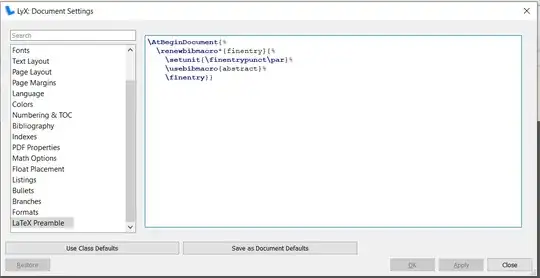
With LyX things are only very slightly more difficult. Assuming you already have everything set up for biblatex, you need to add
\AtBeginDocument{%
  \renewbibmacro*{finentry}{%
    \setunit{\finentrypunct\par}%
    \usebibmacro{abstract}%
    \finentry}}
to your document preamble (Document > Settings... > LaTeX Preamble). That is to say you need to wrap the code from above in \AtBeginDocument{...} to make sure that the code is only executed after biblatex is loaded (otherwise you may get errors about unknown commands).