48

What is the best way of editing an existing LaTeX table? I need to swap the order of two columns and can't think of an efficient way of doing this.

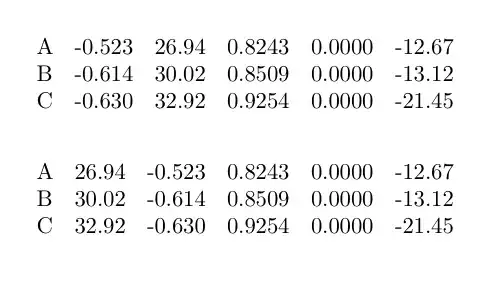
My table is a long creature of the following structure:

A &     -0.523 &      26.94 &     0.8243 &     0.0000 &     -12.67 \\
B &     -0.614 &      30.02 &     0.8509 &     0.0000 &     -13.12 \\
C &     -0.630 &      32.92 &     0.9254 &     0.0000 &     -21.45 \

I need to change the values so that it is:

A &     26.94 &      -0.523 &     0.8243 &     0.0000 &     -12.67 \\
(etc)

The thoughts that I had were to import it into Excel and to drag columns around, and then use the concatenate() function to produce the number & number structure. I feel like there might be a better way of doing this that I am unaware of.

David Carlisle
  • 757,742
celenius
  • 5,274

12 Answers12

56

As a tip for the future:

When creating big tables, I make a command to encode the row.

\newcommand{\resultrow}[4]{#1 & #2 & #3 & #4 \\}

If you then want to change the order/layout of something you only have to change the command definition.

You should take care in making the command as descriptive as possible, and that the arguments are in the order that they are logical to the command not to the table. This will make later changes to the order simpler.

As per request, an example. Take this table:

\begin{tabular}{l l l l}
  a & b & c & d \\
  2.33 & 4.55 & 5.66 & 7.88 \\
  3.44 & 5.66 & 6.77 & 9.00 \\
  .......
\end{tabular}

If you then want to change the order of the columns, well see the other answers to this question. I would however solve it like this:

\newcommand{\abcdresults}[4]{ #1 & #2 & #3 & #4 \\}
\begin{tabular}{l l l l}
  a & b & c & d \\
  \abcresults{2.33}{4.55}{5.66}{7.88}
  \abcresults{3.44}{5.66}{6.77}{9.00}
  .......
\end{tabular}

If you then want to change the order, you can just simply change the body of \abcdresults to for instance: {\textbf{#3} & #1 & #2 & #4 \\}

David Carlisle
  • 757,742
Davy Landman
  • 1,345
  • 16
    +1: for a simple, but nice approach to decouple presentation order from data order! – Daniel May 16 '12 at 12:14
  • @DavyLandman Could you elaborate, please? I don't understand how to use your tip to solve the problem (though I'm using tabular quite frequently). Thanks! – Keks Dose May 24 '12 at 08:44
  • 2
    @KeksDose Even if I may be late in the game, just to explain for future visitors. What Davy is doing is defining a command for writing a row, the abcdresults command. For this 4 column example the command takes four parameters and just outputs them in order putting an '&' in the middle and a new line at the end, just as you would normally do when writing a row. – merosss Dec 09 '17 at 13:29
  • +1. This method has a nice advantage: you can make the input of each row shorter by including some logic into the command. For example, if a column a limited set of possible options with a specific output for each one, you can program the command with \ifthenelse and have a single-character argument for in each row (1 for one option, 2 for another, and so on). In fact, you can have more arguments than columns and utilise them in clever ways. – Júda Ronén Jul 01 '22 at 23:08
48

+1 David for sed one-liner but with all due respect there is no better tool for working with tables than AWK. This is the solution for the above problem!

awk  'BEGIN {FS="&";OFS="&"}{print $1,$3,$2,$4,$5}' file.csv > newfile.csv
  • 1
    Great answer, thanks! I need one more tip to get this to work right, though. I understand that FS sets the separator, but how would I get awk to understand that the \\ at the end of each line is not part of the last field, but the end of line? – altabq May 11 '14 at 01:16
34

Any editor with regular expression replace can easily swap columns. For example on the command line if tab.tex contains your input this regexp will swap column 2 and 3. (You may need more or less backslashes in the regexp depending on the command line shell in use)

 sed -e "s/^\([^\&]*\)\&\([^\&]*\)\&\([^\&]*\)/\1\3\2/" tab.tex 
A       26.94      -0.523 &     0.8243 &     0.0000 &     -12.67 \\
B       30.02      -0.614 &     0.8509 &     0.0000 &     -13.12 \\
C       32.92      -0.630 &     0.9254 &     0.0000 &     -21.45 \
David Carlisle
  • 757,742
  • 6
    Thanks David - I'll try it out. That is a mind-melting regular expression. – celenius May 16 '12 at 01:44
  • 1
    the regexp is really just three ([^&])& groups that is, sequence of not-& followed by an &. It just needs the backslashes to hide the special characters from the shell (I was using bash shell, other command lines may be different) – David Carlisle May 16 '12 at 01:47
  • I'm starting to understand it; thanks again. regexp is something I have tried to learn several times. It did work (though stripped out some of the &). – celenius May 16 '12 at 01:56
  • 2
    oh sorry you need \1&\3&\2& to put the &'s back in the replacement or possibly &&\3&\2& depending. – David Carlisle May 16 '12 at 02:01
  • @David: lol, your last comment is a nice illustration of how your earlier "... regexp is really just ... " is very optimistic. I only use regexes only when I have to. If you don't use them every day, I think the syntax is very hard to remember and get right. – Rabarberski Jun 08 '12 at 13:09
  • 1
    Although in this case it is not the syntax of regexp that is particularly hard but the syntax of (any unknown) command line. & isn't special in regexp so the regep to match that is & which is easy enough but & might be special to your command line and the syntax to pass & through to sed might be \& but it might not, depending on which command line processor you are using. You can avoid this of course by putting the regex in a file and then giving the file to set (with -f option but then it isn't a one-liner so less fun:-) – David Carlisle Jun 08 '12 at 13:19
21

There are already good answers here, but there's a moral imperative to point out that, of course, there's an easy way to do this in emacs (or xemacs), without using regular expressions. You can copy a column to a register using copy-rectangle-to-register, paste it in as a new column using insert-register, and then delete the unwanted column using delete-rectangle. It's less fancy than using a regular expression, but easier to do one step at a time, making sure it's doing exactly what you want.

For the sake of completeness, use C-Space to mark one corner of the rectangle, and move to the opposite one. Then you can invoke the command you want on the rectangle defined by the two corners.

Dror
  • 22,613
  • 1
    Definitely +1 for using "column edit mode" in your text editor. I think column edit mode would be faster than the awk/sed regex because it would take me at least 5 minutes to create from scratch the above regex... when column edit would be done in 2 minutes. – Trevor Boyd Smith May 16 '12 at 11:59
  • Alternatively, you can use Emac's Org mode to convert the data to a table with (org-table-create-or-convert-from-region) and move the columns around with M-<left> and M-<right>. Then you can either export it in LaTeX format or save it as a text file. – Ricardo May 16 '12 at 12:55
  • Yes I nearly gave an emacs rectangle answer rather than sed, so +1, although someone claimed in a comment to an answer I gave to a different question that not everyone uses emacs, and also the rectangle comamnds require the input is nicely lined up as in the MWE, whereas the sed or awk field based versions will match fields even if the input file is less well padded for alignment of the entries. – David Carlisle May 16 '12 at 12:56
  • 3
    @DavidCarlisle, in emacs, if the input is not as nicely aligned as in the MWE, align and align-current work well and can take care of that. – Ricardo May 16 '12 at 15:24
  • well yes it's to be expected that emacs would take care of you:-) – David Carlisle May 16 '12 at 15:53
  • @DavidCarlisle Your regexp answer is clearly the zippier one, but what do you mean spreading strange rumors that not everyone uses emacs? – Phil Hirschhorn May 17 '12 at 00:25
  • 1
    @PhilHirschhorn I also hear that there are some strange people who use something called "Microsoft Word" instead of LaTeX. The world never ceases to amaze. – Seamus May 17 '12 at 12:29
21

Some TeX editors, e.g. WinEdt and TeXnicCenter and also text editors, e.g. Notepad++, offer a rectangular selection feature which is highly useful for editing tables.

For the WinEdt users, this nice and often overlooked functionality is in the Status Line.

enter image description here

If you click on LINE it becomes Block and that switches to the rectangle mode. This allows the user to select rectangular regions and perform copy paste options as usual.

enter image description here

This is especially useful to fill in the missing & columns to tabular data imported from Excel, MATLAB etc. via copying one column of & and pasting it between columns.

TeXnicCenter 2 makes rectangular selections if keys ALT + SHIFT are pressed while selecting. The same is true for Notepad++.

percusse
  • 157,807
  • Also very useful to know! Apparently you can do this in TextWrangler using a "rectangular selection" function with the command Option-drag or shift-option-click (though I can't get it to work). – celenius May 17 '12 at 20:53
  • @dgs Thanks a bunch for the addition. I didn't know that TC2 have that option too. – percusse May 20 '12 at 12:05
  • You're welcome. Actually it was this very feature which made me dump TC1, even though TC2 still is an alpha release. – dgs May 20 '12 at 12:39
6

In TeXShop (for Mac Users)
(1) Hold the <option> key down and then click and drag the mouse to select a column.
(2) Cut <command><X> and
(3) Paste <command><V>
to place it as a new column of your table where desired.

enter image description here

Sony
  • 3,920
4

In Excel you don't need to use concatenate to keep the table structure. If you import the table as in your MWE, you should be able to keep the & separators and the \\ line breaks in separate columns. Once you swap the columns, you can save it as a tab-delimited .txt file and you are done. The & and \\ will be separated from the data by a tab, but that shouldn't be an issue.

Ricardo
  • 3,186
  • That's very useful to know. Do you choose a space as your delimiter when importing? – celenius May 16 '12 at 16:09
  • I use space and tab when importing; most importantly, I look for the visual cue in the Excel import-window that tells you how the data will be imported, and choose the delimiters accordingly. – Ricardo May 19 '12 at 23:52
3

Like emacs, Vim has a column selection mode (^V) which will allow you to select columns and move them about. So ^v {select column} d {move to new location} p. And there's an extension called Tabular which will allow you to reformat tables with ease as well.

Robbie
  • 2,893
2

In TeXstudio menu, click on 'LaTex' then 'Manipulate Tables' and you can cut and paste columns.

You do not need to select the whole column, but rather simply place the cursor in one of the rows of the column you want to cut.

Fato39
  • 296
Andrew
  • 63
  • 1
    yes but the rectangular selection on TeXStudio, which is done with ctrl+alt+shift+leftmouse+drag, is uneasy. – emeryville Jan 06 '20 at 13:34
  • @emeryville You can just place the cursor in the column, no need to select it whole. I added a clarification to this answer. – Fato39 Jan 24 '24 at 16:00
1

You can do it with ed in a shell script, for example :

#!/bin/sh
ed tab.tex <<END
1,$s/^\([^&]*\)&\([^&]*\)&\([^&]*\)&\([^&]*\)&\([^&]*\)&\([^&\]*\)/\1\&\3\&\2\&\4\&\5\&\6/
w
q
END
Jacques
  • 11
  • 1
1

You can also use one of Sam Franke’s excellent tools for manipulating delimited text files, CSVed and uniCSVed. Those are true graphical interfaces. You find the programs at this web-page.

Sveinung
  • 20,355
1

Here is a Excel Macro for exporting table content to a latex table. It is not perfect but when prototyping large tables and reordering columns this is quite helpful.

OliverS
  • 111
  • The official homepage of excel2latex would either be http://ctan.org/pkg/excel2latex or https://launchpad.net/excel2latex – matth May 24 '12 at 20:01