1

I am using the xcolor package with the table option to color every other row of a table (excellent guidance here). This only requires a single line and is generally awesome. However, several times in my paper I find myself wanting to color only a subset of a row (e.g., not coloring the first N columns). (In the example below, it obscures a vertically-set word.) Is there a way to do this using this package (or another one with similar complexity), with the hope that tikz tables is not the only answer?

Example of how alternating color for the whole row isn't what I want

MWE:

\documentclass{article}
\usepackage[table]{xcolor}
\usepackage{booktabs,multirow,graphicx}
\definecolor{lightgray}{gray}{0.94}
\begin{document}
\begin{table}
  \begin{tabular}{clr}
    \toprule
    Alg. & Dataset & Result \\
    \midrule
    \parbox[t]{2mm}{\multirow{4}{*}{\rotatebox[origin=c]{90}{BFS}}}
         & soc-ork & 1.61\\
         & soc-lj  & 2.95\\
         & h09     & 1.60\\
         & i04     & 14.72\\
    \bottomrule
  \end{tabular}

\rowcolors{2}{lightgray}{white} \begin{tabular}{clr} \toprule Alg. & Dataset & Result \ \midrule \parbox[t]{2mm}{\multirow{4}{*}{\rotatebox[origin=c]{90}{BFS}}} & soc-ork & 1.61\ & soc-lj & 2.95\ & h09 & 1.60\ & i04 & 14.72\ \bottomrule \end{tabular} \end{table} \end{document}

Sebastiano
  • 54,118
jowens
  • 163

3 Answers3

7

It's easy to do that with {NiceTabular} of nicematrix (latest version: 5.8 of 2021-01-01).

\documentclass{article}
\usepackage{xcolor}
\usepackage{booktabs,graphicx}
\usepackage{nicematrix}
\definecolor{lightgray}{gray}{0.94}

\begin{document} \begin{table} \begin{NiceTabular}{clr}[code-before = {\rowcolors{2}{lightgray}{}[cols=2-]} ] \toprule Alg. & Dataset & Result \ \midrule \Block{4-1}{\rotate BFS} & soc-ork & 1.61 \ & soc-lj & 2.95 \ & h09 & 1.60 \ & i04 & 14.72\ \bottomrule \end{NiceTabular} \end{table} \end{document}

You need several compilations (because nicematrix uses PGF/Tikz nodes).

Output of the above code

F. Pantigny
  • 40,250
1

enter image description here

\documentclass{article}
\usepackage[table]{xcolor}
\usepackage{booktabs,multirow,graphicx}
\definecolor{lightgray}{gray}{0.94}
\begin{document}
\begin{table}
  \begin{tabular}{clr}
    \toprule
    Alg. & Dataset & Result \\
    \midrule
    \multirow{4}{*}{\rotatebox[origin=c]{90}{BFS}}
         & soc-ork & 1.61\\
         & soc-lj  & 2.95\\
         & h09     & 1.60\\
         & i04     & 14.72\\
    \bottomrule
  \end{tabular}

\rowcolors{2}{lightgray}{white} \begin{tabular}{clr} \toprule Alg. & Dataset & Result \ \midrule % \multirow{7}{}{\rotatebox[origin=c]{90}{BFS}} & soc-ork & 1.61\ & soc-lj & 2.95\ & h09 & 1.60\ \multirow{-4}{}{\rotatebox[origin=c]{90}{BFS}}
& i04 & 14.72\ \bottomrule \end{tabular} \end{table} \end{document}

EDIT

enter image description here

\newcommand\ccg[1]{\cellcolor{white}{#1}} % for cells in second column
\rowcolors{2}{lightgray}{white}

\begin{tabular}{clr} \toprule Alg. & Dataset & Result \ \midrule & soc-ork & 1.61 \ \ccg{} & soc-lj & 2.95 \ & h09 & 1.60 \ \multirow{-4.5}{*}{\rotatebox[origin=c]{90}{BFS}}
\ccg{} & i04 & 14.72 \ \bottomrule \end{tabular}

Note the use of decimal in multirow for fine control

js bibra
  • 21,280
  • a) that is cool b) my hope is to not make the gray go into the first column at all. – jowens Sep 05 '20 at 01:12
  • @jowens please see edit above – js bibra Sep 05 '20 at 04:54
  • So my hope is that I can shade rows automatically and not have to manually code each line. In my original code, there was one line that did the alternate shading for all rows. If I were to, say, add a single row above the other rows, I'd have to manually change every row in the table. Hoping to avoid that. – jowens Sep 05 '20 at 17:01
1

I will offer a third way to solve the problem, more suited to real world scenarios.

I mostly work with medium-size numeric tables, maybe 40 to 60 rows, 15 to 25 columns, some with text only. Some data is entered manually with a strict “once-only” rule: only once the same data is allowed to be manually entered in the process.

Most of the time the tables were generated in a spreadsheet or imported to it from a statistical package or from the database. Other columns are calculated, reordered, cells are highlighted to share a result with a collaborator, etc. Some columns will be internal consistency checks or comments that will never be made public.

Going to LaTeX to prepare a high-quality typesetting is the last step of a long work. Only a subset of the table will be published.

You would never dream of entering data directly into LaTeX code. Too error prone and a violation of the “once-only” rule.

The best alternative I found is the excel2latex plugin to excel. https://ctan.org/tex-archive/support/excel2latex?lang=en

Once the final publication format is agreed with colleagues and bosses, it is very easy to obtain the (almost) final code. All numeric and text data will be exported without errors. Sometimes you may need to add finishing touches such as aligning numeric data to the decimal dot, include another package, etc.

For example, to generate the example code, it took me 10 minutes to create the excel sheet and 15 seconds to export the code and include the package rotating.

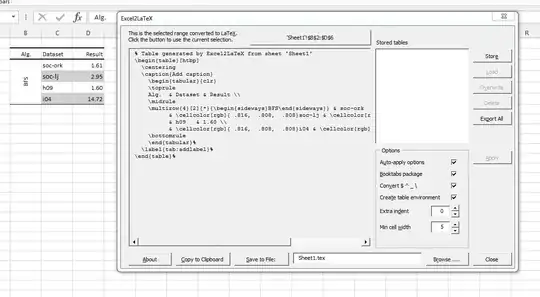
original table export table

As you can see, the auto-generated code is somewhat different from the one proposed in the other answers, but it is very simple, easily editable, and the end result is nearly identical. (You can try with and without the booktab option).

\documentclass{article}

\usepackage[table]{xcolor} \usepackage{booktabs,multirow}

\usepackage{rotating}

\begin{document}

% Table generated by Excel2LaTeX from sheet 'Sheet1' \begin{table}[htbp] \centering \caption{Add caption} \begin{tabular}{clr} \toprule Alg. & Dataset & Result \ \midrule \multirow{4}[2]{*}{\begin{sideways}BFS\end{sideways}} & soc-ork & 1.61 \ & \cellcolor[rgb]{ .816, .808, .808}soc-lj & \cellcolor[rgb]{ .816, .808, .808}2.95 \ & h09 & 1.60 \ & \cellcolor[rgb]{ .816, .808, .808}i04 & \cellcolor[rgb]{ .816, .808, .808}14.72 \ \bottomrule \end{tabular}% \label{tab:addlabel}% \end{table}%

\end{document}

output

In the last report I participated in, looking at the printed draft, the project manager decided that a column should be sorted in ascending order rather than descending order. It only took a few minutes to complete that task, rather than a day or more of entering all the data by hand in the LaTeX code and checking each figure at the output.

I explored several alternative tools. See

Comprehensive list of tools that simplify the generation of LaTeX tables

Some of them are online. A promising new one is https://www.latex-tables.com.

It can import excel files and other formats and can be useful in some cases.

For the moment I'll stick with excel2latex as the core of my tables workflow is done in excel.

Simon Dispa
  • 39,141