22

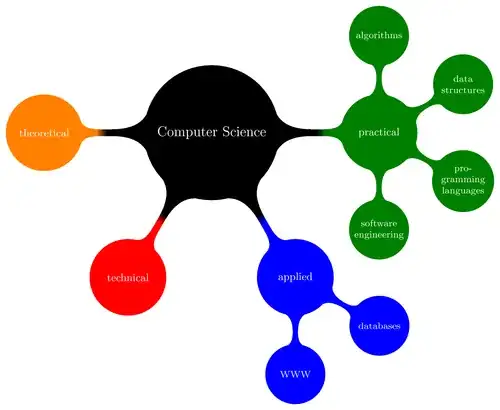
I was working on a PGF/TikZ Mindmap:
tikz mindmap

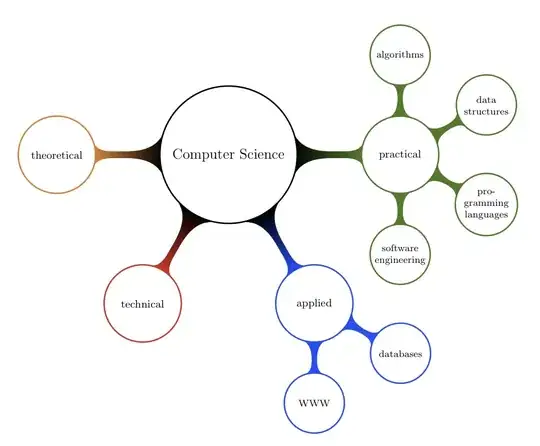
I cannot find a way to just draw the border, which looks like an easy action but I've tried everything! I manage to change the color of the nodes, but no control on the border. The code is this one (the same from the page above):

% Author: Till Tantau
% Source: The PGF/TikZ manual
\documentclass{article}

\usepackage{tikz}
\usetikzlibrary{mindmap,trees}
\begin{document}
\pagestyle{empty}
\begin{tikzpicture}
  \path[mindmap,concept color=black,text=white]
    node[concept] {Computer Science}
    [clockwise from=0]
    child[concept color=green!50!black] {
      node[concept] {practical}
      [clockwise from=90]
      child { node[concept] {algorithms} }
      child { node[concept] {data structures} }
      child { node[concept] {pro\-gramming languages} }
      child { node[concept] {software engineer\-ing} }
    }  
    child[concept color=blue] {
      node[concept] {applied}
      [clockwise from=-30]
      child { node[concept] {databases} }
      child { node[concept] {WWW} }
    }
    child[concept color=red] { node[concept] {technical} }
    child[concept color=orange] { node[concept] {theoretical} };
\end{tikzpicture}\end{document}
Alenanno
  • 37,338

1 Answers1

23

I'm not sure if this is what you want:

\documentclass{article}

\usepackage{tikz}
\usetikzlibrary{mindmap,trees}
\tikzset{concept/.append style={fill={none}}}
\begin{document}
\pagestyle{empty}
\begin{tikzpicture}
  \path[mindmap,concept color=black,text=black]
    node[concept] {Computer Science}
    [clockwise from=0]
    child[concept color=green!50!black] {
      node[concept] {practical}
      [clockwise from=90]
      child { node[concept] {algorithms} }
      child { node[concept] {data structures} }
      child { node[concept] {pro\-gramming languages} }
      child { node[concept] {software engineer\-ing} }
    }  
    child[concept color=blue] {
      node[concept] {applied}
      [clockwise from=-30]
      child { node[concept] {databases} }
      child { node[concept] {WWW} }
    }
    child[concept color=red] { node[concept] {technical} }
    child[concept color=orange] { node[concept] {theoretical} };
\end{tikzpicture}
\end{document}

output of code

Alan Munn
  • 218,180
  • 1
    Precisely! :D All it took was \makeatletter \tikzset{concept/.style={circle,draw=\tikz@concept@color,every concept}} \makeatother? Wow... – Alenanno May 20 '12 at 14:07
  • @Alenanno Ah, I thought you want to draw ( but not fill ) the connections that's why I thought it's not easy. Sorry! – percusse May 20 '12 at 14:10
  • @percusse Oh :D Don't worry! Thanks for your interest! :) I added "nodes" to the title so it's clearer for future visitors. – Alenanno May 20 '12 at 14:12