I am currently writing my resume in texStudio using a template that uses \cvitem. The issue I'm having is the spell check does not check the spelling within the arguments for \cvitem. For example, if I want to add a section called "Topic" and include the description "Item" I would use, \cvitem{Topic}{Item}. If I have a spelling error and enter \cvitem{Tpic}{Itm} instead, spell check will not catch the spelling errors of "Topic" or "Item". However, if these spelling errors are outside the argument, in a free standing paragraph, they will be caught. For a dictionary I am using the English dictionary as provided by Open Office.
Is there a way to turn on spell checking inside arguments?
Here is an example of TexStudio missing an spelling error. As you can see the issue is caught when the text is outside an argument.

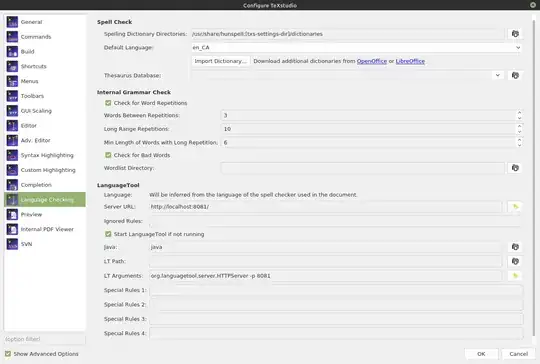
This is a screen shot of the currently used Language settings.

TpicandItmbelong to. Are you reffering to the words themselves or to the syntax highlight around the command\cvitem? Syntax highlights depend of.cwlfiles. – FHZ Oct 15 '20 at 18:02hunspellfrom Libre Office, it is able to differentiate in TeX syntax. Can you test with different editor (Emacs, vim?) – Tomáš Kruliš Oct 16 '20 at 07:35moderncvclass and my TeXStudio shows any spell error. Actually it shows erros inside any command for any selected language. Could you also post a picture of your Options -> Configura TeXstudio ->Language Checkingconfigurations? – FHZ Oct 16 '20 at 16:57Theaaurus DatabaseandWordlist Directory. I'm not sure if this might cause some interference. Check the answers here if some might fix the issue. There is this thread at TeXstudio Forum about issues with Dictionary which might have some suggestion for you. I could not reproduce your issue, therefore there is not much I can help. Sorry. – FHZ Oct 16 '20 at 22:24Syntax Highlighting. Verify theWave underlinecolumn. It should be marked at some "missings" atLaTeX checkingandLanguage checking. But I don't see any relation between anyWave underlineoption and your issue. I use the default settings there and my TeXstudio checks the spelling erros inside commands. – FHZ Oct 16 '20 at 22:31\cvitem{ Tpic }" using spaces before and after braces? Same for "\textbf{ Tpic }". This could be related to a false recognition of braces. – FHZ Oct 16 '20 at 22:35