You can use the special discard layer after you've set it up with
\pgfdeclarelayer{discard}
When it is declared as the layer to be used with pgfonlayer,
the content will be placed on that layer but since you don't set it with
\pgfsetlayers{discard, main}
it won't show up in the picture. (Only discard works that way, every other name needs to be specified in \pgfsetlayers.)
With that setup you can just do
\begin{pgfonlayer}{discard}
  \pic [local bounding box = Subtikz] {subtikz};
\end{pgfonlayer}
This obviously won't work if you want to use the pic as part of another path that should show up but that can be arranged as well (especially if you don't use any foreground or background code in your pic).
I've added a simple \pgfshowdiscardlayeranyway command that uses that layer anyway which may be useful for debugging purposes.
Since that layer is not setip with \pgfsetlayers it will accumulate and will not be emptied at the start of the next picture which I show off in the code below since I'm just using \pgfshowdiscardlayeranyway in a second TikZ picture which then contains your original pic.
This had advantages but maybe it's not desirable, for this I'll add a discard discard layer key that can be used as an option to a tikzpicture (or a scope) to globally empty out the layer. It might be worth to do
\tikzset{every picture/.append style={discard discard layer}}
to not drag around that layer through out your whole document.
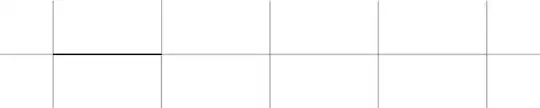
As an additional note, the way it is setup now, your discarded pic still contributes to the bounding box in the original picture but not if you use the \pgfshowdiscardlayeranyway in another picture. (This isn't noticeable in the example below because I added a grid to show the positions better.)
Code
\documentclass[tikz]{standalone}
\usetikzlibrary{calc}
\pgfdeclarelayer{discard} % ← declare discard layer
\makeatletter
\tikzset{
  discard discard layer/.style={
    execute at end scope=%
      \global\let\pgf@layerbox@discard\pgfutil@voidb@x}}
\newcommand*\pgfshowdiscardlayeranyway{\box\pgf@layerbox@discard}
\makeatother
\begin{document}
\begin{tikzpicture}[
  % discard discard layer,
  subtikz/.pic={\draw (0, 0) -- (1, 0);}]
\draw[help lines] (-.5,-.5) grid (4.5,.5);
\begin{pgfonlayer}{discard} % ← place on discard layer
  \pic [local bounding box = Subtikz] {subtikz};
\end{pgfonlayer}
% Calculate position depending on other input.
\path let \p1 = (Subtikz.north east),
          \p2 = (1, 2), \p3 = (3, 4) in
  coordinate (NorthEast) at ({max(\x1, \x2, \x3)}, \y1);
% Draw pic taking into account other input.
\pic at (NorthEast) {subtikz};
%\pgfshowdiscardlayeranyway % ← show layer anyway
\end{tikzpicture}
\begin{tikzpicture}
\draw[help lines] (-.5,-.5) grid (4.5,.5);
\pgfshowdiscardlayeranyway
\end{tikzpicture}
\end{document}
Outpu



\savebox. See 2nd part of this answer. – dexteritas Nov 18 '20 at 11:01