How do I draw multiple arrows between two nodes? Currently I am able to draw only one between two nodes. And how do I draw curved arrows? How to align them properly? I want to draw something like this:
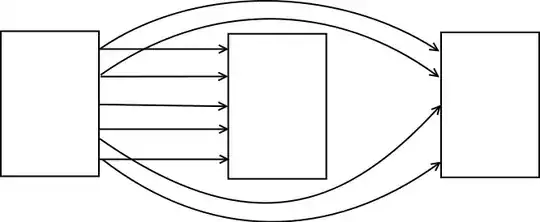
How do I draw multiple arrows between two nodes? Currently I am able to draw only one between two nodes. And how do I draw curved arrows? How to align them properly? I want to draw something like this:


Explanations:
1 ) Nodes are placed with one path, between each node I place an option to modify the coordinates system [xshift=7cm]
2 ) To get the straight arrows, the idea is to draw the first arrow between (a) and (b)
\draw (a.east) -- (b.west); % styles are defined in the scope environment
then to get the last arrows, it's enough to move the first arrows. This is possible with the same magic actions: [yshift=\i * 0.8 cm] \i is increased by one at each loop and yshift modifies the coordinate system.
3 ) to add some curved arrows, you can use to[out=...,in=...] or something like [bend] (see the manual to get some complements)
\documentclass[landscape]{scrartcl}
\usepackage{tikz}
\usetikzlibrary{arrows}

\begin{document}
\begin{tikzpicture}[thick]

\path [every node/.style={draw,minimum width=3cm, minimum height=5cm]}]
  node (a) at (0,0) {}
  [xshift=7cm]
  node (b) at (0,0) {}
  [xshift=7cm]
  node (c) at (0,0) {};

\begin{scope}[->,>=latex]
    \foreach \i in {-2,...,2}{%
      \draw[->] ([yshift=\i * 0.8 cm]a.east) -- ([yshift=\i * 0.8 cm]b.west) ;}

    \foreach \i in {1,2}{%
      \draw[->] ([yshift=\i * 0.8 cm]a.east) to [out=50,in=130] ([yshift=\i * 0.8 cm]c.west) ;}

    \foreach \i in {-1,-2}{%
      \draw[->] ([yshift=\i * 0.8 cm]a.east) to [out=-50,in=-130] ([yshift=\i * 0.8 cm]c.west) ;}
\end{scope}

\end{tikzpicture}
\end{document}


It seems you forgot to add the picture. Is it like this you want?
\documentclass{article}
\usepackage{tikz}
%
\begin{document}
\begin{tikzpicture}
\node (a) at (0,0) {A};
\node (b) at (4,0) {B};
\draw[-latex] (a) -- (b);
\draw[-latex,bend right]  (a) edge (b);
\draw[-latex,bend left]  (a) edge (b);
\end{tikzpicture}
\end{document}

Read the fine manual ;)
\documentclass[parskip]{scrartcl}
\usepackage[margin=15mm]{geometry}
\usepackage{tikz}
\usetikzlibrary{arrows,calc}

\begin{document}

\begin{tikzpicture}
% two boxes
\node[draw,minimum width=3cm, minimum height=3cm] (a) at (0,0) {A};
\node[draw,minimum width=3cm, minimum height=3cm] (b) at (5,0) {B};

% normal line
\draw[-latex] (a) -- (b);

% compute a point in the middle between E and NE or W and NW, then draw a line between these two
\path (a.east) -- (a.north east) coordinate[pos=0.5] (a1);
\path (b.west) -- (b.north west) coordinate[pos=0.5] (b1);
\draw[latex-] (a1) -- (b1);

% use 'to' operation with different looseness and 'calc' library for computing starting points
\draw[red,looseness=3] ($(a.south)-(0.1,0)$) to[out=270,in=270] ($(b.south)+(0.1,0)$);
\draw[blue,looseness=0.3] ($(a.south)+(0.1,0)$) to[out=270,in=270] ($(b.south)-(0.1,0)$);
\draw[green,looseness=1] (a.south) to[out=270,in=270] (b.south);

% use 'bend left' and 'bend right' for bent arrows
\draw[bend right=20,red,-latex] (a.north east) to (b.north west);
\draw[bend left=45,blue,latex-] (a.north east) to (b.north west);
\end{tikzpicture}

\end{document}


Q:How do I draw multiple arrows between two nodes?
A: You can draw as follows.
\documentclass{standalone}
\usepackage{tikz}
%
\begin{document}
%
\begin{tikzpicture}
\coordinate (A) at (0,0);
\coordinate (B) at (2,0);
\coordinate (C) at (4,0);
\coordinate (D) at (6,0);
\draw [-latex] (A) -- (B);
\draw [-latex] (A) to [bend left] (C);
\draw [-latex] (A) to [bend left=60] (D);
\end{tikzpicture}
%
\end{document}


!in front of it to turn it into a link. A moderator or another user with edit privileges can then reinsert the!to turn it into an image again. – Torbjørn T. May 25 '12 at 09:40