Sometimes a figure I want to place at the bottom of a page is placed on the next page regardless of the available space. I, finally, did some testing and realized that the height of a figure may not be more than 25% of the \textheight for it to be placed at the bottom. And, at least in my tests, it may not exceed 65% of the \textheight to be placed at the top.
UPDATE: As described by the comments and the linked explanation of the placing algorithm in most cases adding ! to the positioning parameters should solve the problem. Following a working example with bottom positioning and a page of follow-up text:
\documentclass{article}
\usepackage{graphicx}
\usepackage{lipsum}
\begin{document}
Some text here.
\begin{figure}[!b]%
\includegraphics[draft, height=0.40\textheight, width=0.6\columnwidth]{example-image}%
\centering
\caption{Relaxing constraints with !, this figure (40% textheight)
    will be placed at the bottom, too.}%
\label{}%
\end{figure}
\lipsum[1-5]
\end{document}

However, in my original document, the text and figure is followed by a minipage which does not fit into the same page and needs to be placed on the next page (in fact, it is a rather lengthy lstlisting which I don't want to break up). Adding such a minipage to the above code yields strange behavior. The figure is placed on the first page but not at the bottom. Instead it seems to behave as if the h positioning has been used:
\documentclass{article}
\usepackage{graphicx}
\usepackage{lipsum}
\begin{document}
Some text here.
\begin{figure}[!b]%
\includegraphics[draft, height=0.40\textheight, width=0.6\columnwidth]{example-image}%
\centering
\caption{Relaxing constraints with !, this figure (40% textheight)
    will be placed at the bottom, too.}%
\end{figure}
\begin{minipage}{\linewidth}
\lipsum[1-5]
\end{minipage}
\end{document}
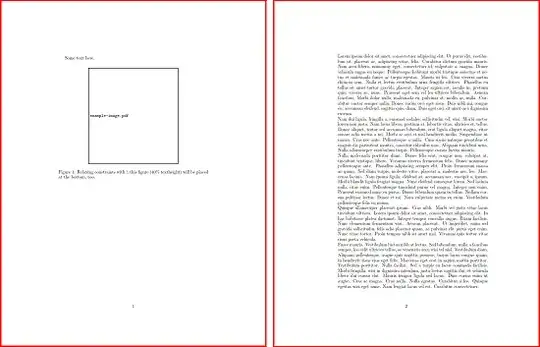
The same behavior can be observed when I add the text without a minipage but trigger a pagebreak before the lipsum. I assume minipage may introduce a pagebreak or equivalent if it doesn't fit onto a page.
Last but not least, a clearpage before the minipage solves the problem and places the figure at the bottom while, as far as I understand the algorithm, a figure may only be placed on subsequent pages when the layouter reaches a clearpage:
\documentclass{article}
\usepackage{graphicx}
\usepackage{lipsum}
\begin{document}
Some text here.
\begin{figure}[!b]%
\includegraphics[draft, height=0.40\textheight, width=0.6\columnwidth]{example-image}%
\centering
\caption{Relaxing constraints with !, this figure (40% textheight)
    will be placed at the bottom, too.}%
\label{}%
\end{figure}
\clearpage
\begin{minipage}{\linewidth}
\lipsum[1-5]
\end{minipage}
\end{document}

I love such corner cases as I constantly seem to run into them in every aspect of my life. Maybe someone can explain what happens here and how to deal with the situation in a way which does not fall back on you ten pages later in the document ;)
Best wishes, Stefan


\topfractionis0.7and\bottomfractionis0.3. You can of course redefine those. See How to influence the position of float environments like figure and table in LaTeX? for more details. (This might be in fact a duplicate). – campa Dec 11 '20 at 13:32:-)– campa Dec 11 '20 at 13:38\begin{figure}[bp!]%will do it, – Simon Dispa Dec 11 '20 at 13:55\clearpage. I roughly read through the linked explanation, now, but can not really attribute that behavior to the description of the algorithm. It even seems to contradict the described behavior. I will update my question as something seems to clash there which is not described in the linked topic. – Johnson Dec 11 '20 at 14:28minipagedoes not allow pagebreaks. You may use a list environment oradjustboxenv fromchangepagepackage, see minipage with page break. – muzimuzhi Z Dec 12 '20 at 09:26