5

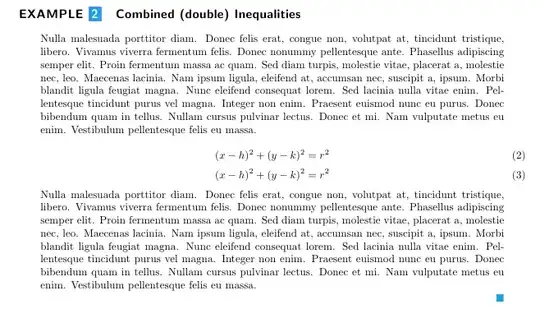
I was working on a new environment for the examples I explain for my lecture notes (fancy environment), but when I create an equation using the equation environment within my newly created example environment, this does not obey the indentation that I have placed on my environment. Is this possible?

\documentclass[letterpaper]{article}
\usepackage{fullpage}
\usepackage{amsmath,amssymb,amsthm}
\usepackage[dvipsnames]{xcolor}
\usepackage{tikz}
\usetikzlibrary{shapes.symbols}
\usepackage{lipsum}
%%%%%%%%%%%%%%%%%%%%%%%%%%%%%%%%%%%%%%%%%%%%%%%%%%%%%%%%%%%%%%%%%%%%
%% Example Environment 
\newcounter{boxnum}
\newenvironment{egenv}[1]{%
\begingroup\addvspace\medskipamount%
  \stepcounter{boxnum}{\sffamily\bfseries\large EXAMPLE
  \tikz [baseline=(char.base)] \node[shape=rectangle,draw=blue!50,inner sep=2.5pt,fill=Cerulean,text=white] (char) {\arabic{boxnum}};%
  \quad{#1}\vskip0.75\baselineskip}
  \setlength{\leftskip}{20pt}%
  \setlength{\rightskip}{20pt}%
  \setlength{\parfillskip}{0pt plus 2fil}
}{%
  \par\hfill{\color{Cerulean}$\blacksquare$}%
  \par\addvspace\medskipamount%
\endgroup
}
%%%%%%%%%%%%%%%%%%%%%%%%%%%%%%%%%%%%%%%%%%%%%%%%%%%%%%%%%%%%%%%%%%%
\parindent0pt
\begin{document}

\lipsum[2]
\begin{equation}
  (x-h)^2+(y-k)^2=r^2
\end{equation}

\begin{egenv}{Combined (double) Inequalities}
\lipsum[3]
\end{egenv}

\begin{egenv}{Combined (double) Inequalities}
\lipsum[3]
\begin{equation}\label{stdform}
  (x-h)^2+(y-k)^2=r^2
\end{equation}
\begin{equation}\label{stdformnn}
  (x-h)^2+(y-k)^2=r^2
\end{equation}
\lipsum[3]
\end{egenv}
\end{document}

This yields:
enter image description here

Of course I would like the equation numbering to restore its normal right indent outside my environment. I have looked at Changing the apperance of equation numbers with amsmath which seems to do what I want with:

\makeatletter
\let\mytagform@=\tagform@
\def\tagform@#1{\maketag@@@{\bfseries(\ignorespaces#1\unskip\@@italiccorr)}\hspace{20pt}}
\renewcommand{\eqref}[1]{\textup{\mytagform@{\ref{#1}}}}
\makeatother

But the above effect is global. Any help into the matter will greatly appreciated.

azetina
  • 28,884

1 Answers1

5

There are a couple of ways to fix this- if you don't mind loading a package, then you can use the adjustwidth environment from the changepage package and use

\begin{adjustwidth}{20pt}{20pt}

enter image description here

You could also use a list environment (which is what the changepage package does), which might also help with your 'endmark' (see note below).

Some other notes:

  • you'll probably want to use \refstepcounter assuming that you might want to \label and \ref your environment later on
  • the 'end mark' is not guaranteed to stay with the environment. you could try and fix this by making a 'no-break-item' as detailed in https://tex.stackexchange.com/a/47586/6621

I've left the list solution commented in the MWE below so that you can play with it if you like.

MWE

\documentclass[letterpaper]{article}
\usepackage{fullpage}
\usepackage{changepage}
\usepackage{amsmath,amssymb,amsthm}
\usepackage[dvipsnames]{xcolor}
\usepackage{tikz}
\usetikzlibrary{shapes.symbols}
\usepackage{lipsum}
%%%%%%%%%%%%%%%%%%%%%%%%%%%%%%%%%%%%%%%%%%%%%%%%%%%%%%%%%%%%%%%%%%%%
%% Example Environment 
\newcounter{boxnum}
\newenvironment{egenv}[1]{%
\begingroup\addvspace\medskipamount%
  \refstepcounter{boxnum}{\sffamily\bfseries\large EXAMPLE
  \tikz [baseline=(char.base)] \node[shape=rectangle,draw=blue!50,inner sep=2.5pt,fill=Cerulean,text=white] (char) {\arabic{boxnum}};%
  \quad{#1}\vskip0.75\baselineskip}
 % You can experiment with the `list` environment if you like
 % \begin{list}{}{%
 % \setlength{\leftmargin}{20pt}%
 % \setlength{\rightmargin}{20pt}%
 % \setlength{\parfillskip}{0pt plus 2fil}
 % }%
 %\item%
 \begin{adjustwidth}{20pt}{20pt}
}{%
  \par\hfill{\color{Cerulean}$\blacksquare$}%
  %\item\hfill{\color{Cerulean}$\blacksquare$}%
  %\end{list}
  \end{adjustwidth}
  \par\addvspace\medskipamount%
\endgroup
}
%%%%%%%%%%%%%%%%%%%%%%%%%%%%%%%%%%%%%%%%%%%%%%%%%%%%%%%%%%%%%%%%%%%
\parindent0pt
\begin{document}

\lipsum[2]
\begin{equation}
  (x-h)^2+(y-k)^2=r^2
\end{equation}

\begin{egenv}{Combined (double) Inequalities}
\lipsum[3]
\end{egenv}

\begin{egenv}{Combined (double) Inequalities}
\lipsum[3]
\begin{equation}\label{stdform}
  (x-h)^2+(y-k)^2=r^2
\end{equation}
\begin{equation}\label{stdformnn}
  (x-h)^2+(y-k)^2=r^2
\end{equation}
\lipsum[3]
\end{egenv}
\end{document}
cmhughes
  • 100,947
  • Fabulous indeed! I will look at your proposition and have a look at the changepage package. – azetina May 26 '12 at 19:22
  • @azetina glad you like it :) the ntheorem package offers thmmarks which does the kind of thing that you want with your blue square. It's quite a complicated algorithm to get it to work for every scenario (e.g ending with an equation, or enumerate, or something else). The amsthm package might also do it, but I'm not sure. – cmhughes May 27 '12 at 00:33