Since I discovered the tikzmark macro I've been enthusiastic about it.
I think that it is possible to distinguish at least two versions of the command:
a basic one (two examples: https://tex.stackexchange.com/a/35719/13304 and tikzmark to have different behaviour if first run (and mark locations not yet available))
an improved version (two examples: https://tex.stackexchange.com/a/50054/13304 and Highlight a column in equation or math environment)
One answer in which both versions are used is https://tex.stackexchange.com/a/51590/13304.
Assume to use now the improved version. For what concern Highlight a column in equation or math environment the basic definition is:
\newcommand{\tikzmarkin}[1]{%
      \tikz[remember picture with id=#1]
      \draw[line width=1pt,rectangle,rounded corners,fill=\fillcol]
      (pic cs:#1) ++(0.065,-0.15) rectangle (-0.05,0.32)
      ;}
while in https://tex.stackexchange.com/a/51590/13304:
\newcommand<>{\boxto}[1]{%
\only#2{\tikz[remember picture,overlay]
\draw[myframe,line width=1pt,fill=mybrown,,rectangle,rounded corners]
(pic cs:#1) ++(1.4,-.25) rectangle (-.2,0.4)
;}%
}
They have in common one thing, the fact that the rectangle is defined a priori. In the following example I will point out that this could be not convenient when used multiple times:
\documentclass{article}
\usepackage{amsmath}
\usepackage{tikz}

% to change colors
\newcommand{\fillcol}{white}
\newcommand{\bordercol}{red}

%% code by Andrew Stacey
% https://tex.stackexchange.com/questions/51582/background-coloring-with-overlay-specification-in-algorithm2e-beamer-package#51582

\makeatletter
\tikzset{%
     remember picture with id/.style={%
       remember picture,
       overlay,
       draw=\bordercol,
       save picture id=#1,
     },
     save picture id/.code={%
       \edef\pgf@temp{#1}%
       \immediate\write\pgfutil@auxout{%
         \noexpand\savepointas{\pgf@temp}{\pgfpictureid}}%
     },
     if picture id/.code args={#1#2#3}{%
       \@ifundefined{save@pt@#1}{%
         \pgfkeysalso{#3}%
       }{
         \pgfkeysalso{#2}%
       }
     }
   }

   \def\savepointas#1#2{%
  \expandafter\gdef\csname save@pt@#1\endcsname{#2}%
}

\def\tmk@labeldef#1,#2\@nil{%
  \def\tmk@label{#1}%
  \def\tmk@def{#2}%
}

\tikzdeclarecoordinatesystem{pic}{%
  \pgfutil@in@,{#1}%
  \ifpgfutil@in@%
    \tmk@labeldef#1\@nil
  \else
    \tmk@labeldef#1,(0pt,0pt)\@nil
  \fi
  \@ifundefined{save@pt@\tmk@label}{%
    \tikz@scan@one@point\pgfutil@firstofone\tmk@def
  }{%
  \pgfsys@getposition{\csname save@pt@\tmk@label\endcsname}\save@orig@pic%
  \pgfsys@getposition{\pgfpictureid}\save@this@pic%
  \pgf@process{\pgfpointorigin\save@this@pic}%
  \pgf@xa=\pgf@x
  \pgf@ya=\pgf@y
  \pgf@process{\pgfpointorigin\save@orig@pic}%
  \advance\pgf@x by -\pgf@xa
  \advance\pgf@y by -\pgf@ya
  }%
}
\makeatother

\newcommand{\tikzmarkin}[1]{%
      \tikz[remember picture,overlay]
      \draw[line width=1pt,rectangle,rounded corners,fill=\fillcol, draw=\bordercol]
      (pic cs:#1) ++(0.065,-0.42) rectangle (-0.05,0.52) node [anchor=base] (#1){}
      ;}


\newcommand\tikzmarkend[2][]{%
\tikz[remember picture with id=#2] #1;}


\begin{document}
\begin{align*}
&x+\tikzmarkin{a}\dfrac{z}{y}\tikzmarkend{a}=100 \hspace{1cm} \text{perfect alignment}\\
&x+\tikzmarkin{z}y\tikzmarkend{z}=100 \hspace{1cm} \text{bad behaviour}
\end{align*}

\end{document}
This leads to:

This is due to the fact that the rectangle has been defined to be suitable for the fraction and not for a single term.
To improve the method proposed based on the
\tikzmark, my question is: it is possible to make those dimensions dynamic?
I mean not only for a math case, but also for simple text. For example:
\begin{document}

\begin{itemize}
\item this is a text to be \tikzmarkin{a}highlighted\tikzmarkend{a}
\item \tiny{this is a text to be \tikzmarkin{b}highlighted\tikzmarkend{b}}
\end{itemize}

\end{document}
where the tikzmark has been defined as:
\newcommand{\tikzmarkin}[1]{%
      \tikz[remember picture,overlay]
      \draw[line width=1pt,rectangle,rounded corners,fill=\fillcol, draw=\bordercol]
      (pic cs:#1) ++(0.065,-0.16) rectangle (-0.05,0.32) node [anchor=base] (#1){}
      ;}
leads to:
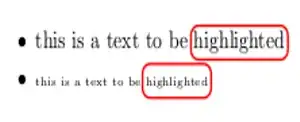
but when the text is \tiny, the rectangle dimensions could have been reduced a bit.


