You are already placing tons of tangent arrow heads, so you can use the same strategy to place a complete arrow in a second postaction. Since t runs from 0 to 2pi and you want to place the arrow at t=2, the position is 1/pi. Please note that it is important to use coordinates with units, i.e.
\draw[color = red, very thick,-latex] (-0.5cm,0cm) -- (0.5cm,0cm);
to have the arrow parallel since otherwise you will be using a coordinate system installed by pgfplots.
\documentclass[12pt]{article}
\usepackage{pgfplots}
\pgfplotsset{compat=1.17}
\usetikzlibrary{decorations.markings}
\usepackage[margin=1in]{geometry}
\begin{document}
    \begin{figure}[h!]
        \centering
        \begin{tikzpicture}
            \begin{axis}[view={120}{20},
                height = 4in,width=4in,
                axis lines=center,axis on top,
              no marks,axis equal,
                xmin=-1.5,xmax=1.5,ymin=-1.5,ymax=1.5,zmin=-1.5,zmax=1.5,
             enlargelimits={upper=0.1}]
    \addplot3+[color = blue, thick, no markers,samples=250, samples y=0,domain=0:2pi,variable=\t,
    postaction={decorate,decoration={
    markings,
    mark=between positions 0.01 and .999 step 2em with {\arrow [scale=1]{stealth}},
    }},
    postaction={decorate,decoration={
    markings,
    mark=at position 1/pi with {
        \draw[color = red, very thick,-latex]
    (-0.5cm,0cm) -- (0.5cm,0cm);
    }
    }}
    ]({sin(deg(\t))},{sin(deg(2\t))},{sin(deg(3*\t))});
        \end{axis}
    \end{tikzpicture}
\end{figure}

\end{document}
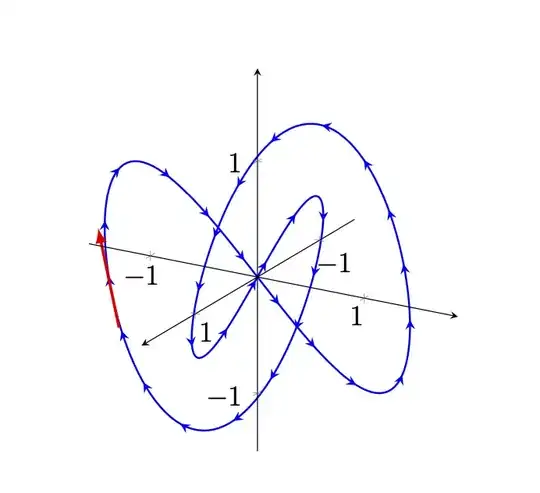
You can compute the velocity at a given t. (In principle you can compute the tangent analytically, too, so this hybrid answer is a bit senseless but this is a LaTeX answer so we let LaTeX find out the slope. We could also let it find out the velocity numerically, perhaps on another day. And of course the position is just an approximation, too.)
\documentclass[tikz,border=3mm]{standalone}
\usepackage{pgfplots}
\pgfplotsset{compat=1.17}
\usetikzlibrary{decorations.markings}
\begin{document}
\foreach \myt in {0.2,0.4,...,6.2}
{\begin{tikzpicture}
  \begin{axis}[view={120}{20},
                height = 4in,width=4in,
                axis lines=center,axis on top,
              no marks,axis equal,
                xmin=-1.5,xmax=1.5,ymin=-1.5,ymax=1.5,zmin=-1.5,zmax=1.5,
             enlargelimits={upper=0.1}]
    \addplot3+[color = blue, thick, no markers,samples=250, samples y=0,domain=0:2*pi,variable=\t,
    postaction={decorate,decoration={
    markings,
    mark=between positions 0.01 and .999 step 2em with {\arrow [scale=1]{stealth}},
    }},
    postaction={decorate,decoration={
    markings,
    mark=at position {\myt/2/pi} with {
        \pgfmathsetmacro{\mylen}{sqrt(pow(cos(deg(\myt)),2)+pow(2*cos(deg(2*\myt)),2)+pow(3*cos(3*deg(\myt)),2))}
        \draw[color = red, very thick,-latex,overlay]
    (0cm,0cm) -- (0.5*\mylen*1cm,0cm);
    }
    }}
    ]({sin(deg(\t))},{sin(deg(2*\t))},{sin(deg(3*\t))});
\end{axis}
\end{tikzpicture}}
\end{document}


t=3corresponds tomark=at position 1/pi with, and the length is just given the components in(-0.5cm,0cm) -- (0.5cm,0cm);. If you want the "real" velocity, you need to compute the time derivative of your curve and take the absolute value, which yieldssqrt(pow(cos(deg(\t)),2)+pow(2*cos(deg(2*\t)),2)+pow(3*cos(3*deg(\t)),2))in this case. – Jan 03 '21 at 03:32overlay, you made this into a GIF, right? Out of curiosity, in which viewer is the GIF viewable? – Superman Jan 03 '21 at 03:46overlayis just to avoid that the bounding box gets altered. As for the viewer, I do not know, certainly on Safari you can see an animation. – Jan 03 '21 at 03:48\foreachloop at the beginning of the document. I can see the GIF from the StackExchange app on my iPad. – Superman Jan 03 '21 at 03:51\usetikzlibrary{arrows.meta}and then use something like\draw[color = red, very thick,{Circle[length=3pt]}-latex,overlay] .... – Jan 03 '21 at 04:11