If all you want is to generate a word file out of a LaTeX document, it is an easier way. You can go from LaTeX > pdf > word.
Using this code a produced a document with formulas, a figure and references taken from biblatex-examples.bib, using biblatex with APA style.
I suppressed the page number and the headers.
\documentclass[12pt,a4paper]{article}
\usepackage{graphicx}
\usepackage[left=2.00cm, right=2.00cm, top=2.00cm, bottom=2.00cm]{geometry}
\usepackage{nopageno}
\usepackage{fancyhdr}
\fancyhf{}
\usepackage[math]{blindtext}
\usepackage[%
backend=biber,
natbib=true,
style=APA,
]{biblatex}
\usepackage{filecontents}
\begin{filecontents}[overwrite]{\jobname37.bib}
    % examples form biblatex-examples.bib
@article{sarfraz,
    author       = {M. Sarfraz and M. F. A. Razzak},
    title        = {Technical section: {An} algorithm for automatic capturing of
        the font outlines},
    year         = 2002,
    volume       = 26,
    number       = 5,
    pages        = {795-804},
    issn         = {0097-8493},
    journal      = {Computers and Graphics},
}
@article{bertram,
    author       = {Bertram, Aaron and Wentworth, Richard},
    title        = {Gromov invariants for holomorphic maps on {Riemann} surfaces},
    journaltitle = {JAMS},
    date         = 1996,
    volume       = 9,
    number       = 2,
    pages        = {529-571},
    langid       = {english},
    langidopts   = {variant=american},
    shorttitle   = {Gromov invariants},
}


@book{kullback,
    author       = {Kullback, Solomon},
    title        = {Information Theory and Statistics},
    year         = 1959,
    publisher    = {John Wiley & Sons},
    location     = {New York},
}
@online{markey,
    author       = {Markey, Nicolas},
    title        = {Tame the {BeaST}},
    date         = {2005-10-16},
    url          = {http://mirror.ctan.org/info/bibtex/tamethebeast/ttb_en.pdf},
    subtitle     = {The {B} to {X} of {BibTeX}},
    version      = {1.3},
    urldate      = {2006-10-01},
    langid       = {english},
    langidopts   = {variant=american},
    sorttitle    = {Tame the Beast},
}
\end{filecontents}
\addbibresource{\jobname37.bib}
\begin{document}
\blindmathpaper
\begin{figure}
    \centering
    \caption{Grid 100 x 100}
    \includegraphics[width=0.3\linewidth]{example-grid-100x100pt}
\end{figure}
From \citep{sarfraz}.  See also \citep{bertram} and \citep{kullback} and \cite{markey}.
\printbibliography
\end{document}
This is the look of the pdf with Sumatra viewer.

Opening the same file with ms word (I am using 2013) you get
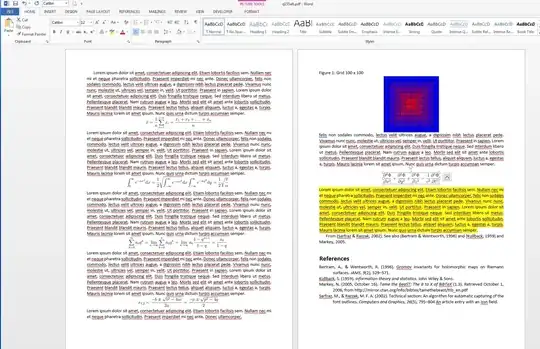
where I did some yellow marking. The formulas will appear as figures, exactly as seen in the LaTeX generated pdf.
You can now add the footer and header as required, using ms word tools.
See other alternatives here https://tex.stackexchange.com/a/551411/161015


