1

I have the following MnWE, and it is non-working since after xelatex.exe it doesn't show the Czech letters with accents ěščřž, but it shows "á".

So how do I type these accents no matter how complicated the expression for accents will be. But I need xelatex.exe in any case.

All auxiliary files needed to compile the MnWE below are here.

\documentclass{article}

%\usepackage{amssymb}

\usepackage[czech]{babel}

%\usepackage[utf8]{inputenc}

\usepackage[utf8]{inputenc}

\usepackage[IL2]{fontenc}

\usepackage{addfont} \addfont[1.5]{OT1}{slabikar}{\slabikar}

\pdfmapline{=slabikar slabikar <slabikar.pfb}

\begin{document}

\font\pis = slabikar at1cm \pis \baselineskip = 1.5cm \obeylines Jakmile ulehneš, zavřeš oči a uvidíš své ruce,

\end{document}

enter image description here

user2925716
  • 1,940
  • 3
    do not use fontenc and inputenc and OT1 and \pdfmapline with xelatex. Use pdflatex with such a setup. – Ulrike Fischer Jan 27 '21 at 16:34
  • But I need xelatex due to the rest of my source file ! Could you modify my MnWE to MWE to work with xelatex ?? It is impossible for me to modify everything else to pdflatex. – user2925716 Jan 27 '21 at 16:41
  • xetex works in Unicode and the font slabikar is in IL2 code. So, š written in the source file is interpreted as Unicode U+0161 by xetex but you need to transform it to the IL2 code ^^b9. This could be done using active character settings locally when the slabikar font is selected. – wipet Jan 27 '21 at 17:03

4 Answers4

6

In XeLaTeX, you can do following:

\documentclass{article}

\def\adef#1{\catcode#1=13 \begingroup \lccode~=`#1\lowercase{\endgroup\def~}} \font\slabikar=slabikar \def\pis{\slabikar \adef š{^^b9}% \adef ř{^^f8}% \adef č{^^e8}% } \pdfmapline{=slabikar slabikar <slabikar.pfb}

\begin{document}

{\pis \baselineskip = 1.5cm \obeylines Jakmile ulehneš, zavřeš oči a uvidíš své ruce, \par}

\end{document}

You have to add more Czech letters into the \pis macro. See ISO-8859-2 code for these letters.

You have pointed the font slabikar to this site. The file csf-enc.tex is here, the mapping from Unicode to ISO2 is implemented in this file.

wipet
  • 74,238
  • Could you kindly explain to me what does \adef#1 in your code ? – user2925716 Jan 29 '21 at 15:24
  • \adef š sets the character š active, i.e. definable as a macro and runs \def š. It is defined as ^^b9 which is equal to single character with code b9, so character š expands to ^^b9. All definitions and active settings are local in the goup, so the encoding mapping is active only in the region determined by {\pis ... }. – wipet Jan 29 '21 at 16:12
  • Thank you for your comment. I'm still curious what exactly do this line: "{\catcode#1=13 \begingroup \lccode~=#1\lowercase{\endgroup\def~}}" : i.e.catcodeandlccodeand~`. Some more detailed answer is still possible ? – user2925716 Jan 30 '21 at 18:52
4

If you want to use xelatex try something like this (this assumes a rather current babel):

\documentclass{article}

\usepackage{babel} \babelprovide[import,main]{czech}

\begin{document}

Jakmile ulehneš, zavřeš oči a uvidíš své ruce,

\end{document}

enter image description here

Ulrike Fischer
  • 327,261
  • Oh, you have completely misunderstand my problem :-( Please observe the shape of letters in my original question. They are alike as for children's script in 1st year of the primary school, those of yours are computer shape like...My letters smoothly bind one to another, please have a look at my picture in my Q. – user2925716 Jan 27 '21 at 16:54
  • you can't use your font with xelatex. You will have to find a open type version and use this, load \usepackage{fontspec} and then \setmainfont{yourfont}. – Ulrike Fischer Jan 27 '21 at 16:56
  • 6
    And if I may say so: downvoting doesn't make me more helpful. – Ulrike Fischer Jan 27 '21 at 16:57
  • I'm sorry, I cannot up-vote now and I apologize for my down-vote, I was just trying to be honest. Isn't there a way to place $\check{a}$ above some on those letters there? The non-accent letters are good so far and they seem to work with XeLaTeX well. Could you possibly create open type version for me ? The font is not very trivial, it is sophisticated but even if it were, I'd be still unable to create what you say. – user2925716 Jan 27 '21 at 17:12
  • 1
    Here they essentially say that slabikar is not and cannot be in OTF: Pozn. z roku 2020: Dozvedel jsem se, ze existuje pismo Skolske, viz www.skolskepismo.sk. Pismo je implementovano v OTF (OpenType). Pismo Slabikar bohuzel neni ve formatu OTF, protoze TeXove ligaturni popisy neumime do OTF prevest. Kdyby to někdo umel, prosim, ozvete se. – user2925716 Jan 27 '21 at 17:21
  • You were already honest in your comment, and you could have given me the chance to improve the answer, after all your question does not mention that the font is important. The issue here mentions an open type font, perhaps this works for you: https://github.com/latex3/luaotfload/issues/154 – Ulrike Fischer Jan 27 '21 at 17:21
4

A LaTeX implementation. The problem is that the some glyphs are not in the Unicode position. Of course you want to preserve the position when not setting text in the slabikar font.

I added also support for LuaLaTeX. Note that XeLaTeX doesn't need \pdfmapline or similar.

\documentclass{article}
\usepackage{iftex}
\usepackage[czech]{babel}
\usepackage{newunicodechar}

\ifluatex \pdfextension mapline{=slabikar slabikar <slabikar.pfb} \fi

\newunicodechar{Č}{\ifslabikar ^^c8\else Č\fi} \newunicodechar{č}{\ifslabikar ^^e8\else č\fi} \newunicodechar{Ď}{\ifslabikar ^^cf\else Ď\fi} \newunicodechar{ď}{\ifslabikar ^^ef\else ď\fi} \newunicodechar{Ě}{\ifslabikar ^^cc\else ě\fi} \newunicodechar{ě}{\ifslabikar ^^ec\else ě\fi} \newunicodechar{Ň}{\ifslabikar ^^d2\else Ň\fi} \newunicodechar{ň}{\ifslabikar ^^f2\else ň\fi} \newunicodechar{Ř}{\ifslabikar ^^d8\else Ř\fi} \newunicodechar{ř}{\ifslabikar ^^f8\else ř\fi} \newunicodechar{Š}{\ifslabikar ^^a9\else Š\fi} \newunicodechar{š}{\ifslabikar ^^b9\else š\fi} \newunicodechar{Ť}{\ifslabikar ^^ab\else Ť\fi} \newunicodechar{ť}{\ifslabikar ^^bb\else ť\fi} \newunicodechar{Ů}{\ifslabikar ^^d9\else Ů\fi} \newunicodechar{ů}{\ifslabikar ^^f9\else ů\fi} \newunicodechar{Ž}{\ifslabikar ^^ae\else Ž\fi} \newunicodechar{ž}{\ifslabikar ^^be\else ž\fi}

\DeclareFontFamily{T1}{slabikar}{} \DeclareFontShape{T1}{slabikar}{m}{n}{<-> s*[2] slabikar}{}

\newif\ifslabikar \newenvironment{slabikar} {% \par\addvspace{\topsep}% \setlength{\parindent}{0pt}% \linespread{2}% \slabikartrue\usefont{T1}{slabikar}{m}{n}% } {\par\addvspace{\topsep}}

\begin{document}

\begin{slabikar} Jakmile ulehneš, zavřeš oči a uvidíš své ruce,

Odemyky-zamyky,\ rozvažte se, jazyky!\ Povězte mi řeči lidí,\ co kdo slyší, co kdo vidí.\ A z~těch slabik, slov a vět\ vykouzlíme celý svět.

ÁáČčĎďÉéĚěÍíŇňÓóŘřŠšŤťÚúŮůÝýŽž \end{slabikar}

\noindent Jakmile ulehneš, zavřeš oči a uvidíš své ruce,

\noindent Odemyky-zamyky,\ rozvažte se, jazyky!\ Povězte mi řeči lidí,\ co kdo slyší, co kdo vidí.\ A z~těch slabik, slov a vět\ vykouzlíme celý svět.

\noindent ÁáČčĎďÉéĚěÍíŇňÓóŘřŠšŤťÚúŮůÝýŽž

\end{document}
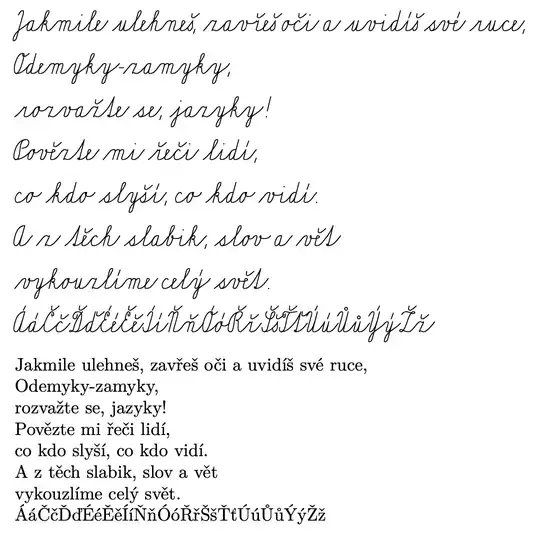
enter image description here

An approach that doesn't make the characters active except inside the slabikar environment.

\documentclass{article}
\usepackage{iftex}
\usepackage[czech]{babel}

\ifluatex \pdfextension mapline{=slabikar slabikar <slabikar.pfb} \fi

\ExplSyntaxOn \cs_new:Nn \slabikar_Č: { ^^c8 } \cs_new:Nn \slabikar_č: { ^^e8 } \cs_new:Nn \slabikar_Ď: { ^^cf } \cs_new:Nn \slabikar_ď: { ^^ef } \cs_new:Nn \slabikar_Ě: { ^^cc } \cs_new:Nn \slabikar_ě: { ^^ec } \cs_new:Nn \slabikar_Ň: { ^^d2 } \cs_new:Nn \slabikar_ň: { ^^f2 } \cs_new:Nn \slabikar_Ř: { ^^d8 } \cs_new:Nn \slabikar_ř: { ^^f8 } \cs_new:Nn \slabikar_Š: { ^^a9 } \cs_new:Nn \slabikar_š: { ^^b9 } \cs_new:Nn \slabikar_Ť: { ^^ab } \cs_new:Nn \slabikar_ť: { ^^bb } \cs_new:Nn \slabikar_Ů: { ^^d9 } \cs_new:Nn \slabikar_ů: { ^^f9 } \cs_new:Nn \slabikar_Ž: { ^^ae } \cs_new:Nn \slabikar_ž: { ^^be } \tl_const:Nn \c_slabikar_chars_tl { Č č Ď ď Ě ě Ň ň Ř ř Š š Ť ť Ů ů Ž ž } \tl_map_inline:Nn \c_slabikar_chars_tl { \char_set_active_eq:Nc #1 { slabikar_#1: } } \NewDocumentCommand{\convertslabikar}{} { \tl_map_inline:Nn \c_slabikar_chars_tl { \char_set_catcode_active:N ##1 } } \ExplSyntaxOff

\DeclareFontFamily{T1}{slabikar}{} \DeclareFontShape{T1}{slabikar}{m}{n}{<-> s*[2] slabikar}{}

\newenvironment{slabikar} {% \par\addvspace{\topsep}% \setlength{\parindent}{0pt}% \linespread{2}% \convertslabikar\usefont{T1}{slabikar}{m}{n}% } {\par\addvspace{\topsep}}

\begin{document}

\begin{slabikar} Jakmile ulehneš, zavřeš oči a uvidíš své ruce,

Odemyky-zamyky,\ rozvažte se, jazyky!\ Povězte mi řeči lidí,\ co kdo slyší, co kdo vidí.\ A z~těch slabik, slov a vět\ vykouzlíme celý svět.

ÁáČčĎďÉéĚěÍíŇňÓóŘřŠšŤťÚúŮůÝýŽž \end{slabikar}

\noindent Jakmile ulehneš, zavřeš oči a uvidíš své ruce,

\noindent Odemyky-zamyky,\ rozvažte se, jazyky!\ Povězte mi řeči lidí,\ co kdo slyší, co kdo vidí.\ A z~těch slabik, slov a vět\ vykouzlíme celý svět.

\noindent ÁáČčĎďÉéĚěÍíŇňÓóŘřŠšŤťÚúŮůÝýŽž

\end{document}

egreg
  • 1,121,712
  • This solution makes declared characters as active in whole document. It seem more effective to make active characters only in the sabikar environment especially when the texts in slabikar font is very rare used in the document. The feature of \newunicodechar seems to be irrelevant in such case. – wipet Jan 28 '21 at 08:13
  • @wipet I don't see how this can be a problem. But I added a different approach. – egreg Jan 28 '21 at 09:01
1

An alternative is to use a cursive OpenType font that supports Czech. This sent me down a rabbit-hole for a bit.

The Sant Elia font family by Yellow Design Studio supports Czech, and is available gratis (but under a restrictive license). However, it only supports precomposed characters (NFC form), not combining accents. And some of its Czech characters use the deprecated seac operation, which XeTeX and LuaTeX do not support.

The solution turned out to be to open the font in FontForge and save it without any changes. This produces a version that works in XeTeX or LuaTeX. I saved it as fonts/SantEliaRough-Line-Fixed.otf. The darker and thicker versions of this font cost money, but if you want, you can work around that by adding FakeBold =.

\documentclass[czech]{article}
\tracinglostchars=2
\usepackage{babel}
\usepackage{fontspec}

\defaultfontfeatures[SantEliaRough-Line-Fixed]{ Path = {./fonts/}, Ligatures = Common, Style = Swash, Numbers = OldStyle, Extension = .otf } \setmainfont{SantEliaRough-Line-Fixed}

\baselineskip=1.5cm

\begin{document} Jakmile ulehneš, zavřeš oči a uvidíš své ruce, ... \end{document}

Sant Elia Line sample

If you compile in LuaLaTeX, this might be one of the few times when increasing the font expansion with microtype past the default might be attractive: you want the shapes to look irregular.

Davislor
  • 44,045