8

I'm interested in where the convention for using the backslash-bracket (\[ ... \]) for math display environments originates. I really can't stand slash-bracket notation because most people write it on a single line like so:

\[ f(x) = |x| \],

which makes it difficult to find math equations, even in relatively small documents. I always use equation or displaymath environments because

  1. it's much easier to search, especially with LaTeX languageservers, which are designed for use with LaTeX environments;
  2. it improves code readability. It's not just my opinion that LaTeX is more readable when it uses displaymath environments; when I share LaTeX code for collaborating on presentations, homework, or research my companions often comment that my code is very clean and easier to read, citing the lack of backslash-brackets as the reason.

Why is the backslash-bracket convention so popular? Is it just due to collective laziness to write a \begin{displaymath} ... \end{displaymath} block?

sRavioli
  • 136
  • 8
    "Is it just due to collective laziness"? In my case, individual laziness suffices. But in my sorry defense, I do try to set off my \[ and \] on lines by themselves. – Steven B. Segletes Feb 11 '21 at 00:54
  • 1
    No need for defense, I think that the code looks elegant enough with the brackets if placed on individual lines. It just happens that most of the contributors to documents or web pages that I've edited like to put everything on one long line spanning 500 characters or more. Some of the worst offenders won't even put the expression on its own line and just nest the brackets in the middle of a sentence. – Nolan Faught Feb 11 '21 at 02:29

2 Answers2

13

Welcome to TEX.SE! You can first see this answer.

If you search "displaymath" in texdoc latex2e and you can find in sec 8.5: latex2e

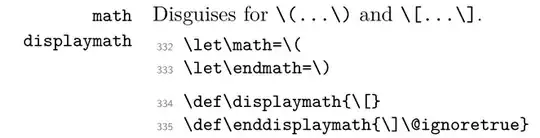
Further more if you search "displaymath" in texdoc source2e, you can find that source2e

You can see in LaTeX, \[ mathtext \] is equal to \begin{displaymath} mathtext \end{displaymath}. If you write your source file like this

\[
    mathtext 
\]
\begin{displaymath}
    mathtext
\end{displaymath}

both of them seems clean and can remaind you these are "displaymath".

When you use amsmath package, it redefines \[ mathtext \] as \begin{equation*} mathtext \end{equation*} for numberless equation. (You can see this in amsmath.sty)

Syvshc
  • 1,328
  • 2
    For amsmath, if prose is wanted rather than code, texdoc amsldoc typed at a command line prompt should bring up the user guide (if working on a TeX Live installation). – barbara beeton Feb 11 '21 at 02:09
  • Yep, you can see "The wrapper \[ ... \] is equivalent to equation*." from sec 3.2 in texdoc amsldoc. (Well, I don't know how to quote in a comment. – Syvshc Feb 11 '21 at 02:12
  • Thank you, I didn't even know about texdoc. I'm a fairly experienced programmer but LaTeX follows different rules than conventional programming, so I have difficulty reconciling differences in code style and reusability. – Nolan Faught Feb 11 '21 at 02:30
  • 1
    @NolanFaught you can use texdoc <packagename> in command line (terminal) to get the doc of , also you can use texdoc latex2e to get document of latex2e, and texdoc source2e to get document of source code of latex2e – Syvshc Feb 11 '21 at 03:06
1

I personally almost always type equations in three lines. And I use the shorter form because it's easier.

The main issue you seem to find is that the source file is hard to parse. I would like to mention that many of us work on a setup with reverse search. For instance I use WinEdt + SumatraPDF, where reverse-search can be configured; whenever I want to find an equation I just double-click on the equation and WinEdt opens the right file in the right line.