A possibility to get a line with a length equal to \linewidth or \textwidth without overfull box is to use a clip or, as I wrote in a comment, to modify the bounding box.
\documentclass{minimal}
\usepackage{tikz}

\begin{document}
    \noindent
    \begin{tikzpicture}
        \draw (0,0.1) -- (\linewidth-\pgflinewidth,0.1);
        \clip (0,-5\pgflinewidth) rectangle (\textwidth,5\pgflinewidth);
        \draw (0,0) -- (\textwidth,0);
    \end{tikzpicture}
\end{document}

Remark : It's not another possibility because with \draw (0,0) -- (\linewidth-\pgflinewidth,0); the length is not correct.
Explanations :
I think that TikZ (or PGF with the basic layer) needs to be efficient at each step of the drawing. Firstly, the dimensions must be accurate enough and it's difficult with TeX, but Tikz needs to be fast enough. It's complicated like Caramdir shows in a example to calculate exactly the bounding box in all the cases. Some rules are necessary to avoid being too slow and to get correct results.
1) When you draw a simple line you get a complicated bounding box

This picture shows the problem at each side of the picture. In this first picture I used line join=round but in the next I used the values by default.

2) why add 0.5\pgflinewidth
When you draw a rectangle for example, the width is determined from the middle of line (with rounded corners or not). So I think that the main rule is to add 0.5\pgflinewidth in all the cases.

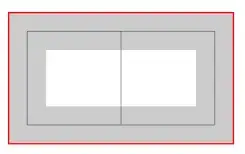
3) Now why clip is fine to get exactly what you want
When a clip is used, the line width is not used

4) Conclusion. I think it's preferable to avoid very large width for the line and in some cases it's necessary to have this question in memory to get exact dimensions.
Here is the code for experimentation:
\documentclass{minimal}
\usepackage{tikz}

\begin{document}

\begin{tikzpicture}
    \draw[help lines] (0,0) grid (1,1);
    \draw[line width=.4cm,opacity=.2,line join=round] (0,0) -- (1,0) -- (0,1);
    \draw[red] (current bounding box.south west) rectangle (current bounding box.north east);
\end{tikzpicture}

\vspace*{12pt}
\begin{tikzpicture}
    \draw[help lines] (0,0) grid (1,1);
    \draw[line width=.4cm,opacity=.2] (0,0) -- (1,0) -- (0,1);
    \draw[red] (current bounding box.south west) rectangle (current bounding box.north east);
\end{tikzpicture}

\vspace*{12pt}
 \begin{tikzpicture}
  \draw[help lines] (0,0) grid (2,1);
    \draw[line width=.4cm,rounded corners,opacity=.2] (0,0) rectangle (2,1);
    \draw[red] (current bounding box.south west) rectangle (current bounding box.north east);
\end{tikzpicture}

\vspace*{12pt}
 \begin{tikzpicture}
  \draw[help lines] (0,0) grid (2,1);
    \draw[line width=.4cm,opacity=.2] (0,0) rectangle (2,1);
    \draw[red] (current bounding box.south west) rectangle (current bounding box.north east);
\end{tikzpicture}

\vspace*{12pt}
\begin{tikzpicture}
  \draw[help lines] (0,0) grid (2,1);
    \clip (0,0) rectangle (2,1);
    \draw[line width=.4cm,opacity=.2] (0,0) rectangle (2,1);
    \draw[red] (current bounding box.south west) rectangle (current bounding box.north east);
\end{tikzpicture}

\end{document}


\hruleif that's all you need? – David Carlisle Jun 02 '12 at 16:38\hrulefilland the like, but I can't use those in a TikZ picture. In my actual use case I'm trying to make a picture-based page header that includes a line going to the end of the text. – Jan Ladislav Dussek Jun 02 '12 at 21:00[use as bounding box]. – Caramdir Jun 03 '12 at 03:17