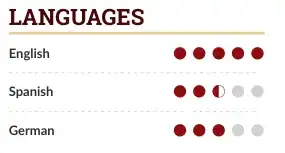
You can use the circle symbols from the wasysym package, which has a half-open circle (\LEFTcircle) as well as a half circle (\LEFTCIRCLE). For the for loop in the \cvskill command three cases can be defined:
- up to and including the integer part of the number: colored circle
- integer part + 1: half circle if 0.5 specified, grey circle otherwise
- rest of numbers: grey circle
A quick way to implement step 2 is to actually specify the 0.5 in a separate optional argument to the \cvskill command. This allows the for loop and number comparison code to stay the same, and only needs to check if the argument is specified or not. For this \ifblank can be used (this command is provided by etoolbox, which is already used by altacv for \ifnumgreater). Using \ifblank means that any number or string in the optional argument will cause a half circle to be printed, for example the string half in the code below.
To make the code easier the loop has changed from 1..5 to 0..4. This is done because with this approach you check the 0.5 in the next iteration, i.e., 2.5 has two normal iterations and during the third the 0.5 is checked.
For the half circle you can choose to superimpose a colored half circle on top of a grey full circle using \rlap, or to just print the half-open circle from wasysym. Both variants are given below.
Code for superimposed circle (note: to be added in the .tex document, the altacv.cls file remains unchanged):
% in preamble
% [preamble packages and settings here]
\usepackage{wasysym}
\renewcommand{\cvskill}[3][]{%
\textcolor{emphasis}{\textbf{#2}}\hfill
\foreach \x in {0,...,4}{%
  \Large%
  \space{%
  \ifnumless{\x}{#3}%
  {\color{accent}\CIRCLE}%
  {%
     \ifnumequal{\x}{#3}{%
        \ifblank{#1}{\color{body!30}\CIRCLE}%
        {\rlap{\color{body!30}\CIRCLE}\color{accent}\LEFTCIRCLE}%
     }%
     {\color{body!30}\CIRCLE}%
  }%
  }%
}\par%
}
% [rest of preamble here]
\begin{document}
% [document content here]
\cvsection{Languages}
\cvskill{English}{5}
\divider
% optional argument used here
\cvskill[half]{Spanish}{2}
\divider
\cvskill{German}{3}
% [rest of document content here]
Result:

Code for half-open circle:
\usepackage{wasysym}
\renewcommand{\cvskill}[3][]{%
\textcolor{emphasis}{\textbf{#2}}\hfill
\foreach \x in {0,...,4}{%
  \Large%
  \space{%
  \ifnumless{\x}{#3}%
  {\color{accent}\CIRCLE}%
  {%
     \ifnumequal{\x}{#3}{%
        \ifblank{#1}{\color{body!30}\CIRCLE}%
        {\color{accent}\LEFTcircle}%
     }%
     {\color{body!30}\CIRCLE}%
  }%
  }%
}\par%
}
Result: