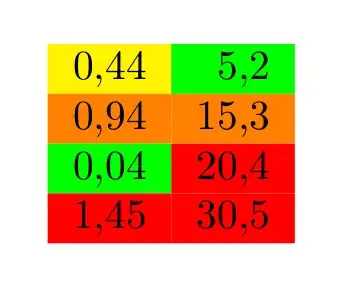
The following adds two new column types called \sempftcolored and \SempftColored. With those you can set an alignment and colour your cells according to some colour ranges you can either specify with \sempftsetcolors or in the first and second argument of \SempftColored.
It uses a loop to find the correct cell colour. The list of colour specifications being used in the first argument of \sempftsetcolors or \SempftColored should have a comma separated list, each containing of two groups, the first being a relation (e.g., {<0.1} for smaller than 0.1) and the second the colour specification which should be applied. The second argument of \sempftsetcolors and \SempftColored is the colour which is applied if none of the relations matched.
For the relations you can use =, >=, <=, != (and theoretically a few more which you will not need). The first matched relation is used (so order in \sempftsetcolors matters).
The argument of \sempftcolored and the last argument of \SempftColored are the cell alignments which should be applied.
\sempftcellcolor (the macro used to evaluate the relations and sets the cellcolor) works with both , (a comma) and . (a period) as the decimal separator of the argument (the cell content in a \sempftcolored column), whereas the numbers used in the colour lists must use a period.
\documentclass{article}
\usepackage[table]{xcolor} % just for more named colours
\usepackage{dcolumn,collcell,array}
%\usepackage{xparse} % not needed with newer LaTeX versions
\ExplSyntaxOn
\seq_new:N \l_sempft_color_ranges_seq
\tl_new:N \l_sempft_color_else_tl
\NewDocumentCommand \sempftsetcolors { m m }
  {
    \seq_set_from_clist:Nn \l_sempft_color_ranges_seq {#1}
    \tl_set:Nn \l_sempft_color_else_tl {#2}
  }
\NewExpandableDocumentCommand \sempftcellcolor { m }
  {
    \sempft_color_loop:e { \sempft_ensure_decimal_period:n {#1} }
    #1
  }
\cs_new:Npn \sempft_color_loop:n #1
  {
    \seq_map_tokens:Nn \l_sempft_color_ranges_seq
      { __sempft_color_loop:nn {#1} }
    \use:n { \cellcolor { \l_sempft_color_else_tl } }
  }
\cs_generate_variant:Nn \sempft_color_loop:n { e }
\cs_new:Npn __sempft_color_loop:nn #1#2
  {
    __sempft_color_loop:nnn {#1} #2
  }
\cs_new:Npn __sempft_color_loop:nnn #1#2#3
  {
    \fp_compare:nT { #1 #2 }
      {
        \cellcolor {#3}
        \seq_map_break:n { \use_none:nn }
      }
  }
% auxiliary function to parse floats correctly regardless of the decimal
% separator being a period or comma
\cs_new:Npn \sempft_ensure_decimal_period:n #1
  { __sempft_ensure_decimal_period_auxi:w \q_nil #1 \q_mark , \q_stop }
\cs_new:Npn __sempft_ensure_decimal_period_auxi:w #1 ,
  { __sempft_ensure_decimal_period_auxii:w #1 .  }
\cs_new:Npn __sempft_ensure_decimal_period_auxii:w #1 \q_mark #2 \q_stop
  { \exp_not:o { \use_none:n #1 } }
\ExplSyntaxOff
\sempftsetcolors{{<0.1}{green}, {<0.5}{yellow}, {<1}{orange}}{red}
\newcolumntype\sempftcolored[1]
  {>{\collectcell\sempftcellcolor}#1<{\endcollectcell}}
\newcolumntype\SempftColored[3]
  {>{\sempftsetcolors{#1}{#2}\collectcell\sempftcellcolor}#3<{\endcollectcell}}
\begin{document}
\begin{tabular}
  {
    \sempftcolored{D,,{1.2}}
    \SempftColored{{<10}{green},{<20}{orange}}{red}{D,,{2.1}}
  }
  0,44 &  5,2 \
  0,94 & 15,3 \
  0,04 & 20,4 \
  1,45 & 30,5 \
\end{tabular}
\end{document}


\ifdim0.001pt<5pt yes \else no\fiIf you want help with an error please supply a small complete test file that makes the error then people can debug it for you – David Carlisle Feb 18 '21 at 10:03\newcommand\zz[1]{...#2}with a definition with1 declared argument where you try to use a second argument. – David Carlisle Feb 18 '21 at 10:05\ifdim#1ptis not#followed by1ptbut it means#1(the first parameter) followed bypt, so\ifdim#0.1ptis wrong. However, I'm not sure what your are trying to do. – campa Feb 18 '21 at 10:22\zzis a pair of numbers. What do they both represent? – Steven B. Segletes Feb 18 '21 at 10:25