14

I draw shapes on background via pgfonlayer

\documentclass{article}
\usepackage{tikz}
\usetikzlibrary{backgrounds}

\begin{document}
 \begin{tikzpicture}
  \begin{pgfonlayer}{background}
   \draw[rounded corners,fill=red] (1,1) rectangle (2,2);
   \draw[fill=blue] (0,0) circle (.8cm);
  \end{pgfonlayer}
 \end{tikzpicture}
\end{document}

I know the values (coordinates) needed to draw rectangle or circle, but I have no idea what are the parameters needed to draw a star.

We define the starting coordinate; for rectangle we give the second coordinate two draw rectangle between two points, for circle, we give the radius to draw circle around the starting point. What we need to give to draw star around the starting point?

\draw[fill=green] (0,0) star ????;

PS. Sorry, I know this is a basic typical question, but I had a long struggle with it.

Googlebot
  • 4,035
  • 5
    You can just use a node [star] for this, which is included in the \usetikzlibrary{shapes.geometric}. See Drawing Stars/Similar with TikZ. The pgfmanual describes the many different node shapes in great detail. – Jake Jun 07 '12 at 12:21
  • @Jake It's not difficult to draw shapes with node. I am using this pgfonlayer for other packages like background, and I prefer to follow the standard procedure. – Googlebot Jun 07 '12 at 12:25
  • 1
    What do you mean by "standard procedure"? And what does this have to do with pgfonlayer? You can use nodes in pgfonlayer environments. – Jake Jun 07 '12 at 12:26
  • @Jake now I get your purpose; I thought you mean using node outside pgfonlayer. – Googlebot Jun 07 '12 at 12:31
  • 2
    An important point is that there is no star creator as there is for circle or rectangle. In such cases, node shapes are a common way to easily create a wide variety of shapes. – Andrew Stacey Jun 07 '12 at 13:13

4 Answers4

15

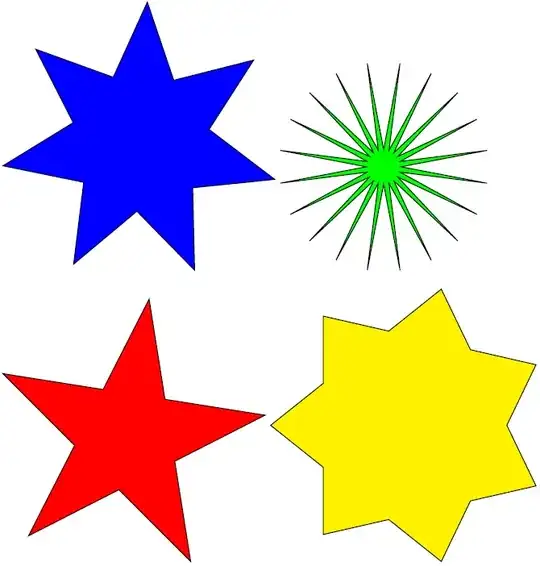
Here you have a macro for drawing stars as well as "n-grams". meaning stars that result when you connect the diagonals of a regular polygon:

\documentclass[parskip]{scrartcl}
\usepackage[margin=15mm]{geometry}
\usepackage{tikz}
\usetikzlibrary{shapes,backgrounds}

\newcommand{\tstar}[5]{% inner radius, outer radius, tips, rot angle, options
\pgfmathsetmacro{\starangle}{360/#3}
\draw[#5] (#4:#1)
\foreach \x in {1,...,#3}
{ -- (#4+\x*\starangle-\starangle/2:#2) -- (#4+\x*\starangle:#1)
}
-- cycle;
}

\newcommand{\ngram}[4]{% outer radius, tips, rot angle, options
\pgfmathsetmacro{\starangle}{360/#2}
\pgfmathsetmacro{\innerradius}{#1*sin(90-\starangle)/sin(90+\starangle/2)}
\tstar{\innerradius}{#1}{#2}{#3}{#4}
}

\begin{document}

\begin{tikzpicture}
 \tstar{2}{4}{7}{10}{thick,fill=blue}
\end{tikzpicture}
\begin{tikzpicture}
 \tstar{0.5}{3}{20}{0}{thick,fill=green}
\end{tikzpicture}

\begin{tikzpicture}
 \ngram{4}{5}{45}{thick,fill=red}
\end{tikzpicture}
\begin{tikzpicture}
 \ngram{4}{7}{0}{thick,fill=yellow}
\end{tikzpicture}

\end{document}

enter image description here

Tom Bombadil
  • 40,123
  • very useful codes for customizing the shape of stars! – Googlebot Jun 09 '12 at 12:15
  • In my first try, I used something like Tom's code : \path \foreach \i in {0,2,...,8}{(36*\i:#1) coordinate (a\i)}; etc. but I abandoned this idea because it seemed to me that it was faster to define directly the shape with ten points, but perhaps I'm wrong...The advantage with Tom'method is to define others shapes with more points. – Alain Matthes Jun 09 '12 at 12:34
9

It's not very difficult to draw a star without a node

\documentclass[11pt]{scrartcl}
\usepackage{tikz}    

\newcommand\Star[3][]{%
\path[#1] (0  :#3) -- ( 36:#2) 
       -- (72 :#3) -- (108:#2)
       -- (144:#3) -- (180:#2)
       -- (216:#3) -- (252:#2)
       -- (288:#3) -- (324:#2)--cycle;}


\begin{document}
\begin{tikzpicture}
\Star[fill=gray!30,draw]{2}{4} 
\end{tikzpicture}
\end{document} 

enter image description here

Alain Matthes
  • 95,075
  • it's not difficult but what is the advantage of using \path over \node? – Googlebot Jun 09 '12 at 12:15
  • 1
    @Ali A node is something specific. It's a shape around something, genrally a text,it is a structure with anchors and generally, it's not possible to scale it, because you scale the text with it. A path is useful if you need to scale the picture. If you want a specific shape, you need to draw this shape with \path because you can used only predefined shapes. – Alain Matthes Jun 09 '12 at 12:28
7

This answer summarized useful comments by Andrew Stacey and Jake, and all credit goes to them

TikZ does have creators for common shapes like circle and rectangle, but not for uncommon shapes like star. Thus, for creating star, you need to use \node instead of \draw. The code will look like this

\begin{pgfonlayer}{background}
\node[star,fill=red,minimum width=1cm] at (0,0) {};
\end{pgfonlayer}

I hope this will help someone struggling with shapes in pgfonlayer.

Googlebot
  • 4,035
2
\documentclass{article}
\usepackage{tikz}
\begin{document}
 \begin{tikzpicture}
   \node[
       star,
       star points=8,
       star point height=1.2mm,
       ball color=violet,
       draw=blue!50,
       font=\bf
    ] at (current page.center) {I'M FROM VIETNAMESE};
 \end{tikzpicture}
\end{document}