29

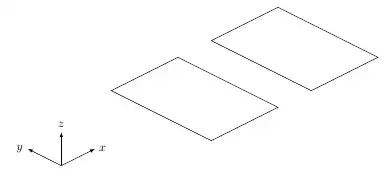
In the below image

  • top: rectangles

  • Bottom: isometric views. How to do it in TikZ?

enter image description here

Similar result but not correct...

\documentclass{article}
\usepackage{tikz}

\begin{document}

\begin{tikzpicture}
\draw (0,0) -- (1,0)--(1,1)--(0,1)--cycle;
\end{tikzpicture}

\begin{tikzpicture}[rotate=30]
\draw (0,0) -- (1,0)--(1,1)--(0,1)--cycle;
\end{tikzpicture}
\end{document}
Stefan Pinnow
  • 29,535
sandu
  • 7,950
  • 6
    You have to put x={(0.86cm,0.5cm)},y={(-0.86cm,0.5cm)} into your tikzpicture options to get an isometric perspective. If you want to use 3D coordinates, you also have to specify z={(0cm,1cm)}, and use three dimensional coordinates (like \draw (0,0,1) -- (2,1,3)). – Jake Jun 11 '12 at 07:26
  • 1
    For the record: Jake's patch is now incorporated in v3.1 of TikZ. – Stefan Pinnow Jan 15 '19 at 18:51
  • Tikz now supports [isometric view] using the perspective tikzlibrary. – John Kormylo Mar 06 '23 at 13:19

4 Answers4

33

Like Andrew wrote, 3d is not in the documentation. I updated my answer because I introduced some mistakes and complications. First we need to define the vectors for the xyz system, then with the 3dlibrary options, we can work in a specific plane.

 canvas is xy plane at z=0

I design the plane xy with z=0, I made a mistake with yx because in this case I exchange the vectors x and y.

Here a list of the options in 3d

coordinate system  xyz cylindrical
coordinate system  xyz spherical

/tikz/cs/longitude/
/tikz/cs/latitude/

 plane origin
 plane x
 plane y

 canvas is plane
 canvas is xy plane at z
 canvas is yx plane at z
 canvas is xz plane at y
 canvas is zx plane at y
 canvas is yz plane at x
 canvas is zy plane at x

The code :

 \documentclass{scrartcl}
 \usepackage{tikz}
 \usetikzlibrary{arrows,3d}

 % see the explanation below
 \makeatletter
 \tikzoption{canvas is xy plane at z}[]{%
   \def\tikz@plane@origin{\pgfpointxyz{0}{0}{#1}}%
   \def\tikz@plane@x{\pgfpointxyz{1}{0}{#1}}%
   \def\tikz@plane@y{\pgfpointxyz{0}{1}{#1}}%
   \tikz@canvas@is@plane
 }
 \makeatother 

\begin{document}
\begin{tikzpicture}
 [x={(0.866cm,0.5cm)}, y={(-0.866cm,0.5cm)}, z={(0cm,1cm)}, scale=2]
  \draw[->,red] (0,0,0) --  (1,0,0);
  \draw[->,red] (0,0,0) --  (0,1,0);    
  \draw[->,red] (0,0,0) --  (0,0,1);    
  \begin{scope}[canvas is xy plane at z=0]
      \draw[blue,shift={(1.5,0)}] (0,0) -- (1,0)--(1,1)--(0,1)--cycle;
      \draw[blue,shift={(3,0)}] (0,0) -- (1,0)--(1,1)--(0,1)--cycle;
  \end{scope}  
  \end{tikzpicture}

  \end{document}

The code for the option used in my example is

  \tikzoption{canvas is xy plane at z}{%
    \tikz@addtransform{\pgftransformshift{\pgfpointxyz{0}{0}{#1}}}%
  } 

This is only a shift transformation.

Update

As Jake noticed in this answer grid in 3d

The implementation of canvas is xy plane at z in tikzlibrary3d.code.tex is incorrect, it merely sets a coordinate shift, but doesn't activate the full transformation code necessary. You can redefine the key correctly within your document:

 \makeatletter
 \tikzoption{canvas is xy plane at z}[]{%
   \def\tikz@plane@origin{\pgfpointxyz{0}{0}{#1}}%
   \def\tikz@plane@x{\pgfpointxyz{1}{0}{#1}}%
   \def\tikz@plane@y{\pgfpointxyz{0}{1}{#1}}%
   \tikz@canvas@is@plane
 }
 \makeatother  

I forgot this and it is why I use yxinstead of xy in my first attempt.

enter image description here

Alain Matthes
  • 95,075
  • @Jake Yes you are right, I forgot to modify my example – Alain Matthes Jun 11 '12 at 07:51
  • 1
    Given that the 3d library is not (yet, as I understand it) documented, I think it worth highlighting its use here particularly as it makes life so easy for this. (Also worth pointing out that there are lots of other examples on this site of its use so its lack of documentation is partially made up for here.) – Andrew Stacey Jun 11 '12 at 08:22
  • Sadly, I can't upvote again ... excellent additions - Thanks! – Andrew Stacey Jun 11 '12 at 08:54
  • 1
    To obtain values with good precision, you may use x={({cos(30)*1cm},{sin(30)*1cm})},y={({cos(150)*1cm},{sin(150)*1cm})},z={(0,1cm)} – Paul Gaborit Jun 11 '12 at 11:39
  • 1
    @PolGab yes you are right, I'm influenced by the data of PGF (-3.85mm,-3.85mm) for the z vector. Very strange value, sqrt(2)/4 seems to be more natural. – Alain Matthes Jun 11 '12 at 12:27
  • 2
    Chapter 40 of the pgf manual now covers the 3d library. – Matthias Arras Jun 19 '19 at 12:44
18

As @Jake pointed out in a comment, you can specify the coordinate system of your choice as an option of the tikzpicture environment. Here is an example:

\documentclass[a4paper,11pt]{article}

\usepackage{tikz}

\begin{document}
\begin{tikzpicture}[y={(-1cm,0.5cm)},x={(1cm,0.5cm)}, z={(0cm,1cm)}]
% coordinate system
\coordinate (O) at (0, 0, 0);
\draw[-latex] (O) -- +(1, 0,  0) node [right] {$x$};
\draw[-latex] (O) -- +(0,  1, 0) node [left] {$y$};
\draw[-latex] (O) -- +(0,  0, 1) node [above] {$z$};
% rectangles
\draw (3,-1.5,0) -- (3,1.5,0) -- (5,1.5,0) -- (5,-1.5,0) -- cycle;
\draw (6,-1.5,0) -- (6,1.5,0) -- (8,1.5,0) -- (8,-1.5,0) -- cycle;

\end{tikzpicture}
\end{document}

enter image description here

Gonzalo Medina
  • 505,128
Spike
  • 6,729
12

Instead of giving the base vectors as a (x,y) tuple [y={(-1cm,0.5cm)},x={(1cm,0.5cm)}, z={(0cm,1cm)}], I prefer to use (angle:length)

\begin{tikzpicture}[x={(90:1cm)}, y={(0:1cm)}, z={(45:0.7cm)}]

This gives you a better understanding of the vector directions.

3

As of pgf version 3.1.2, the perspective library can be used which provides isometric view option. Relevant changelog: https://github.com/pgf-tikz/pgf/blob/master/doc/generic/pgf/CHANGELOG.md#312---2019-04-04-christian-feuersaenger.

This release was in 2019. I suppose texlive 2020 and later would support this.

\documentclass{article}
\usepackage{tikz}
\usetikzlibrary{3d,perspective}

\begin{document} \begin{tikzpicture}[isometric view] \draw[->] (0,0,0) -- (1,0,0) node [pos=1.2] {$x$}; \draw[->] (0,0,0) -- (0,1,0) node [pos=1.2] {$y$}; \draw[->] (0,0,0) -- (0,0,1) node [pos=1.2] {$z$};

\begin{scope}[canvas is xy plane at z=0]
    \foreach \xshift in {2,4}{%
        \draw[xshift=\xshift cm] (0,0) rectangle (1,1);
    }
\end{scope}

\end{tikzpicture} \end{document}

enter image description here

Zxcvasdf
  • 1,735