For a presentation in SVG format, you may give package media4svg a try.
Typeset with:
dvilualatex name
dvilualatex name
dvisvgm --bbox=papersize --font-format=woff2 --zoom=-1 --page=- --output=%f-%0p.svg name
and open name-1.svg in the (Chrome, Firefox, ...) browser.
Here is the example (source) that comes with the package (Click to see it in action):

\documentclass[dvisvgm,hypertex,aspectratio=169]{beamer}
\usepackage[british]{babel}
\usefonttheme{serif}
\usepackage[T1]{fontenc}
\usepackage{media4svg}
\usepackage{menukeys,siunitx,calc}
%%%%%%%%%%%%%%%%%%%%%%%%%%%%%%%%%%%%%%%%%%%%%%%%%%%%%%%%%%%%%%%%%%%%%%%%%%%%%%%
% PageDown, PageUp key event handling; navigation symbols <--, -->
% mouse cursor autohide on idle
%%%%%%%%%%%%%%%%%%%%%%%%%%%%%%%%%%%%%%%%%%%%%%%%%%%%%%%%%%%%%%%%%%%%%%%%%%%%%%%
\usepackage[totpages]{zref}
\usepackage{fontawesome5}
\setbeamertemplate{navigation symbols}{}
\def\navBtnSize{9pt}
\def\navBtnLnWd{1.6pt}
\AtBeginShipout{%
\AtBeginShipoutAddToBox{%
\special{dvisvgm:raw
<style>svg{cursor: none}</style>%
<defs>%
<script type="text/javascript">%
<![CDATA[%
var svgRoot=document.getElementsByTagName('svg')[0];%
var cursorTimer;%
document.addEventListener('mousemove', function(e){%
e.preventDefault();e.stopPropagation();%
svgRoot.style.cursor='initial';%
if(e.target!=svgRoot){%
e.target.style.cursor='inherit';%
}%
try{clearTimeout(cursorTimer);}catch(err){};%
cursorTimer=setTimeout(function(){e.target.style.cursor='none';},3000);%
});%
document.addEventListener('keydown',function(e){%
if(e.key=='PageDown'||e.key=='ArrowDown'||e.key=='ArrowRight'){%
\ifnum\thepage<\ztotpages
document.location.replace('\jobname-\the\numexpr\thepage+1\relax.svg');%
\fi%
}else if(e.key=='PageUp'||e.key=='ArrowUp'||e.key=='ArrowLeft'){%
\ifnum\thepage>1
document.location.replace('\jobname-\the\numexpr\thepage-1\relax.svg');%
\fi%
}%
});%
]]>%
</script>%
</defs>%
}%
}%
\AtBeginShipoutUpperLeftForeground{%
\raisebox{-\dimexpr\height+0.5ex\relax}[0pt][0pt]{\makebox[\paperwidth][r]{%
\normalsize\color{structure!40!}%
\ifnum\thepage>1%
\href{\jobname-\the\numexpr\thepage-1\relax.svg}{\faArrowLeft}%
\else%
\textcolor{lightgray}{\faArrowLeft}%
\fi\hspace{0.5ex}%
\ifnum\thepage<\ztotpages%
\href{\jobname-\the\numexpr\thepage+1\relax.svg}{\faArrowRight}%
\else%
\textcolor{lightgray}{\faArrowRight}%
\fi%
\hspace{0.5ex}%
}}%
}%
}%
%%%%%%%%%%%%%%%%%%%%%%%%%%%%%%%%%%%%%%%%%%%%%%%%%%%%%%%%%%%%%%%%%%%%%%%%%%%%%%%
\title{Presentation example with embedded video}
\subtitle{Use a Web browser and press \keys{F11}}
\author{AlexG}
\date{\today}
\begin{document}
\selectlanguage{british}
\begin{frame}[fragile]
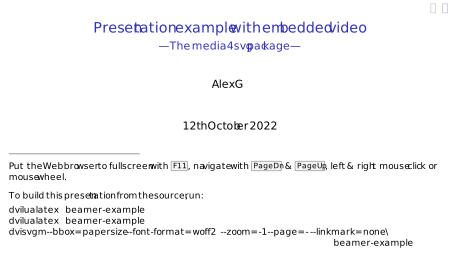
\titlepage\footnotesize
\makebox[0.3\linewidth]{\hrulefill}\[1ex]
Navigate with \keys{PageUp} & \keys{PageDn}, toggle Full-Screen with \keys{F11}.\[2ex]
To build this presentation from the source, run:\vspace{-2ex}
\begin{verbatim}
dvilualatex beamer-example
dvilualatex beamer-example
dvisvgm --bbox=papersize --font-format=woff2 --zoom=-1 --page=- --output=%f-%0p.svg
beamer-example
\end{verbatim}
\end{frame}
\begin{frame}[fragile]{Video file}
Embedded local video file from package \emph{mwe}
\begin{verbatim}
\includemedia[width=24em,height=13.5em]{}{example-movie.mp4}
\end{verbatim}
\begin{center}
\includemedia[width=24em,height=13.5em]{}{example-movie.mp4}
\end{center}
\end{frame}
\begin{frame}[fragile]{Remote video}
Video streamed from URL
\begin{verbatim}
\includemedia[width=24em,height=13.5em,url]{}{%
https://interactive-examples.mdn.mozilla.net/media/cc0-videos/flower.webm}
\end{verbatim}
\begin{center}
\includemedia[width=24em,height=13.5em,url]{}{https://interactive-examples.mdn.mozilla.net/media/cc0-videos/flower.webm}
\end{center}
\end{frame}
\begin{frame}[fragile]{Player control}
The standard player controls (option `\verb+controls+') take a lot of space of the media display. Therefore, it is not recommended to enable them. Nevertheless, interactivity is still provided through touch or left mouse button click, and through the keyboard as summarized in the table.
Click on the media display to start playback. To pause playback, press the left mouse button on the media display. Release it to resume playback. To pause playback permanently, press the left mouse button on the media display and move the mouse out while keeping the button pressed.
\begin{minipage}[t]{0.5\linewidth}
\rule{1ex}{0pt}\
\begin{tabular}{ll}\hline
Command & Shortcut\\hline
\rule{0pt}{2.4ex}Toggle Play/Pause & \keys{\SPACE}\
Increase volume & \keys{\arrowkeyup}\
Decrease volume & \keys{\arrowkeydown}\
Unmute audio & \keys{Ctrl+\arrowkeyup}\
Mute audio & \keys{Ctrl+\arrowkeydown}\
Toggle Full-Screen & \keys{F11}
\end{tabular}
\end{minipage}%
\begin{minipage}[t]{0.5\linewidth}
\rule{1ex}{0pt}\
\begin{tabular}{ll}\hline
Command & Shortcut\\hline
\rule{0pt}{2.4ex}Seek back \SI{1}{\percent} & \makebox[\widthof{\keys{\SPACE}}][l]{\keys{\arrowkeyleft}}\
Seek forward \SI{1}{\percent} & \keys{\arrowkeyright}\
Seek back \SI{10}{\percent} & \keys{Ctrl+\arrowkeyleft}\
Seek forward \SI{10}{\percent} & \keys{Ctrl+\arrowkeyright}\
Seek to beginning & \keys{Home}\
Seek to end & \keys{End}
\end{tabular}
\end{minipage}
\end{frame}
\end{document}
Note: For having a video auto-play on page-open, it must be muted at the same time. This is for security reasons. Thus, ,autoplay,muted must be added to the option list of \includemedia.... (See texdoc media4svg.)


-p-option. (See edit.) – AlexG Apr 30 '21 at 13:04texdoc media4svg, So you need to add,autoplay,mutedto the option list of \includemedia... – AlexG Apr 30 '21 at 13:51\usetheme{metropolis}– Volker Weißmann Apr 30 '21 at 15:24media4svg(v. 0.7, 2022/05/18), page up/down works immediately, even if the video has the focus. – AlexG May 19 '22 at 08:19