167

I would like to increase the size of pretty much every headlines, so that it is more prominent than the normal text.

I read about the titlesec package, but can't seem to find good example how to use the package.

Using Gonzalo Medina does in fact change the font size, however, it changes the default font as well.

Before:

enter image description here

After:

enter image description here

cherrung
  • 3,759

5 Answers5

202

Standard classes

Here's an example using titlesec:

\documentclass{article}
\usepackage{titlesec}

\titleformat{\section}{\LARGE\bfseries} \titleformat{\subsection}{\Large\bfseries} \titleformat{\subsubsection}{\large\bfseries} \titleformat{\paragraph}{\large\bfseries} \titleformat*{\subparagraph}{\large\bfseries}

\begin{document}

\section{Test section} \subsection{Test section} \subsubsection{Test section} \paragraph{Test section} \subparagraph{Test section}

\end{document}

I used the simplified version of \titleformat (i.e., \titleformat*) since the only desired change was in size, but you can use the extended version if "bigger" changes are required. These are the default definitions for the standard classes (taken from the documentation):

\titleformat{\section}
{\normalfont\Large\bfseries}{\thesection}{1em}{}
\titleformat{\subsection}
{\normalfont\large\bfseries}{\thesubsection}{1em}{}
\titleformat{\subsubsection}
{\normalfont\normalsize\bfseries}{\thesubsubsection}{1em}{}
\titleformat{\paragraph}[runin]
{\normalfont\normalsize\bfseries}{\theparagraph}{1em}{}
\titleformat{\subparagraph}[runin]
{\normalfont\normalsize\bfseries}{\thesubparagraph}{1em}{}

so you can make bigger changes. The following image shows both the standard sizes and the ones obtained with the above modifications:

enter image description here

And here's an exampe using the sectsty:

\documentclass{article}
\usepackage{sectsty}

\sectionfont{\LARGE} \subsectionfont{\Large} \subsubsectionfont{\large} \paragraphfont{\large}

\begin{document}

\section{Test section} \subsection{Test section} \subsubsection{Test section} \paragraph{Test section} \subparagraph{Test section}

\end{document}

According to an edit to the original question, the OP wanted also a sans serif font:

\documentclass{article}
\usepackage{titlesec}

\titleformat{\section}{\LARGE\bfseries\sffamily} \titleformat{\subsection}{\Large\bfseries\sffamily} \titleformat{\subsubsection}{\large\bfseries\sffamily} \titleformat{\paragraph}{\large\bfseries\sffamily} \titleformat*{\subparagraph}{\large\bfseries\sffamily}

\begin{document}

\section{Test section} \subsection{Test section} \subsubsection{Test section} \paragraph{Test section} \subparagraph{Test section}

\end{document}

KOMA classes

The above approaches are to be used mostly with the default document classes (book, report, article); if the document class used is one of the classes of the KOMA-Script bundle, then it's not advisable to use titlesec (See Incompatibilities between KOMA-Script and titlesec) but to use the features provided by the KOMA classes:

\documentclass{scrartcl}

\setkomafont{section}{\LARGE} \setkomafont{subsection}{\Large} \setkomafont{subsubsection}{\large} \setkomafont{paragraph}{\large} \setkomafont{subparagraph}{\large}

\begin{document}

\section{Test section} \subsection{Test section} \subsubsection{Test section} \paragraph{Test section} \subparagraph{Test section}

\end{document}

memoir

For the memoir document class, the situation is analogous: is also not advisable to use titlesec (See About memoir and titlesec incompatibility) but to use the features provided by the class; in the case of the lower sectional units, the class provides the family of commands \setXheadstyle:

\documentclass[article]{memoir}

\setsecheadstyle{\LARGE\bfseries} \setsubsecheadstyle{\Large\bfseries} \setsubsubsecheadstyle{\large\bfseries} \setparaheadstyle{\large\bfseries} \setsubparaheadstyle{\large\bfseries}

\begin{document}

\section{Test section} \subsection{Test section} \subsubsection{Test section} \paragraph{Test section} \subparagraph{Test section}

\end{document}

Bernard
  • 271,350
Gonzalo Medina
  • 505,128
  • Thanks. Works pretty good, except for the first modification. Because changing the size without further options, it changes to a different font. – cherrung Jun 13 '12 at 21:49
  • 2
    @cherrung: How about just adding \sffamily to the list of corrections? – Werner Jun 13 '12 at 22:22
  • 1
    @cherrung as Werner said, simply add \sffamily, as I did in the last code of my updated answer. – Gonzalo Medina Jun 13 '12 at 22:43
  • @cherrung which document class are you using? The standard classes don't use a sans-serif font by default, so your last requirement makes me wonder if you are using some non-standard document class. – Gonzalo Medina Jun 13 '12 at 22:54
  • @GonzaloMedina I use the scrartcl document class and I do like the sans-serif font. – cherrung Jun 13 '12 at 23:12
  • 2
    @cherrung that is crucial information that you should have mentioned in your original question. KOMA-Script and titlesec are incompatible, so titlesec is not advisable here; I've provided an example on how to proceed with the KOMA classes in my updated answer. – Gonzalo Medina Jun 13 '12 at 23:35
  • @GonzaloMedina Sorry, didn't know it was crucial. Your previous version seemed to work though. Didn't even know that I was using KOMA classes... – cherrung Jun 13 '12 at 23:45
  • On a related note: You're using \setkomafont for KOMA-script classes, which seems to point slightly towards what I'm looking for. Is there such thing as \getkomafont as well, or \applykomafont or the like? Because I'm making my own, more flexible header command. – Egor Hans Dec 04 '17 at 08:44
  • What do all this sizes mean? How big are these sizes? For example, I am writing a paper and I am forced to comply to requirements like "14pt for Section's font size", "13pt for Subsection's font size", etc. Which of these I should use? – Kusavil Jan 29 '18 at 21:28
40

titlesec package options

For simple cases, you can use \usepackage[<size>]{titlesec}, where <size> is big, medium, small, or tiny.

big

big

medium

medium

small

small

tiny

tiny

Example code

\documentclass{article}

\usepackage[medium]{titlesec}

\begin{document} \section{A section} \subsection{A subsection} \subsubsection{A subsubsection} \end{document}

RazerM
  • 773
21

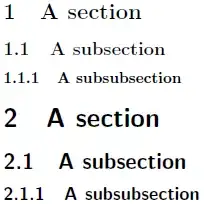
You can just modify the sectional commands with the appropriate font size. Here's a small example in the article document class:

enter image description here

\documentclass{article}
\begin{document}
\section{A section}
\subsection{A subsection}
\subsubsection{A subsubsection}

\makeatletter
\renewcommand\section{\@startsection {section}{1}{\z@}%
                                   {-3.5ex \@plus -1ex \@minus -.2ex}%
                                   {2.3ex \@plus.2ex}%
                                   {\normalfont\LARGE\bfseries}}% from \Large
\renewcommand\subsection{\@startsection{subsection}{2}{\z@}%
                                     {-3.25ex\@plus -1ex \@minus -.2ex}%
                                     {1.5ex \@plus .2ex}%
                                     {\normalfont\Large\bfseries}}% from \large
\renewcommand\subsubsection{\@startsection{subsubsection}{3}{\z@}%
                                     {-3.25ex\@plus -1ex \@minus -.2ex}%
                                     {1.5ex \@plus .2ex}%
                                     {\normalfont\large\bfseries}}% from \normalsize
\makeatother

\section{A section}
\subsection{A subsection}
\subsubsection{A subsubsection}

\end{document}

For a different font, replace \normalfont with the appropriate definition. For example, using \sffamily will yield:

enter image description here

Werner
  • 603,163
4

For completeness I'll give a ConTeXt solution also.

You can change the heading style using:

\setuphead[chapter,title]        [style=\tfd]
\setuphead[section,subject]      [style=\tfc]
\setuphead[subsection,subsubject][style=\tfb]

The font switch \tf equals the body fontsize, \tfa is 1.2 times \tf; \tfb is 1.2 times \tfa and so on. If you want sans serif headings, then use

\setuphead[chapter,title]        [style=\ssd]
\setuphead[section,subject]      [style=\ssc]
\setuphead[subsection,subsubject][style=\ssb]

Here also the same logic applies. \ss is sans serif at body fontsize; \ssa is 1.2 times \ss, \ssb is 1.2 times \ssa, and so on.

Aditya
  • 62,301
-1
\section{\huge{Human}}% this works fine
vaman
  • 81