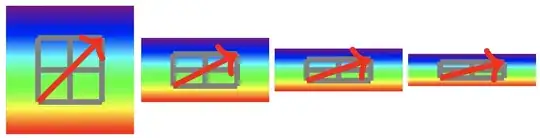
This is a bug analysis, I don't have a solution.
I attempt to answer the following two problems:
- Why is there a clipping at all?
- Why is there a clipping when the line is vertical/horizontal,
but not when the line is less boring?
Why clipping
It is, in fact, not a clipping.
It's the natural boundary of the fading/shading.
See the explanation after \pgfshadepath.
Or let me summarize as follows:
a fading/shading is essentially a window and a curtain.
Normally you would buy a curtain large enough to cover the entire window.
Otherwise, people passing by your window see inside your room.
But there is a caveat when computing the necessary size of the curtain.
For example, if you have a 50bp x 50bp window,
you would expect that a 50.1bp x 50.1bp curtain is definitely large enough.
But that's not right.
Because some people want the curtain to be installed with a 45° rotation.
So the curtain ends up covering an octagonal region
but leaving out four small corners.

So the package authors outsmart people by ordering oversize curtains.
The curtain is translated and rescaled so that
the window will locate at the center, covering 25% of the area.

Sometimes, we see fat and short windows.
Then the curtain is also scaled along the proper axis

Why is horizontal and vertical arrows problematic
Actually, all arrows are problematic because
the arrow tips do not count toward the bounding box.
More precisely,
- The default arrow tip of TikZ
does not have a bounding box (convex hull).
- That said, the default arrow tip of
\usetikzlibrary{arrows.meta}
does have a bounding box (convex hull).
- That said, the bounding box of an arrow tip is not available
until the very end of the output routine.
You see, the arrows are added by the command \pgfusepath
and this command is executed only after
you have done everything with nodes, decorations, double,
and perhaps shading and fading.
In fact, the magic node current path bounding box
has never included arrow tips.
(see the definition of \pgf@arrow@update@bb.)
So when you use path fading with arrow tips,
the tips do not necessarily lie inside the window,
despite that usually they are still covered by the curtain
because there were some safety margin.