11

I need to position an example block:

\begin{exampleblock}{}
   Proposed and implemented
\end{exampleblock}

Without disturbing other frame content. Something like:

--------------------
-------------
--------------------
--------------------------
-----------
   --/============\---------
-----|            |--
-----| Proposed   |--------
-----| and        |--------
-----| implemented|------
-----\============/
--------------------
--------------------------
   -----------------

Let it overlay the text behind it. And not to be taken into account during layouting.

Update The Claudio Fiandrino's way is not apropriate to me, because, i need an Itemize environment working inside, and it would be great, if block style is the same as theme-style.

Necto
  • 411

2 Answers2

16

The beamer documentation (§12.8) suggests to use the textpos package for this, which might be considered as an alternative to TikZ.

\documentclass{beamer}
\usepackage{lmodern}
\usetheme{Luebeck}
\usepackage{lipsum} % <= to insert dummy text
\usepackage[absolute,overlay]{textpos}

\begin{document}

\begin{frame}
\frametitle{Example of block over the text}
\lipsum[1]

\begin{textblock*}{64mm}(32mm,0.25\textheight)
\begin{exampleblock}{}
  Proposed and implemented:
  \begin{itemize}
    \item stuff
    \item more stuff
  \end{itemize}
\end{exampleblock}
\end{textblock*}


\end{frame}

\end{document}

enter image description here

This answer by Christian Feuersänger compares both approaches (textpos, TikZ). A poor-man solution without employing some additional package would be a simple negative \vskip, as demonstrated in this answer.

Daniel
  • 37,517
5

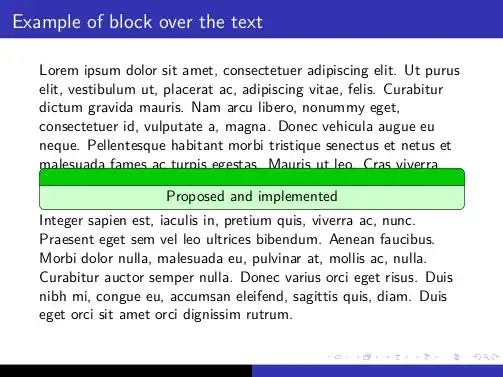
My solution leads to:

enter image description here

Since I'm not very expert with expansions I tried to re-create the block by means of the rectangle split and put it in front of the content by means of a new background. To do so, two libraries are needed: backgrounds and shapes.multipart.

Here is the code:

\documentclass{beamer}
\usepackage{lmodern}
\usetheme{Luebeck}

\usepackage{tikz}
\usetikzlibrary{backgrounds,shapes.multipart}
\pgfdeclarelayer{myback}
\pgfsetlayers{background,main,myback} %<= insert the myback 
% after the "main" to display the content in front of the usual content

% definition of the style
\tikzset{exampleblock/.style={rounded corners,rectangle split, rectangle split parts=2, draw, 
rectangle split part fill={green!80!black, green!20},minimum width=\textwidth
}}

\usepackage{lipsum} % <= to insert dummy text

\begin{document}

\begin{frame}
\frametitle{Example of block over the text}
\lipsum[1]
\begin{tikzpicture}[remember picture,overlay]
\begin{pgfonlayer}{myback}
\node [exampleblock]
at (current page.center) { %<= empty to not insert a title
\nodepart{two}
Proposed and implemented
};
\end{pgfonlayer}


\end{tikzpicture}
\end{frame}

\end{document}

What I like of this approach is that it is possible to customize very easily the width of the block; for example, changing minimum width=\textwidth into minimum width=4cm will lead to:

enter image description here

  • 1
    It is not bad, but this approach restricts the contents inside the block. For example i need an {itemize} environment there. – Necto Jun 14 '12 at 12:42
  • And also, if i change a beamer theme, i will need to readjust the style of this green box. – Necto Jun 14 '12 at 12:43
  • That's right. The more natural approach is to adopt the method for the background as in my answer and pass to the node the whole \begin{exampleblock}{}...\end{exampleblock}. Unfortunately this needs to know precisely how to expand an environment inside a tikzpicture... – Claudio Fiandrino Jun 14 '12 at 12:51
  • @Necto It would sure be easier if it was more flexible from the start, but just a minipage does the trick for itemize. – BadAtLaTeX Nov 12 '23 at 15:47