7

I am trying to make a ybar axis that averages from the middle, but I cannot find a way to change the origin of the x axis.

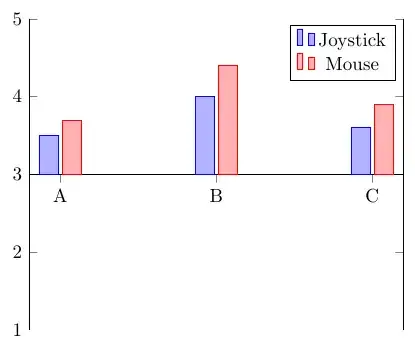
This is what I want:

The x line should start at 3

This is what I have:

The x line is starting at the bottom

As you can see, I am trying to make an average. Can I do it like this or do I have to transform my data?

\documentclass{standalone}
\usepackage{pgfplots}

\begin{document}
\begin{tikzpicture}
    \pgfplotstableread{data/singlecontrol.dat}\datatable

    \begin{axis}[ybar,
    xticklabels from table={\datatable}{variable},
    xtick=data,
    axis x line=middle,
    ymin=1,
    ymax=5
    ]

    \addplot table[x=X,y=averagejs] {\datatable};
    \addlegendentry{Joystick}
    \addplot table[x=X,y=averagem] {\datatable};
    \addlegendentry{Mouse}
    \end{axis}
\end{tikzpicture}
\end{document}
Marnix
  • 1,597
  • 3
  • 17
  • 23
  • I'm not sure what you mean by "trying to make an average" / "averages from the middle". From the screenshot, it looks like you just want the bars to start from y=3, instead of y=0, right? Is 3 the average of something? – Jake Jun 16 '12 at 14:06
  • Yes exactly that. Participants rate questions on a scale from 1 to 5. So the question is indeed: How do I start the x axis on y=3? – Marnix Jun 16 '12 at 14:11

1 Answers1

9

ybar plots always start from y=0. So what you'll have to do is change the tick labels on the y axis, so that 0 "looks like" 3, and subtract 3 from the data values, which you can do using a y filter/.code.

\documentclass[border=5mm]{standalone}
\usepackage{pgfplots}

\begin{document}
\begin{tikzpicture}
    \pgfplotstableread{
    X averagejs averagem variable
    1 3.5 3.7 A
    2 4 4.4 B
    3 3.6 3.9 C   
    }\datatable

    \begin{axis}[ybar,
    xticklabels from table={\datatable}{variable},
    xtick=data,
    axis x line*=middle,
    enlarge x limits,
    y filter/.code={\pgfmathparse{#1-3}},
    ymin=-2, ymax=2,
    yticklabel={\pgfmathparse{\tick+3}\pgfmathprintnumber{\pgfmathresult}}
    ]

    \addplot table[x=X,y=averagejs] {\datatable};
    \addlegendentry{Joystick}
    \addplot table[x=X,y=averagem] {\datatable};
    \addlegendentry{Mouse}
    \end{axis}
\end{tikzpicture}
\end{document}
Jake
  • 232,450