You get a weird positioning also with \not\in (at least with the Computer Modern fonts) and from the dawn of time TeX provides the command \notin. In LaTeX it's the same as in plain TeX, only with the command made robust. You find it in fontmath.ltx:
\DeclareRobustCommand\notin{\mathrel{\m@th\mathpalette\c@ncel\in}}
\def\c@ncel#1#2{\m@th\ooalign{$\hfil#1\mkern1mu/\hfil$\crcr$#1#2$}}
However, \centernot\in is not optimal anyway. Indeed, the slash used for \notin isn't \not, but a simple /.
It's easy to supplement a command \notni:
\documentclass{article}
\usepackage{centernot} % for the comparison
\makeatletter
\DeclareRobustCommand\notni{\mathrel{\m@th\mathpalette\c@ncel\ni}}
\makeatother
\begin{document}
\begin{tabular}{ll}
Output with \verb|\notni|  & $x\notni X$ \
Output with \verb|\not\ni| & $x\not\ni X$ \
Output with \verb|\centernot\ni| & $x\centernot\ni X$
\end{tabular}
\end{document}

You see that even replacing \not with \centernot the result would not be optimal. Just for comparison, here's the same table with in instead of ni:

You can get the best out of both worlds by using an old trick (which is also used by unicode-math.
\documentclass{article}
\usepackage{centernot} % for the comparison
\NewCommandCopy{\standardnot}{\not}
\ExplSyntaxOn
\NewDocumentCommand{\makenot}{mm}
 {
  % #1 = symbol to negate, #2 = replacement
  \exp_args:Nc \NewDocumentCommand{not\cs_to_str:N #1 } {} { #2 }
 }
\RenewDocumentCommand{\not}{m}
 {
  \cs_if_exist:cTF { not\cs_to_str:N #1 }
   {
    \group_begin:
    \cs_set_eq:NN \not \standardnot % to keep centernot happy
    \use:c { not\cs_to_str:N #1 }
    \group_end:
   }
   {
    \standardnot#1
   }
 }
\ExplSyntaxOff
\makeatletter
\makenot{\ni}{\mathrel{\m@th\mathpalette\c@ncel\ni}}
\makeatother
\makenot{\to}{\centernot\to}
\begin{document}
\begin{tabular}{ll}
Output with \verb|\notni|  & $x\notni X$ \
Output with \verb|\not\ni| & $x\not\ni X$ \
Output with \verb|\not\to| & $A\not\to B$
\end{tabular}
\end{document}
With \makenot{<symbol>}{<replacement>} you decide what \not<symbol> should stand for. With this code, \not\ni and \notni are equivalent.
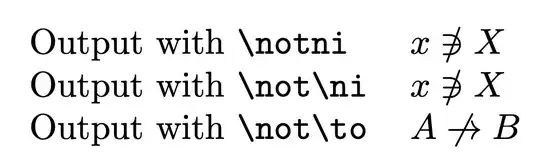
What's the idea? First I alias \not in order to still have the original available. Then I redefine \not with an argument, which should be a control sequence.
Assuming the call is \not\foo, I check whether the control sequence \notfoo is defined and, in this case, use it. Otherwise the standard \not is used.
For instance \not\in would be transformed into \notin out of the box. We can also use \makenot to define new \not<symbol> commands. If we do
\makenot\foo{whatever}
the command \notfoo would be defined to mean whatever. In the example code, \notni is defined as suggested in the first part of the answer. Instead \notto is defined via \makenot\to{\centernot\to}.
There is a safety measure in that the usage of \notfoo is enclosed between \group_begin: and \group_end:, so \not can be redefined to the original meaning inside this group so to make \centernot happy (it uses \not with its original meaning).
Another possible usage is
\makenot{\mid}{\nmid}
so \not\mid would produce the better symbol \nmid; note that neither \not\mid (with the standard \not) nor \centernot\mid produce a nice result (big understatement).
The key is \cs_to_str:N that strips off the backslash leaving just the control sequence name.


\notcreate different output. i am "happy enough" with the way\centernotlooks, i dont want to optimize every occurrence individually. – peter Jul 10 '21 at 08:27\centernot\niis really awful. Anyway, you can do as you like using the code I added. – egreg Jul 10 '21 at 19:55