May be this is a very strange question. But I found this property is very useful to control the overlap element.
So I wonder if latex own this property as HTML div.
Do you have any better idea to solve the overlap problem. Sometime, I need to push some element back.
update:the MWE code
\documentclass{article}

\usepackage{listings}
\usepackage{courier}
\usepackage{caption}
\usepackage{xcolor}
\usepackage{calc}

\DeclareCaptionFont{white}{\color{white}}
\DeclareCaptionFormat{listing}{\parbox{\textwidth}{\colorbox{gray}{#1#2#3}}}
\captionsetup[lstlisting]{format=listing,
labelfont=white,
textfont=white,
singlelinecheck=false,
margin=0pt,
font={bf,footnotesize}
}

\newlength\tdima
\setlength\tdima{ \fboxsep+\fboxrule}

\lstset{
         basicstyle=\small\tt,
         tabsize=2,
         extendedchars=true,
         breaklines=true,
         mathescape,
         escapeinside={\%*}{*)},
         showspaces=false,
         showtabs=false,
         showstringspaces=false,
         columns=flexible,
         xleftmargin=\tdima,
         framextopmargin= 10pt,
         framexbottommargin=10pt,
         float=tp,                            % float setting
         frame=single,
}%

\begin{document}
\begin{lstlisting}[caption=overlap]
using namespace std;
int main(void)
{
    return 0;
}
\end{lstlisting}
\end{document}
Output:
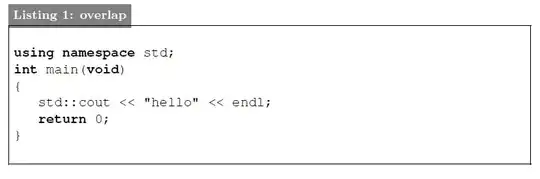
The caption overlap with the frame. And I want to push the caption back. Let the frame cover it. I don't want to use the \vskip to fine tuning the caption position.


\colorboxwith a white background around the code should be the way to go, although I don't know how to achieve this withlstlisting. (As you can see the border is already in front of the label.) Maybe just addingbackgroundcolor=\color{white}will do it. – bodo Jun 23 '12 at 07:22