1

I use the currfile package to help keep track of the source of my latex files. I use Linux, and the full path of the file looks like this:

/home/username/(various directories)/project-one/proposal/FIRST.tex

If I use

\usepackage[abs]{currfile}
\currfilename

then it displays the full path. If I use

\usepackage{currfile}

then I only see FIRST.tex.

Question: Is there a way to display

project-one/proposal/FIRST.tex

(it does not matter if there is a backslash in front of the path).

In case this matters, I use TeXlive in Linux.

underflow
  • 559
  • After I posted this question, stackexchange showed this related post https://tex.stackexchange.com/questions/220396/the-currfile-package?rq=1 It does not quite work for me, since I need to use this for different projects with different paths. A better question would be: If the path of my file looks like (first part with multiple directories) / (second part with multiple directories), how I can automate the printing of just the second part? – underflow Aug 13 '21 at 16:26
  • 1
    Next time, please provide a minimal working example (MWE). It should start with \documentclass, end with \end{document} and use the correct package option and macro name (abspath and \currfileabspath, respectively) for what you would like to do. – frougon Aug 13 '21 at 19:29

1 Answers1

3

In the following code, once \defineKnownPrefixes has been called:

  • \currFileAbsPathWithoutPrefix expands in one step to the desired thing (string'ified path with one instance of the prefix removed if possible, if it is among those specified with \defineKnownPrefixes);

  • \stripPrefixFrom{⟨balanced text⟩} recursively expands to same thing, but using ⟨balanced text⟩ as input instead of the “contents” of \currfileabspath.

\stripPrefixFrom is restricted-expandable: it can be used inside \edef, \xdef, \write, \typeout, \message, etc.

\defineKnownPrefixes assigns the list of prefixes \l_uflow_prefixes_seq and the resulting \currFileAbsPathWithoutPrefix locally (in other words, it respects TeX's grouping rules).

As reminded below, the \currFileAbsPathWithoutPrefix setting requires the document to be compiled with the -recorder option of the TeX engine (see the documentation of currfile).

\documentclass{article}
% For correct typesetting of chars like _ in category code 12, either
% uncomment this or use an Unicode engine (e.g., LuaTeX or XeTeX):
% \usepackage[T1]{fontenc}
\usepackage{xparse} % only useful if your LaTeX is older than 2020-10-01
\usepackage[abspath]{currfile} % use the correct option name

\ExplSyntaxOn \seq_new:N \l_uflow_prefixes_seq

\NewDocumentCommand \defineKnownPrefixes { m } { \seq_set_from_clist:Nn \l_uflow_prefixes_seq {#1} \tl_set:Nx \currFileAbsPathWithoutPrefix { \uflow_strip_prefix_from:V \currfileabspath } % correct macro name }

\prg_generate_conditional_variant:Nnn \str_if_eq:nn { f } { TF }

\prg_new_conditional:Npnn \uflow_str_starts_with:nn #1#2 { T } { \str_if_eq:fnTF { \str_range:nnn {#1} { 1 } { \str_count:n {#2} } } {#2} { \prg_return_true: } { \prg_return_false: } }

\cs_new:Npn __uflow_check_for_one_prefix:nn #1#2 { \uflow_str_starts_with:nnT {#1} {#2} { \seq_map_break:n { \str_range:nnn {#1} { 1 + \str_count:n {#2} } { -1 } \use_none:nn } } }

\cs_new:Npn \uflow_strip_prefix_from:n #1 { \seq_map_tokens:Nn \l_uflow_prefixes_seq { __uflow_check_for_one_prefix:nn {#1} } % If none of the registered prefixes matches, leave a string'ified version % of #1 in the input stream (string'ified for consistency with the other % case, when one of the prefixes matches). \tl_to_str:n {#1} }

\cs_generate_variant:Nn \uflow_strip_prefix_from:n { V } \cs_new_eq:NN \stripPrefixFrom \uflow_strip_prefix_from:n \ExplSyntaxOff

\begin{document}

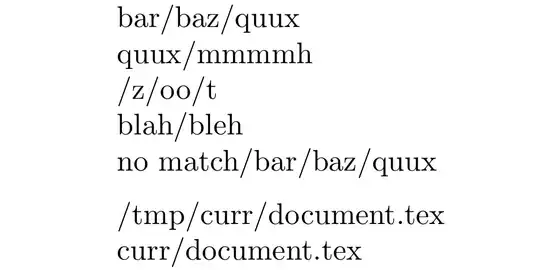
\defineKnownPrefixes{/foo/, /bar/baz/, /quux, {/one/with, a comma/}, /tmp/}

\noindent \stripPrefixFrom{/foo/bar/baz/quux}\ \stripPrefixFrom{/bar/baz/quux/mmmmh}\ \stripPrefixFrom{/quux/z/oo/t}\ \stripPrefixFrom{/one/with, a comma/blah/bleh}\ \stripPrefixFrom{no match/bar/baz/quux}

\medskip\noindent % This requires the .fls file, and therefore a compilation with the % '-recorder' option. \currfileabspath\ \currFileAbsPathWithoutPrefix

\end{document}
enter image description here

frougon
  • 24,283
  • 1
  • 32
  • 55
  • Is it possible to modify this for older latexe2? I tried your sample codes on two machines, one running latex 2e 2017/10/25 and another, 2020/02/02. I got tons of errors for the first and none for the second. On the second machine it almost works. Specifically: I tried this using a path like this: /home/one/two/three/four/file.tex. If I set /tmp to be /home/one then \currfileabspath will give two/three/four.file.tex. But If I set \tmp to be /home/one/two then I got the full path. Unfortunately I can't upload latex on these two machines so I guess I am stuck? THANKS! – underflow Aug 14 '21 at 19:54
  • I just made the test. Created /home/one/two/three/four/file.tex containing the above code. 1) After replacing the /tmp/ with /home/one, the last two lines of output are /home/one/two/three/four/file.tex and /two/three/four/file.tex. 2) After replacing the /tmp/ with /home/one/two, the last two lines of output are /home/one/two/three/four/file.tex and /three/four/file.tex. That is as expected. Maybe you didn't enter these paths (taken from your comment); maybe you forgot to pass the -recorder option after relocating file.tex; something else? I can't say. – frougon Aug 14 '21 at 20:08
  • Thanks! I discovered the problem: The actual path was /home/me/project_one/proposal/file.txt, and the underscore caused problem. When I moved the file to another directory whose path has no underscore, everything works! I tried putting in single/double quotes but it still did not work. – underflow Aug 14 '21 at 20:18
  • This is completely unrelated to the question, but I can understand that you don't know it: the default output encoding in LaTeX when using pdfTeX is OT1, and this encoding doesn't have an underscore in the same place as ASCII (slot "5F). Therefore, using \detokenize{_} doesn't typeset an underscore when one is using OT1 encoding. I suggest to either use \usepackage[T1]{fontenc} or an Unicode-based engine. – frougon Aug 14 '21 at 20:32
  • \usepackage[T1]{fontenc} does the trick -- THANKS! Can you suggest a place where I can learn about this OT1 business? Now I have to figure out how to bribe the sysadmin to upgrade latex2e 2017/10/25 :-( – underflow Aug 14 '21 at 20:33
  • All the material for reasoning about this is in the TeXbook. The rest I learned mostly on this site (+ experimentation, reading the LaTeX source code...). I'll try to explain what happens: my code works at the “string” level. This is necessary because of special characters (_, $, backslash, ^, etc.). The input is string'ified with \detokenize (this will add a space after a \controlword). Then we can work on “strings”. The output is correct if you look at the character codes, and all characters have category code 12 (except spaces: 10). This makes them non-special... – frougon Aug 14 '21 at 20:39
  • ... except spaces, which behave as spaces in a .tex file. When TeX executes/digests a character with catcode 12, it typesets the glyph whose position in the current font is the character code of the character token. So, the font encoding (aka output encoding) has to agree with the input character codes. OT1 doesn't agree with ASCII for a few printable characters, among which the _. With Unicode engines, the situation should be better because Unicode is compatible with ASCII (and I verified with the _). – frougon Aug 14 '21 at 20:43
  • Other potentially problematic characters in OT1 would be <, >, |, ¤ and £ from vague memory. It is hard not to be vague, because OT1 isn't well-defined: cmr10 and cmtt10 don't have exactly the same encoding... Knuth doesn't name “the” OT1 encoding in the TeXbook. He merely gives the encoding tables for the various base fonts, which are similar for text fonts but not quite identical! BTW, currfile's output is already string'ified (all catcodes 12 except 10 for spaces), which is why I started to work with strings here without even thinking. – frougon Aug 14 '21 at 20:50
  • Page 5 of texdoc encguide mentions the characters that are different between the various text fonts of the cmr family, but doesn't go into full detail (for this, I think the best source is comprised by the font tables in the TeXbook appendix C). – frougon Aug 14 '21 at 21:03
  • I will take a look. THANKS! – underflow Aug 14 '21 at 21:07
  • You're welcome. Note that page 5 of texdoc encguide doesn't mention the underscore. This means it must be in the same position in all of the cmr text fonts. But this position is not the position of the underscore in ASCII, which is what is interesting to us here. So, page 5 only helps to understand where OT1 isn't well-defined; in order to know where it differs from ASCII, that is not enough. page 19 has the table for cmr10, which can be compared to an ASCII table if one is patient enough. – frougon Aug 14 '21 at 21:11
  • Small correction: while the TeXbook's appendix C deals with character codes and has some font tables, the one that has the tables of all the standard text fonts in TeX is appendix F (as in “font”—judging from the other appendices, the coincidence appears to be intentional). – frougon Aug 14 '21 at 22:07