When I use the following document (which uses \documentclass{article}):
\documentclass{article}
\title{Sample Document}
\author{John Smith}
\begin{document}
\begin{enumerate}
\item This is a short line
\item This is a short line
\item This is a really really really really long line that wraps around the page and as you can see it goes to the left of the item number.
\item This is a short line
\item This is a short line
\end{enumerate}
\end{document}
I get the following:
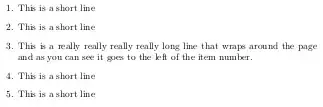
But when I create a similar document using this apa6 class:
\documentclass{apa6}
\title{Sample Document}
\author{John Smith}
\begin{document}
\begin{enumerate}
\item This is a short line
\item This is a short line
\item This is a really really really really long line that wraps around the page and as you can see it goes to the left of the item number.
\item This is a short line
\item This is a short line
\end{enumerate}
\end{document}
I get the following result:

How can I use \documentclass{apa6}, and line up wrapped lines in enumerations similar to \documentclass{article}? And what code in apa6 causes this to happen?


enumitempackage. You can control all aspects of the list format easily. See e.g. Vertical space in lists. – Alan Munn Jun 26 '12 at 05:12