I have a lot of text in table. I want to wrap it with in 2cm. In the last column, I have [1][2][3].....[89][100] but the column width is only 2 cm. It is supposed be wrapped by itself.
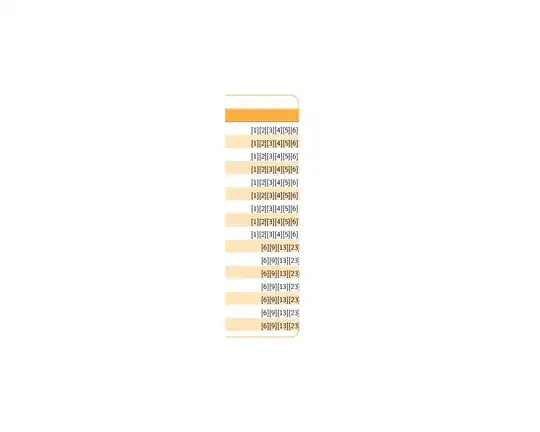
How can I implement that?
I have a lot of text in table. I want to wrap it with in 2cm. In the last column, I have [1][2][3].....[89][100] but the column width is only 2 cm. It is supposed be wrapped by itself.
How can I implement that?
In this case, using the p{2.0cm} column type is necessary, but not sufficient as there is not a natural break point. This is not related to being in a table, even in normal text, having using content such as [1][1][3][2][5][3][7][8][9][89][100] does not have a natural break point.
So, using just the p{2.0cm} column:
\begin{tabular}{p{2.0cm}}
    [1][7][3][8][5][9][7][8][9][89][100]
\end{tabular}
produces:

Here is a solution passing the contents to the ``\AddBreakableChars{}macro, which allows for a discretionary line breaks following a]`. So with:
\begin{tabular}{p{2.0cm}}
    \AddBreakableChars{[1][7][3][8][5][9][7][8][9][89][100]}
\end{tabular}
we obtain the desired result:
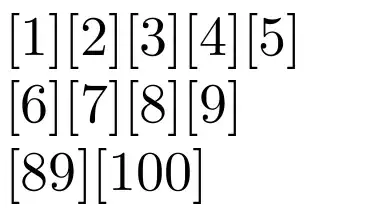
If you include the \usepackage{collcell} in the preamble, then you can define a new column type that automatically passes each entry in this column through the \AddBreakableChars macro via:
\newcolumntype{P}[1]{>{\collectcell\AddBreakableChars}p{#1}<{\endcollectcell}}
and using a P{<width>} column type as in:
\begin{tabular}{P{2.0cm}}
    [1][10][3][11][5][12][7][8][9][89][100]
\end{tabular}
which yields the desired results as above.
\documentclass{article}
\usepackage{hyphenat}
\usepackage{xstring}
\usepackage{forloop}
\usepackage{collcell}
\newsavebox\MyBreakChar%
\sbox\MyBreakChar{}% char to display the break after non char
\newsavebox\MySpaceBreakChar%
\sbox\MySpaceBreakChar{-}% char to display the break after space
\makeatletter%
\newcommand*{\BreakableChar}[1][\MyBreakChar]{%
  \leavevmode%
  \prw@zbreak%
  \discretionary{\usebox#1}{}{}%
  \prw@zbreak%
}%
\newcounter{index}%
\newcommand{\AddBreakableChars}[1]{%
  \StrLen{#1 }[\stringLength]%
  \forloop[1]{index}{1}{\value{index}<\stringLength}{%
    \StrChar{#1}{\value{index}}[\currentLetter]%
    \IfStrEq{\currentLetter}{]}
        {\currentLetter\BreakableChar[\MyBreakChar]}%
        {\currentLetter}%
  }%
}%
\newcolumntype{P}[1]{>{\collectcell\AddBreakableChars}p{#1}<{\endcollectcell}}
\begin{document}
\textbf{Manual Solution:}\par
\begin{tabular}{p{2.0cm}}
    \AddBreakableChars{[1][7][3][8][5][9][7][8][9][89][100]}
\end{tabular}
\bigskip
\textbf{Automatic Solution:}\par
\begin{tabular}{P{2.0cm}}
    [1][2][3][4][5][6][7][8][9][89][100]
\end{tabular}
\end{document}

I think probably the brackets ought to be in math mode, and that gives the advantage of being able to use mathcode "8000 to insert an active definition for the closing bracket.
\documentclass{article}

\usepackage{array}

\edef\savedbrack{\mathchar\the\mathcode`\] }

\begingroup
\uccode`\~`\]
\uppercase{\endgroup
\def\breakablebracket{%
\mathcode`\]"8000
\def~{\savedbrack\penalty 50 }}}

\begin{document}


\begin{tabular}{|>{\raggedright\arraybackslash\breakablebracket$}p{2.0cm}<{$}|}
[1][7][3][8][5][9][7][8][9][89][100]
\end{tabular}

\end{document}


\end{document}
– manish Jun 28 '12 at 07:13


p{2cm}as the specification of the final column? – Mico Jun 26 '12 at 04:05p{<width>}will not be enough because in the table shown there are no spaces in the content that would act as potential line breaks. – Christian Lindig Jun 26 '12 at 04:10cat("\rowcolors{2}{rowcol}{white}","\n") cat("\begin{tabular}{>{\rule{0pt}{.5cm}}>{\arraybackslash}p{2.25 cm}>{\arraybackslash}p{2.25cm}c>{\arraybackslash}p{8cm}c>{\arraybackslash}p{2cm}c}","\n")
– manish Jun 26 '12 at 04:15