7

I want to define a command \widecomma, so that $\widecomma{a,b}$ looks the same as $a,~b$. The following is my attempt.

\let\comma,
\newcommand{\widecomma}[1]{\begingroup\catcode`,=\active\newcommand,{\comma~}#1\endgroup}

But if I try it in the following MWE, \inaccessible error will be raised

\documentclass{article}

\let\comma, \newcommand{\widecomma}[1]{\begingroup\catcode`,=\active\newcommand,{\comma~}#1\endgroup}

\begin{document} $\widecomma{a,b}$ \end{document}

  • 1
    I think I would use expl3 and split a comma list with ,~ as separator. – Gaussler Sep 26 '21 at 16:31
  • @Gaussler Is it simple? I drafted a (maybe similar) solution using \foreach from tikz, but it requires special treatment for the first or last entry. – Tianren Liu Sep 26 '21 at 18:19
  • Now I'm wondering a but, isn't this space a bit big then? Hear me out: here you have a comma with the extra spacing after it plus a word space. Wouldn't the equivalent of a{,}~b be more appropriate? – daleif Sep 27 '21 at 11:38
  • @daleif Which is what I do in my answer. – egreg Sep 27 '21 at 12:21
  • @egreg a bit convoluted? – daleif Sep 27 '21 at 12:36
  • @daleif Why? That's the normal way to locally make a character math active. – egreg Sep 27 '21 at 12:43
  • 1
    @egreg I just though Gausslers solution was much more simple and understandable. – daleif Sep 27 '21 at 12:51
  • @daleif Of course it is! – egreg Sep 27 '21 at 12:56
  • 1
    @egreg I would also prefer my solution for a totally different reason: If you do \widecomma{a,H^{0,0}}, you probably don’t want the changed spacing to affect the comma in the superscript (unless I’ve misunderstood something). – Gaussler Sep 27 '21 at 13:17
  • @Gaussler Yes, of course. Although it would be possible to cope with commas in subscripts and superscripts. – egreg Sep 27 '21 at 13:19
  • @Gaussler I added a workaround. – egreg Sep 27 '21 at 13:30
  • 1
    @egreg Great. However, there could be a million other cases that would also require a workaround. For instance, if one of the entries in the comma list is f(x,y), perhaps you don’t want the spacing to apply to this comma. Whatever – it’s good to see different solutions that behave slightly differently. ;-) – Gaussler Sep 27 '21 at 13:32

2 Answers2

9

It's a bit more complicated than your attempt. Better to make the character math active rather than active tout court, so no category code is changed and \widecomma can also be used in the argument to another command.

The instruction \let\comma=, doesn't work, mainly because you want to save the math code of the comma.

\documentclass{article}

% save the math code of the comma \mathchardef\normalcomma=\mathcode, % define a suitable meaning for the active comma \newcommand{\activatewidecomma}{% \begingroup\lccode~=, \lowercase{\endgroup\def~}{{\normalcomma}\ }% } % in the scope of \widecomma the space after the comma will be wider \newcommand{\widecomma}[1]{% \begingroup % set up the wanted meaning and make the comma math active \activatewidecomma \mathcode,="8000 #1% \endgroup }

\begin{document}

$\widecomma{a,b}$ (wide)

$a,b$ (normal)

\end{document}
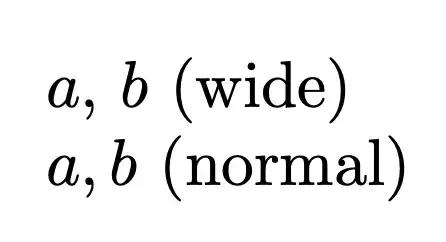
enter image description here

However, as pointed out in comments, commas in subscripts or superscripts should not be affected by this behavior. We can fix the issue in the following way.

\documentclass{article}

% save the math code of the comma \mathchardef\normalcomma=\mathcode, % define a suitable meaning for the active comma \newcommand{\activatewidecomma}{% \begingroup\lccode~=, \lowercase{\endgroup\let~}\makewidecomma } % in the scope of \widecomma the space after the comma will be wider \newcommand{\widecomma}[1]{% \begingroup % set up the wanted meaning and make the comma math active \activatewidecomma \mathcode,="8000 #1% \endgroup } \newcommand{\makewidecomma}{% {\normalcomma}% comma as an ordinary symbol \nonscript\mskip 6mu plus 3mu minus 2mu % space only in text or display style }

\begin{document}

$\widecomma{a,b}$ (wide)

$a,b$ (normal)

$\widecomma{a,H^{0,0}}$ (wide)

$a,H^{0,0}$ (normal)

\end{document}

enter image description here

egreg
  • 1,121,712
6

Following a request in the comments, I provide an expl3 solution based on splitting a comma list.

\documentclass{article}

\ExplSyntaxOn

\NewDocumentCommand{\widecomma}{ m }{ \clist_use:nn { #1 } { {,}\ } % since ~ means space in expl3 }

\ExplSyntaxOff

\begin{document}

( \widecomma{a, b, c} )

\end{document}

enter image description here

EDIT: I guess one could use \def, \cs_new:Npn, or \NewExpandableDocumentCommand since \clist_use:nn is expandable. But I’m not sure if making \widecomma expandable could have unintended consequences. Probably not.

Gaussler
  • 12,801
  • Probably \clist_use:nn{#1}{{,}\ } is better (notice the space after the backslash). No need for \nobreakspace, because TeX will never split a line after a comma or an ordinary symbol. – egreg Sep 27 '21 at 12:23
  • @egreg Updated. But I just tried replicating what the OP did with ~. – Gaussler Sep 27 '21 at 12:28