Here is a minimal example for how to use the PGF manual style. Note the following requirements
- You must use the
ltxdoc documentclass.
- The packages
calc, tikz and hyperref are required.
- The “optional” argument of
codeexample is not really optional. Even if it is empty, there have to be empty brackets [].
I recommend using the hidelinks option for hyperref to hide the red boxes around links in the PDF. In general the hyperref package should be loaded as late as possible (see also Which packages should be loaded after hyperref instead of before?).
Since PGF 3.1.6 the file pgfmanual-en-macros.tex is installed into the TeX search path. Before that version you have to go to the PGF documentation directory and copy the file into your working directory.
\documentclass{ltxdoc}
\usepackage{calc}
\usepackage{tikz}
\input{pgfmanual-en-macros.tex}
\usepackage[hidelinks]{hyperref}
\begin{document}
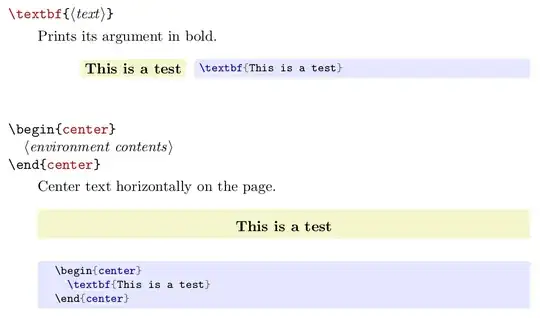
\begin{command}{\textbf\marg{text}}
  Prints its argument in bold.
  % These empty brackets are NOT optional
  %                |
  %                v
\begin{codeexample}[]
\textbf{This is a test}
\end{codeexample}
  %
\end{command}
\begin{environment}{{center}}
  Center text horizontally on the page.
  %
\begin{codeexample}[vbox]
  \begin{center}
    \textbf{This is a test}
  \end{center}
\end{codeexample}
  %
\end{environment}
\end{document}
If for some reason you want to document starred commands separately with the command environment, see this workaround.


hyperrefpackage for this. – Zarko Oct 10 '21 at 07:41hyperrefanchoes. In this can be of help editor. Ho to do this, see documentation forhyperrefpackage. – Zarko Oct 10 '21 at 10:41