1

I like to control the font names in the created PDF file (I'm using LuaTeX).

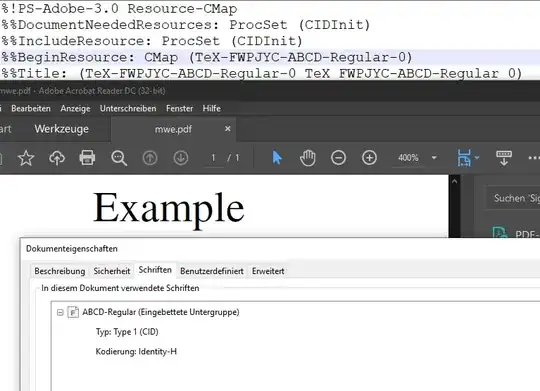
The following code reveils the font name quite easily as shown in the picture. I there a way, I can set a fixed font name per font, without altering it using e.g. FontForge?

\documentclass[a4paper]{article}
\usepackage{fontspec}

\begin{document}

\setmainfont[]{XITS-Regular.otf}

Example

\end{document}

reveiled

Guest
  • 131
  • 8
  • I don't think you can change the font name, short of changing the font file as such. I wonder why you'd even care? – Ingmar Nov 15 '21 at 10:54
  • 1
    XeTeX can do this as shown here: https://tex.stackexchange.com/questions/594822/why-do-the-font-names-change-every-time-a-document-is-compiled – Guest Nov 15 '21 at 10:55
  • I stand corrected & good for them. – Ingmar Nov 15 '21 at 10:55
  • It's also possbile in LuaTeX to alter the GSUB features after the font was loaded. Setting the name should be possible, too. But most people don't care about this. – Guest Nov 15 '21 at 10:57
  • 1
    luatex attaches this random letters too, if you create an uncompressed pdf you will find stuff like /YISSQH+LMRoman10-Regular. But they don't show up in the Adobe dialog. – Ulrike Fischer Nov 15 '21 at 10:59
  • Ok, thank you, I didn't know this. – Guest Nov 15 '21 at 11:00

1 Answers1

1
  • In the comments it was pointed out that my original approach (Approach 2) is maybe not always legal w.r.t. the license of the font, so I added "Approach 1".

Approach 1: Convert PDF to images and include them in a new PDF

  • This should be legal with all fonts that are embeddable into a PDF file.
  • pdfpages can be used to include the generated image files in a new PDF file again, keeping the same optics.

Approach 2: Patching the PDF file (when the license allows it; e.g. SIL Open Font License)

Thanks to the comment by Ulrike Fischer I was able to find the relevant strings when compiling in uncompressed mode:

\edef\pdfcompresslevel{\pdfvariable compresslevel}
\pdfcompresslevel=0
\documentclass[a4paper]{article}
\usepackage{fontspec}

\begin{document}

\setmainfont[]{XITS-Regular.otf}

Example

\end{document}

Then an easy search and replace does the trick. For a generic solution I will implement a decompressor and recompressor or compile in uncompressed mode and include the uncompressed PDF file using pdfpages and recompress in the second run.

Here is how the patched PDF file looks:
patched font name

Guest
  • 131
  • 8
  • 1
    But ... why would you ever want that? – Marcel Krüger Nov 15 '21 at 11:36
  • I'm doing this to protect my layouts a little bit better. It's security by obscurity but better than nothing. Especially when I faked the font using e.g. FakeStretch and FakeBold it's not so easy to say the font unless it's told by metadata. – Guest Nov 15 '21 at 11:38
  • 1
    Well I'm not sure if this is legal. The names are e.g. also used in copyright notices. – Ulrike Fischer Nov 15 '21 at 12:01
  • I think, the "SIL OPEN FONT LICENSE Version 1.1" allows this, btw, see: https://www.quora.com/Will-SIL-font-license-Open-Font-License-allow-me-to-change-fonts-and-authors-names – Guest Nov 15 '21 at 13:48
  • The OFL probably allows changing the name (even though changing it explicitly to hide that a font is used seems at least morally questionable, but that's something everyone has to decide for themselves I guess) but Ulrike was referring to the Copyright notice. You are not allowed to change that and it might contain the font name for some fonts, so you have to be careful not to replace in there. (Of course for many fonts keeping the Copyright notice is enough information to make it rather obvious which font it is anyway...) – Marcel Krüger Nov 15 '21 at 14:38