After careful consideration, I came to the conclusion that using tcolorbox or other box-based approaches is probably not optimal here, since you could only draw a line next to complete paragraphs. From your example I understand however, that the line should also be able to start or end on those lines where the changed part starts or ends, that is, somewhere within the paragraph.
Therefore, I would propose a solution that is based on tikzmarks. These marks can be placed exactly where the changes start and where they end, and the red line would then be drawn covering everything between the two lines in which these two marks are placed.
One shortcoming of this solution is, however, that it cannot span over multiple pages.
This example allows you to choose a custom color for the line:
\documentclass[]{article}
\usepackage{lipsum} % only used to generate filler text
\usepackage{tikz}
\usetikzlibrary{tikzmark}
\newcounter{changebar}
\newcommand{\changebarcolor}{red}
\newcommand{\changestart}[1][red]{%
    \renewcommand{\changebarcolor}{#1}%
    \stepcounter{changebar}%
    \tikzmarknode{chbar-\thechangebar-start}{\strut}%
}
\newcommand{\changeend}{%
    \tikzmarknode{chbar-\thechangebar-end}{\strut}%
    \begin{tikzpicture}[remember picture, overlay]
        \draw[very thick, \changebarcolor] ([xshift={\oddsidemargin+1in-10pt}]current page.west |- chbar-\thechangebar-start.north) -- ([xshift={\oddsidemargin+1in-10pt}]current page.west |- chbar-\thechangebar-end.south);
    \end{tikzpicture}%
}
\begin{document}
\lipsum[1]\changestart\lipsum[1]\changeend\lipsum[1]
In this sentence, only one \changestart[blue]word\changeend{} was changed.
\end{document}

You will need to compile the document at least twice, in order to get the corrent positioning of the lines.
Note that because of TeX's space-gobbling peculiarity, you need to add one set of empty curly brackets after the macro if a space follows or otherwise tell TeX that the following space should not be ignored.
With a bit of work, it is possible to get a solution that works even with page breaks (initially inspired by this and this approach):
\documentclass{article}
\usepackage{lipsum} % only used for filler text
\usepackage{tikz}
\usepackage{tikzpagenodes}
\usetikzlibrary{tikzmark}
\makeatletter
\newcommand{\getchbarstartendpages}[1]{%
    % #1 = change bar id,
    \edef\chbarstartmarkid{\csname save@pt@chbar-#1-start\endcsname}%
    \edef\chbarstartpage{\csname save@pg@\chbarstartmarkid\endcsname}%
    \edef\chbarendmarkid{\csname save@pt@chbar-#1-end\endcsname}%
    \edef\chbarendpage{\csname save@pg@\chbarendmarkid\endcsname}%
}
\makeatother
\newcommand{\chbarifsplit}[3]{%
    % #1 = change bar id,
    % #2 = not split, #3 = split
    \getchbarstartendpages{#1}%
    \ifnum\chbarstartpage=\chbarendpage\relax%
        {#3}%
    \else%
        {#2}%
    \fi%
}
\newcounter{changebar}
\newcommand{\changebarcolor}{red}
\newcommand{\changestart}[1][red]{%
    \renewcommand{\changebarcolor}{#1}%
    \stepcounter{changebar}%
    \tikzmarknode{chbar-\thechangebar-start}{\strut}%
    \chbarifsplit{\thechangebar}{%
    \begin{tikzpicture}[remember picture, overlay]
        \draw[very thick, \changebarcolor] ([xshift={\oddsidemargin+1in-10pt}]current page.west |- chbar-\thechangebar-start.north) -- ([xshift={\oddsidemargin+1in-10pt}]current page.west |- current page text area.south);
    \end{tikzpicture}%
    }{}%
}
\newcommand{\changeend}{%
    \tikzmarknode{chbar-\thechangebar-end}{\strut}%
    \chbarifsplit{\thechangebar}{%
    \begin{tikzpicture}[remember picture, overlay]
        \draw[very thick, \changebarcolor] ([xshift={\oddsidemargin+1in-10pt}]current page.west |- current page text area.north) --  ([xshift={\oddsidemargin+1in-10pt}]current page.west |- chbar-\thechangebar-end.south);
    \end{tikzpicture}%
    }{%
    \begin{tikzpicture}[remember picture, overlay]
        \draw[very thick, \changebarcolor] ([xshift={\oddsidemargin+1in-10pt}]current page.west |- chbar-\thechangebar-start.north) --  ([xshift={\oddsidemargin+1in-10pt}]current page.west |-  chbar-\thechangebar-end.south);
    \end{tikzpicture}%
    }%
}
\AddToHook{shipout/background}{
% for older LaTeX installations use instead:
% \usepackage{everypage}
% \AddEverypageHook{
    \getchbarstartendpages{\thechangebar}%
    \ifnum\chbarstartpage<\thepage\relax%
        \ifnum\chbarendpage>\thepage\relax%
        \begin{tikzpicture}[remember picture, overlay]
            \draw[very thick, \changebarcolor] ([xshift={\oddsidemargin+1in-10pt}]current page.west |- current page text area.north) -- ([xshift={\oddsidemargin+1in-10pt}]current page.west |-  current page text area.south);
        \end{tikzpicture}%
        \fi
    \fi
}
\begin{document}
\lipsum[1] \changestart\lipsum[1]\changeend{} \lipsum[1]
In this sentence, only one \changestart[blue]word\changeend{} was changed.
Hello my friend. What took you so long? How have you been? \changestart[orange]\lipsum[1]\changeend{} \lipsum[1]
\changestart[cyan]\lipsum[1-10]\changeend{} \lipsum[1]
\end{document}
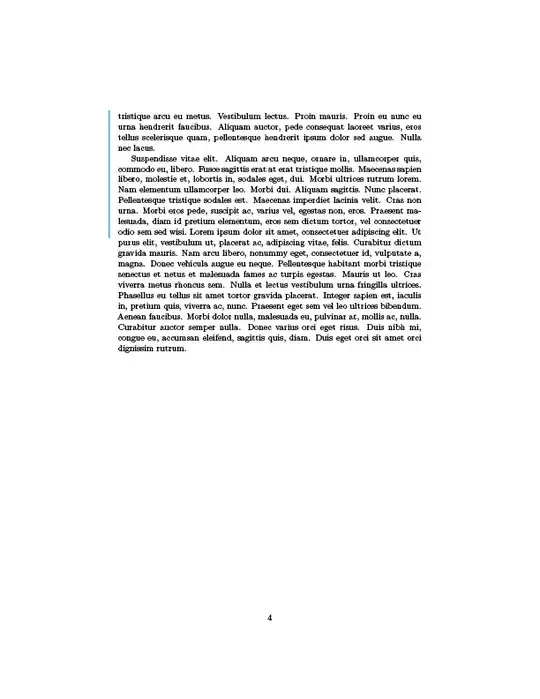
Output:




tcolorbox. – Jasper Habicht Dec 09 '21 at 16:01leftbarenvironment, from theframedpackage. – Bernard Dec 09 '21 at 17:01changebarpackage. – Jasper Habicht Dec 09 '21 at 20:15