- I would rather use
xltabular package instead of longtable. It prescribe table width (for example to be equal to \textwidth)
- For both caption I would use
\caption command (see MWE below)
- It is quite unusual to insert caption at bottom of table, this require some trick for make space for intermediate captions and more important, at use of the
xltabular package, complicate caption numbering.
MWE:
\documentclass{article}
%\usepackage{geometry}
\usepackage{makecell, xltabular}
\renewcommand\theadfont{\bfseries}
\usepackage[font=small, labelfont=bf]{caption}
%---------------- Show page layout. Don't use in a real document!
\usepackage{showframe}
\renewcommand\ShowFrameLinethickness{0.15pt}
\renewcommand*\ShowFrameColor{\color{red}}
%---------------------------------------------------------------%
\usepackage{lipsum}
\begin{document}
\listoftables
\section{Long table}
\lipsum[1-3]
\begingroup
    \small
    \setlength\tabcolsep{4pt}
    \addtocounter{table}{1}
\begin{xltabular}{\textwidth}{|r|l|l|l|c|l|l|l|c|c|>{\centering\arraybackslash}X|}
    \hline
\thead{n} & \thead{$M$}     & \thead{$A_s$} & \thead{$A_d$}
          & \thead{Space}   & \thead{$D_m$} & \thead{$D_s$}
          & \thead{$D_d$}   & \thead{Delay} & \thead{Space x\ Delay}
          & \thead{Algorithm}   \
    \hline
\endfirsthead
    \multicolumn{11}{c}%
    {\textit{ Continued from previous page} } \
    \hline
\thead{n} & \thead{$M$}     & \thead{$A_s$} & \thead{$A_d$}
          & \thead{Space}   & \thead{$D_m$} & \thead{$D_s$}
          & \thead{$D_d$}   & \thead{Delay} & \thead{Space x\ Delay}
          & \thead{Algorithm}   \
    \hline
\endhead
    \hline
    \multicolumn{11}{c}{}\[-3ex]
\caption[]{Polynomial Multiplication Delay Optimization Result (No Padding, $M=A_s=A_d$, $D_m=D_s=D_d$)}
    \smallskip
    \addtocounter{table}{-1}
\endfoot
    \hline
    \multicolumn{11}{c}{}\[-3ex]
\caption[Polynomial Multiplication Delay Optimization Result]
        {Polynomial Multiplication Delay Optimization Result (No Padding, $M=A_s=A_d$, $D_m=D_s=D_d$)}
    \endlastfoot
\label{Table:Polynomial Multiplication-1}
%
1 & 1 & 0 & 0 & 1 & 1 & 0 & 0 & 1 & 1  & Initial Condition\
2 & 4 & 0 & 1 & 5 & 1 & 2 & 0 & 3 & 15 & SB\
3 & 1 & 0 & 0 & 1 & 1 & 0 & 0 & 1 & 1  & Initial Condition\
4 & 4 & 0 & 1 & 5 & 1 & 2 & 0 & 3 & 15 & SB\
5 & 1 & 0 & 0 & 1 & 1 & 0 & 0 & 1 & 1  & Initial Condition\
6 & 4 & 0 & 1 & 5 & 1 & 2 & 0 & 3 & 15 & SB\
7 & 1 & 0 & 0 & 1 & 1 & 0 & 0 & 1 & 1  & Initial Condition\
8 & 4 & 0 & 1 & 5 & 1 & 2 & 0 & 3 & 15 & SB\
9 & 1 & 0 & 0 & 1 & 1 & 0 & 0 & 1 & 1  & Initial Condition\
10 & 4 & 0 & 1 & 5 & 1 & 2 & 0 & 3 & 15 & SB\
11 & 1 & 0 & 0 & 1 & 1 & 0 & 0 & 1 & 1  & Initial Condition\
12 & 4 & 0 & 1 & 5 & 1 & 2 & 0 & 3 & 15 & SB\
\end{xltabular}
\endgroup
\end{document}
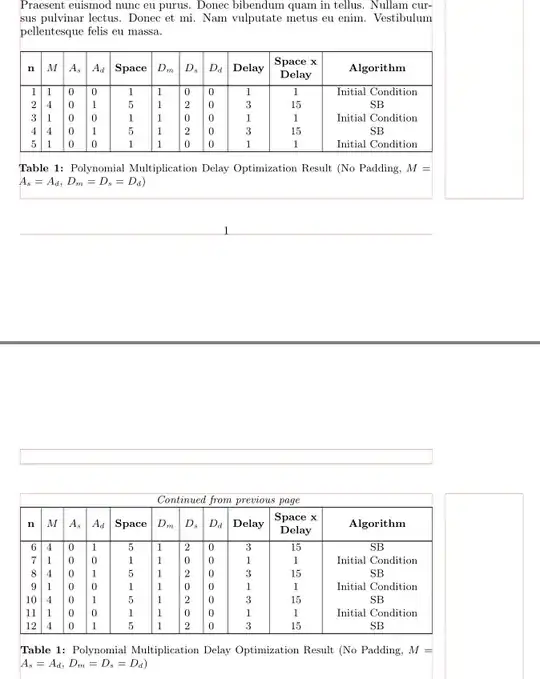
(red lines indicate page layout)
Addendum (Off-topic):
I would design your table on more usual and "professional" way:
- captions on the top of table
- notes for continuation of table at table bottoms
- for numbers use
siunitx package
- removed vertical lines
For table I should use tabularray table with its library siunitx (it load siunitx package). It require just one compilation for final form of table.
\documentclass{article}
%\usepackage{geometry}
%---------------- Show page layout. Don't use in a real document!
\usepackage{showframe}
\renewcommand\ShowFrameLinethickness{0.15pt}
\renewcommand*\ShowFrameColor{\color{red}}
%---------------------------------------------------------------%
\usepackage{lipsum}
\usepackage{tabularray}
\UseTblrLibrary{siunitx}
  \ExplSyntaxOn
\NewChildSelector{eachtwo}
  {
    \int_step_inline:nnnn {2}{2}{\l_tblr_childs_total_tl}
      { \clist_put_right:Nn \l_tblr_childs_clist {##1} }
  }
\ExplSyntaxOff
\begin{document}
\listoftables
\section{Long table}
\lipsum[1-3]
    %\small
    \SetTblrStyle{contfoot-text}{font=\small\itshape, gray3}
    \SetTblrStyle{caption-text}{font=\small}
    \SetTblrStyle{caption-tag}{font=\small\bfseries}
\begin{longtblr}[
caption = {Polynomial Multiplication Delay Optimization Result (No Padding,\ $M=A_s=A_d$, $D_m=D_s=D_d$)},
  entry = {Polynomial Multiplication Delay Optimization Result},
  label = {tab:tblr}
                ]{rowhead = 1,
                 colsep=5pt,
                 colspec={@{} Q[c, si={table-format=2.0}]
                          *{8}{c}
                          X[c, si={table-format=2.0}]

                          X[2,j]
                          @{} },
                 hline{1,Z} = 1pt, hline{2}=0.6pt,
                 row{1} = {mode=math},
                 row{2-Y} = {rowsep=-0.5pt},
                 row{eachtwo} = {abovesep=1ex},
                 }
% column headers

n   & M     & A_s   & A_d
    & \SetCell[c=1]{mode=text} Space

    & D_m   & D_s   & D_d
    & \SetCell[c=1]{mode=text} Delay

    & \SetCell[c=1]{m,mode=text} {{{Space x Delay}}}
    & \SetCell[c=1]{c,mode=text} Algorithm \
% table body
1 & 1 & 0 & 0 & 1 & 1 & 0 & 0 & 1 & 1  & Initial Condition\
2 & 4 & 0 & 1 & 5 & 1 & 2 & 0 & 3 & 15 & SB\
3 & 1 & 0 & 0 & 1 & 1 & 0 & 0 & 1 & 1  & Initial Condition\
4 & 4 & 0 & 1 & 5 & 1 & 2 & 0 & 3 & 15 & SB\
5 & 1 & 0 & 0 & 1 & 1 & 0 & 0 & 1 & 1  & Initial Condition\
6 & 4 & 0 & 1 & 5 & 1 & 2 & 0 & 3 & 15 & SB\
7 & 1 & 0 & 0 & 1 & 1 & 0 & 0 & 1 & 1  & Initial Condition\
8 & 4 & 0 & 1 & 5 & 1 & 2 & 0 & 3 & 15 & SB\
9 & 1 & 0 & 0 & 1 & 1 & 0 & 0 & 1 & 1  & Initial Condition\
10& 4 & 0 & 1 & 5 & 1 & 2 & 0 & 3 & 15 & SB\
11& 1 & 0 & 0 & 1 & 1 & 0 & 0 & 1 & 1  & Initial Condition\
12& 4 & 0 & 1 & 5 & 1 & 2 & 0 & 3 & 15 & SB\
\end{longtblr}
\end{document}


\captionwould not have that effect but you used a\multicolumn{11}{c}which like allccolumns forces the text on one line. – David Carlisle Dec 13 '21 at 00:22