4

I'd like to produce a \psline (or, even better, \pscurve) in PSTricks that has a color gradient. I can't find a package that allows me to do so. Is there one? (pst-slpe produces sophisticated gradients for areas, but not, as far as I can see, for lines.)

(On the page https://comp.text.tex.narkive.com/tjLnOyJ4/applying-a-gradient-color-to-a-line Werner reports that he had asked the same question on the PSTricks mailing list in 2003 and received a response from Manuel Luque with the definition of a (complicated) function to create a parametric plot with a color gradient. It doesn't seem easy to adapt that code to \psline.)

  • 1
    psline is a thin wrapper around the postscript lineto which can't (as far as I know) modify the color along the stroke so somewhere you are going to need to replace a single lineto by a paramaterised function plotting points of different colours so the answer you link to might be the best answer there is. – David Carlisle Dec 14 '21 at 19:46
  • Thank you for the explanation and the pointer. As far as I can see, the most recent version of the \parametricplotHSB code is at http://pstricks.blogspot.com/2011/09/vos-courbes-aux-couleurs-de-larc-en.html. It appears not to be included in any package. – Martin J. Osborne Dec 14 '21 at 20:40
  • A \pslineHSB macro has been written at some point (see https://tex.stackexchange.com/questions/406413/varying-the-color-along-pstricks-lines-circles-etc/ for a demo that contains not only a plot but also two lines with a gradient) but I could not find the code for this macro anywhere. I did find a subsection about \pslineHSB in the docs of pst-hsb at https://archiv.dante.de/~herbert/texnik/source/pst-hsb/ but the code itself does not seem to be there. – Marijn Dec 14 '21 at 22:13
  • @Marijn Good sleuthing! Presumably \pslineHSB uses \parametricplotHSB along the lines of \def\pslineHSB(#1,#2)(#3,#4){\parametricplotHSB{#1}{#3}{t t #1 sub #4 #2 sub #3 #1 sub div mul #2 add}}. That needs to be developed to handle vertical lines and allow for an optional argument, but those modifications seem easy. I guess one could do the same thing for \pscurve, although it seems that that would be much more difficult. – Martin J. Osborne Dec 15 '21 at 00:22

2 Answers2

6

Run with lualatex

\documentclass{standalone}
\usepackage{pst-hsb}
\begin{document}

\begin{pspicture}(-0.75,-0.75)(11,5) % \psgrid(0,-4)(10,4) \psaxes{->}(0,0)(11,5)
\pslineHSBlinewidth=1mm,HueBegin=0,HueEnd=0.5(10,1) \pslineHSBlinewidth=1mm,HueBegin=0.5,HueEnd=0.7(10,3) \pslineHSBlinewidth=1mm,HueBegin=0.8,HueEnd=1(10,5) \end{pspicture}

\end{document}
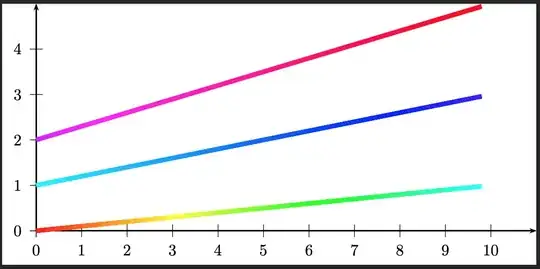
enter image description here

Or only for two given colors. Maybe that it will be part of an update of PSTricks ...

\documentclass{article}
\usepackage{pstricks-add}
\makeatletter
\define@key[psset]{pstricks}{startColor}[black]{%
  \colorlet{tempcolor}[rgb]{#1}%   we need rgb
  \pst@getcolor{tempcolor}\ps@startColor}
\define@key[psset]{pstricks}{endColor}[white]{%
  \colorlet{tempcolor}[rgb]{#1}%
  \pst@getcolor{tempcolor}\ps@endColor}
\psset[pstricks]{startColor=black,endColor=white}

\def\pscolorLine{\def\pst@par{}\pst@object{pscolorLine}} \def\pscolorLine@i{% \pst@getarrows{% \begin@OpenObj \pscolorLine@ii}}

\def\pscolorLine@ii(#1){@ifnextchar({\pscolorLine@iii(#1)}{\pscolorLine@iii(0,0)(#1)}}%

\def\pscolorLine@iii(#1,#2)(#3,#4){% \use@par \ifx\psk@arrowA@empty\else\psline[linecolor=\ps@startColor]{->}(!#3 0.5 mul #4 0.5 mul)(#1,#2)\fi \ifx\psk@arrowB@empty\else\psline[linecolor=\ps@endColor]{->}(!#1 0.5 mul #2 0.5 mul)(#3,#4)\fi \pst@getcoor{#1,#2}\pst@tempA \pst@getcoor{#3,#4}\pst@tempB \addto@pscode{ 10 dict begin [ \psgetRGBColorValues{\ps@startColor} ] dup == aload length 1 eq { dup dup } if 3 copy 3 array astore /startColor ED [ \psgetRGBColorValues{\ps@endColor} ] dup == aload length 1 eq { dup dup } if 3 copy 3 array astore /endColor ED % on stack R1 G1 B1 R2 G2 B2 4 -1 roll % R1 G1 R2 G2 B2 B1 sub 256 div /dB ED % R1 G1 R2 G2 3 -1 roll % R1 R2 G2 G1 sub 256 div /dG ED % R1 R2 exch sub 256 div /dR ED \pst@tempB /Y2 ED /X2 ED \pst@tempA /Y1 ED /X1 ED Y2 Y1 sub X2 X1 sub atan /Angle ED Y2 Y1 sub Angle sin dup 0 eq { pop }{ div } ifelse /L_line ED % line length \ifx\psk@arrowA@empty\else X2 X1 sub L_line div \psk@arrowlength\space mul \pst@number\psxunit mul X1 add /X1 ED Y2 Y1 sub L_line div \psk@arrowlength\space mul \pst@number\psyunit mul Y1 add /Y1 ED \fi \ifx\psk@arrowB@empty\else X2 X1 sub L_line div \psk@arrowlength\space mul \pst@number\psxunit mul X2 exch sub /X2 ED Y2 Y1 sub L_line div \psk@arrowlength\space mul \pst@number\psyunit mul Y2 exch sub /Y2 ED \fi Y2 Y1 sub 256 div /dY ED X2 X1 sub 256 div /dX ED % dR dG dB == == == %startColor == endColor == \ifPst@noCurrentPoint\else\pst@cp\fi % current point? 0 1 255 {
/dIndex ED %startColor == X1 Y1 moveto X1 dX add Y1 dY add % start for coordinate array gsave lineto CP /Y1 ED /X1 ED \pst@number\pslinewidth SLW startColor aload pop 3 copy setrgbcolor % on stack r g b dB add 3 1 roll % b+dB r g dG add 3 1 roll % b+dB g+dG r dR add 3 1 roll % b+dB g+dG r+dR 3 array astore /startColor ED stroke grestore } for end }% \end@OpenObj \ignorespaces }

\makeatother

\begin{document}

\begin{pspicture}linewidth=12pt,showgrid(5,5) \pscolorLine(0,-5)(0,5) \pscolorLinestartColor=cyan,endColor=magenta(5,0) \pscolorLine[startColor=blue,endColor=green]{->}(-5,5)(5,-5) \pscolorLine[startColor=red,endColor=blue]{<->}(-5,-5)(5,5) \end{pspicture}

\end{document}

enter image description here

user187802
  • 16,850
  • texdoc pst-hsb will open t-ghsb.pdf that contains only a single page with two rectangles. – Display Name Dec 16 '21 at 09:21
  • It does not even compile (TL-2021) :-( ! LaTeX Error: File pst-hsb.sty not found. – AlexG Dec 16 '21 at 09:26
  • But apparently user187802 has the source package available (the wrapper package pst-hsb.sty and the actual code in pst-hsb.tex), maybe this can be shared somewhere (possibly even by copying the full code of pst-hsb.tex in this answer if it is not too long)? – Marijn Dec 16 '21 at 09:39
  • 2
    I completely forget that it is not on CTAN. I'll upload it as soon as possible. Until then it is here: https://hvoss.org/pst-hsb.zip – user187802 Dec 16 '21 at 10:03
  • What does "Run with lualatex" mean? – Martin J. Osborne Dec 16 '21 at 15:00
  • @MartinJ.Osborne lualatex is one of the various LaTeX compilers, i.e., the name of the program that you type in the terminal/command prompt to run LaTeX (so here lualatex nameofyourfile.tex [enter]), or if you don't use the terminal then it is one of the options that is listed in your editor somewhere in a menu or toolbar. Recent versions of LuaLaTeX have the advantage that they can compile (a subset of) PSTricks code and also produce pdf output, whereas before you needed to compile with latex and then run dvips and ps2pdf on the respective output files. – Marijn Dec 16 '21 at 16:21
  • @MartinJ.Osborne: With lualatex you do not need GhostScript, you'll get directly a pdf – user187802 Dec 16 '21 at 16:43
  • This solution (much!) more than serves my purpose, and I have accepted the answer. However, for others looking for \pslines with color gradients, note that the gradients possible with pst-hsb.sty are, if I understand correctly, limited to segments of the rainbow. For example, I don't think you can go from red to green without passing through yellow. (Please correct me if I'm wrong.) – Martin J. Osborne Dec 16 '21 at 18:42
  • @MartinJ.Osborne: You are right, at the moment only colours in hub model. But another one should be no problem. Let's see what I can do ... – user187802 Dec 16 '21 at 18:47
  • I think something might be slightly off in the calculations: if I add \pslineHSB[linewidth=1mm,HueBegin=0,HueEnd=0.5](1,2)(2,1) after the first \pslineHSB in your example, I get a line from (2,1) to (3,0), and if I add a \pslineHSB with the same value of the x coordinate for both points (e.g. (2,1),(2,3)) I seem not to get any line at all. – Martin J. Osborne Dec 16 '21 at 21:03
  • @MartinJ.Osborne: see edited answer – user187802 Dec 23 '21 at 11:41
  • Thank you --- that's terrific! I broke my right wrist today, so it's hard for me to work on the computer, but as soon as I can I'll try it out. – Martin J. Osborne Dec 25 '21 at 00:54
  • IMHO pst-hsb does only a part of the job: it's called hsb but only offers control for the first parameter (hue). Additional parameters such as SaturationBegin, BrightnessBegin, etc. would make it more interesting. I've searched for ways to get a \psarc with arrows at the ends and gradient filling with two arbitrary colors, but it seems that no pst-* package allows for that… – jp boucheron Apr 01 '23 at 17:50
  • That's simple to implement ... will do in the next few days – user187802 Apr 01 '23 at 19:53
  • Hi there, is there a possibility to add the linewidth as a parameter that can be changed for a line? Something like WidthBegin and WidthEnd? I am looking for such possibilities. – Niklas Jan 17 '24 at 15:55
4

While you are waiting for PStricks help, here is my attempt at a Metapost solution, for comparison.

enter image description here

\documentclass[border=5mm]{standalone}
\usepackage{luamplib}
\begin{document}
\mplibtextextlabel{enable}
\begin{mplibcode}
vardef cgdraw(expr P, a, b) = 
    save s, n; 
    numeric s, n;
    4s = xpart urcorner currentpen - xpart llcorner currentpen;
    n = arclength P / s;
    for i=0 upto n:
        draw point arctime s * i of P of P withcolor (i/n)[a, b];
    endfor
enddef;
beginfig(1);
    path p; p = origin .. (89, 34) .. (144, -13) .. (200, 0);
    cgdraw(p, red, blue);
endfig;
\end{mplibcode}
\end{document}

This is wrapped in luamplib, so please compile it with lualatex.

It works simply by drawing dots along the path. You can use the same approach to taper the width of the line, for example by changing the line in the loop to

draw point arctime s * i of P of P withpen currentpen scaled (1-i/n);

which would give you this

enter image description here

  • Note that draw with a single point in MP just draws a dot at the point using the current pen. (Same as drawdot).
Thruston
  • 42,268