Although various packages, such as lgc, can be useful, they are usually limited in scope and you can be left wasting time trying to figure out other details (in your case how to avoid printing a +- if b is negative). An easy way around this is to find a better tool: the sagetex package lets you farm out mathematical content to a computer algebra system, Sage which just so happens to let you use Python (an easy to understand programming language which is great for working with strings). The power of LaTeX, Python, and Sage will be able to help you handle almost any mathematical issue easily. For your problem we can try the code below:
\documentclass{article}
\usepackage{sagetex}
\begin{document}
Suppose I have the equation \[ax^2+b=0\] where $a$ and $b$ are random integers
between $-100$ and $100$, inclusive.
\begin{sagesilent}
a = randint(-100,100)
b = randint(-100,100)
if b<0:
    output = r"\[ %d x^2 - %d = 0\]"%(a,-b)
else:
    output = r"\[ %d x^2 + %d = 0\]"%(a,b)
\end{sagesilent}
For example, if $a = \sage{a}$ and $b = \sage{b}$ then the equation is:
\sagestr{output}
\end{document}
The output running in Cocalc gives this random quadratic:
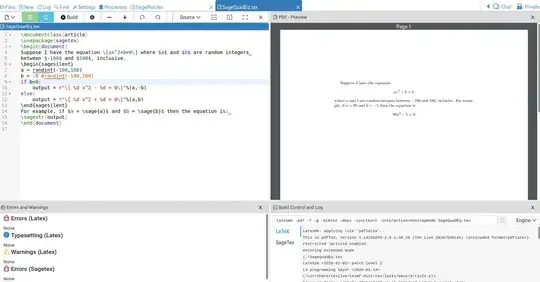
The code isn't too difficult to read, even if you don't know Python. Picking up basic Python commands isn't difficult either. You can almost certainly find the line where a and b are chosen to be random integers between -100 and 100. As you observed in your question, if b is negative then the sign needs to change. That's done with and if-then-else statement. The less easily understood part is the line output = r"\[ %d x^2 - %d = 0\]"%(a,-b). The %d indicates an integer is to be put in that spot (%f for float and %s for string). There are 2 places that need an integer the %(a,-b) indicates that a will be in the first %d and -b in the second %d. This line is executed when b is negative typesetting a negative sign followed by -b, which is positive. The else part executes when b is positive, so + is typeset and b, which is positive, is inserted.
Sage is not part of LaTeX so either 1. download to your computer and get it to work with LaTeX (sometimes problematic) or 2. open up a free Cocalc account. Copy/paste and you're on your way in 5 minutes.
EDIT: \sage{} is used to get numerical data, \sagestr{} to get string data, \sageplot{} for plots. Search this site for some of the many applications of the sagetex package.


$$in LaTeX, see Why is\[ … \]preferable to$$? – egreg Dec 28 '21 at 18:58