I've implemented something else below that might be of interest to your setup - a key-valued approach to setting an \index entry heading and subheading. This removes the formatting specification from the end-user, allowing you to be a bit more consistent/uniform in your use headings/subheadings. That is, you don't have to specify the heading with \textbf{<heading>} every time. Instead,
\myindex[heading={<heading>},subheading={<subheading>}]{<index entry>}
would check whether you've supplied a heading/subheading and index the <index entry> accordingly.
Additionally, \addvspace{<len>} is added with every heading to ensure there's a sufficient gap up to <len> above the heading (except for the first heading which should sit right below the Index title; this can be changed).
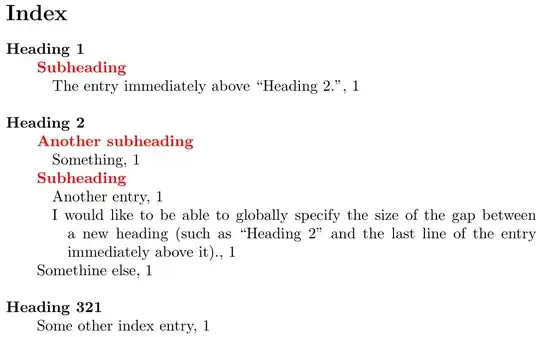
\documentclass{article}
\usepackage{imakeidx}
\makeindex
\usepackage{idxlayout}
\usepackage{xcolor}
\usepackage{xkeyval}
\makeatletter
\DeclareDocumentCommand{\insertidxheadinggap}{}{%
  % Delayed execution of macro (https://tex.stackexchange.com/a/89187/5764)
  \def\insertidxheadinggap{\addvspace{\baselineskip}}}% Add \baselineskip above headings (excluding first)
\define@cmdkey{idx}{heading}[\relax]{}% Heading title
\define@cmdkey{idx}{subheading}[\relax]{}% Subheading title
\newcommand{\myindex}[2][]{%
  \setkeys{idx}{%
    heading,subheading,% Default settings
    #1}% User-provided settings
  % Construct \index{...} command based on heading/subheading supplied by user
  \begingroup\edef\x{\endgroup
    \noexpand\index{%
      \expandafter\ifx\cmdKV@idx@heading\relax\else
        \cmdKV@idx@heading @%
        \insertidxheadinggap%
        \noexpand\textbf{\cmdKV@idx@heading}!% Heading format: \textbf{<heading>}
      \fi
      \expandafter\ifx\cmdKV@idx@subheading\relax\else
        \noexpand\textbf{\noexpand\color{red}\cmdKV@idx@subheading}!% Subheading format: \textbf{\color{red}<subheading}
      \fi
      #2% Index entry
  }}\x
}
\makeatother
\begin{document}
Some words.%
\myindex[heading={Heading 1},subheading=Subheading]{The entry immediately above ``Heading 2.''}
Some words.%
\myindex[heading={Heading 2},subheading=Subheading]{I would like to be able to globally specify the size
  of the gap between a new heading (such as ``Heading 2'' and the last line of the entry immediately above it).}
\myindex[heading={Heading 2},subheading={Another subheading}]{Something}
\myindex[heading={Heading 2}]{Somethine else}
\myindex[heading={Heading 2},subheading=Subheading]{Another entry}
\myindex[heading={Heading 321}]{Some other index entry}
\idxlayout{columns=1}
\printindex
\end{document}
The above approach assumes you'll have a bunch of headings and no non-heading entries, as they may not have the appropriate spacing adjustments. Additionally, one could extend this to include a "sort string" for the heading, which will allow you to manipulate the position of the heading within other headings.


