I'm creating some 3D graphics using TikZ, and I need to apply a transformation matrix to some coordinates I'm specifying in 2D so they end up in 3D. I am going to draw graphics on all three visible sides of a cube, and I have defined macros that work in 2D that I want to be able to use on those sides. Is there any way to do this? I saw that there are some primitive transformations in PGF, but they all work in 2D.
Asked
Active
Viewed 2,883 times

2 Answers
16
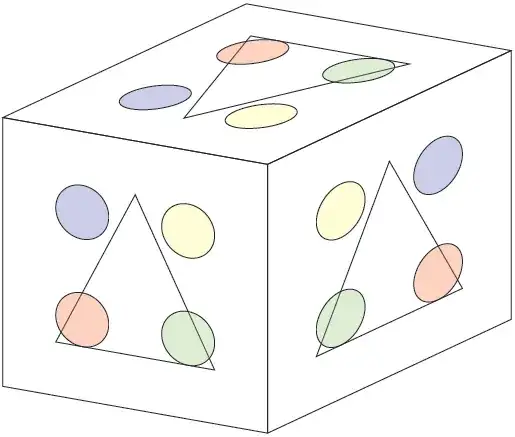
How about this:
\documentclass[parskip]{scrartcl}
\usepackage[margin=15mm]{geometry}
\usepackage{tikz}
\usetikzlibrary{3d}

\begin{document}

\tikzset{xzplane/.style={canvas is xz plane at y=#1,very thin}}
\tikzset{yzplane/.style={canvas is yz plane at x=#1,very thin}}
\tikzset{xyplane/.style={canvas is xy plane at z=#1,very thin}}

\begin{tikzpicture}[x={(0.985cm,-0.174cm)},y={(-0.906cm,-0.423cm)},z={(0cm,1cm)}]
    \draw[xzplane=5] (0,0) -- (5,0) -- (5,5) -- (0,5) -- cycle;
    \draw[yzplane=5] (0,0) -- (5,0) -- (5,5) -- (0,5) -- cycle;
    \draw[xyplane=5] (0,0) -- (5,0) -- (5,5) -- (0,5) -- cycle;
    \foreach \x in {xzplane,yzplane,xyplane}
    {   \draw[\x=5] (1,1) -- (4,1) -- (2.5,4) -- cycle;
        \filldraw[\x=5,red,fill opacity=0.2,draw=black] (1.5,1.5) circle (0.5);
        \filldraw[\x=5,green,fill opacity=0.2,draw=black] (3.5,1.5) circle (0.5);
        \filldraw[\x=5,blue,fill opacity=0.2,draw=black] (1.5,3.5) circle (0.5);
        \filldraw[\x=5,yellow,fill opacity=0.2,draw=black] (3.5,3.5) circle (0.5);
    }
\end{tikzpicture}

\end{document}

Tom Bombadil
- 40,123
-
That definitely seems like a way to go if you want to make a cube like in my case, thank you very much. What if you want to define an arbitrary plane, like x+2y+z=3 or something like that, is that possible? – StrawberryFieldsForever Jul 13 '12 at 11:47
-
Hmm, I don't think this will be possible with the mechanism I used. Also, with non-orthogonal another problem arises: you must specify the origin and the axes on the plane. I think you should ask another question about this. – Tom Bombadil Jul 13 '12 at 16:02
6
Here is a way, but rotations are generally needed to get the text "right".
The '3d' TikZ library is required.
Put this as usual in the preamble of your LaTeX file
% We need an origin and two ORTHOGONAL vectors spanning the plane, defined
% by their END POINTS with respect to the chosen origin
% For the plane ax+by+cz+d=0, put for instance
%   \def\tikz@plane@origin{\pgfpointxyz{-d/a}{0}{0}}%
%   \def\tikz@plane@x{\pgfpointxyz{-d/a-b/a}{1}{0}}%
%   \def\tikz@plane@y{\pgfpointxyz{-d/a-1}{-b/a}{(a*a+b*b)/(a*c)}}%
% For instance the [111] plane, i.e. x+y+z-1=0, named my_plane
\makeatletter
\tikzoption{canvas is my_plane}[]{%
    \def\tikz@plane@origin{\pgfpointxyz{1}{0}{0}}%
    \def\tikz@plane@x{\pgfpointxyz{0}{1}{0}}%
    \def\tikz@plane@y{\pgfpointxyz{0}{-1}{2}}%
    \tikz@canvas@is@plane
}
\makeatother
Then in your tikzpicture environment, something like
\begin{scope}[every node/.append style={transform shape},
              canvas is my_plane]
    \node at (A){$A$};
\end{scope}
We could probably customize it further with parameters. Hope it helps as it stands.

HR95
- 61