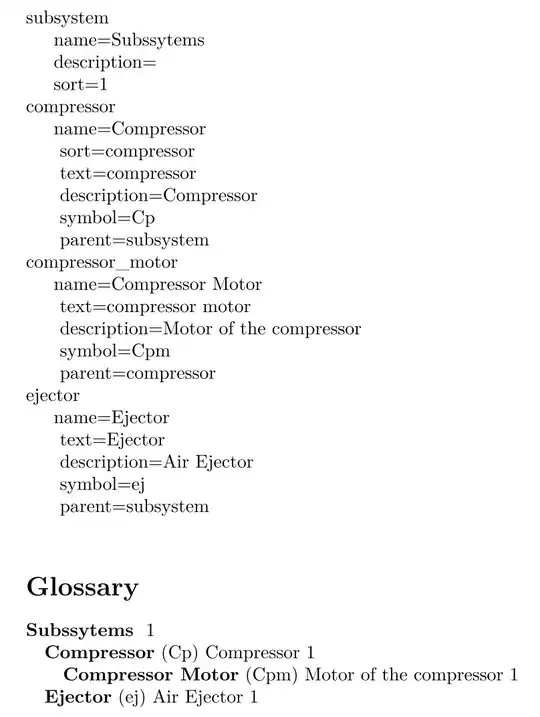
This answer is here in order to not let this question without an almost "working" answer, if someone (by the greatest of chance) comes across this solution and wishes (strangely) to use it.
If someone come with a cleaner/better solution it would be great!
Here a solution (not really elegant and robust) for printing all entries fields (some explanation and discussion below the MWE):
Prerequisite:
- All glossary entries definitions must be stored into a text file (
.tex, .bib, etc.).
- A newline MUST be present after each
\newglossaryentry with no comments "%". So this is Ok:
\newglossaryentry{subsystem}
{% A new line is needed after each \newglossaryentry key !!!
name={Subssytems},description={},sort={1}}
But NOT this (a character is inserted just after {subsystem} and just before the first {):
\newglossaryentry{subsystem}% A comment here
{% A new line is needed after each \newglossaryentry key !!!
name={Subssytems},description={},sort={1}}
or also NOT this (no newline inserted just after {subsystem} and just before the first {):
\newglossaryentry{subsystem}{% No newline here just after {subsystem}
{%
name={Subssytems},description={},sort={1}}
- Needs 3 packages:
listofitems (to extract the entry fields, thanks to Steven B. Segletes answer), tikz (to have a nice for loop), catchfile (to extract the content of the text file containing the entries definitions, thanks to egreg answer)
MWE:
\documentclass{article}
\usepackage{listofitems}
\usepackage{tikz}% To make a nice for loop
\usepackage{catchfile}% To read the glossary entries file
\usepackage[style=tree]{glossaries-extra}
\makenoidxglossaries
\input{glossary_entries} % Need to be placed after the begin document for a good behaviour of \readlist command
\catcode`_=12% For a good print of underscore without using verbatim
\newcommand{\printallglossaryfields}[3]{{%
% #1 = name of the text file containing all the glossary entries definitions
% #2 = \endlinechar used by \CatchFileEdef for readinf the text file
% #3 = separator list in order to extract entries key, e.g. separator "\newglossaryentry|| " for set separator "\newglossaryentry" or " " (space)
% Read the text (.tex or .bib...) file containing the glossary entries definition
\IfFileExists{#1}
{\CatchFileEdef{\glsEntriesListString}{#1}{#2}}
\glsEntriesListString% This call is needed to a good behaviour of \readlist
\ignoreemptyitems% Ingnore empty items from le list
\setsepchar{#3/,}% Define separator for nested list with first list separator "\newglossaryentry" or " " (space) and second list separator "," (comma)
\readlist\myglsentrylist{\glsEntriesListString}% Extract the list from glossary entries
\setsepchar{,}% Define separator for the list inside a glossary entry (in order to extract fields)
\foreach \i in {1,2,...,\myglsentrylistlen}{%Loop under the glossary entry list
  \ifodd\i% If odd, print the list element
    \myglsentrylist[\i]\newline
  \else% If even, make another list with the fields after removing curly braces "{}" surronding the fields
    \itemtomacro\myglsentrylist[\i]\myfieldslisttemp
    \expandafter\def\expandafter\myfieldslisttemp\myfieldslisttemp% Removing curly braces "{}"
    \readlist\myfieldslist{\myfieldslisttemp}
    {%
    \foreachitem\x\in\myfieldslist[]{\ifnum\xcnt=1 \else\ \fi \indent\x\newline}% Print all list item (i.e. gls entry fields)
    }%
  \fi
}}}
\begin{document}
\glsaddall
\noindent
\printallglossaryfields{glossary_entries.tex}{\endlinechar=13}{\newglossaryentry|| }
\printnoidxglossaries
\end{document}
Contents of the glossary_entries.tex file:
\newglossaryentry{subsystem}
{% A new line is needed after each \newglossaryentry key !!!
name={Subssytems},description={},sort={1}}
\newglossaryentry{compressor}
{% A new line is needed after each \newglossaryentry key !!!
    name={Compressor},
    sort={compressor},
    text={compressor},
    description={Compressor},
    symbol={Cp},
    parent=subsystem
}
\newglossaryentry{compressor_motor}
{% A new line is needed after each \newglossaryentry key !!!
    name={\glsname{compressor} Motor},
    text={\gls{compressor} motor},
    description={Motor of the \gls{compressor}},
    symbol={\glssymbol{compressor}m},
    parent=compressor
}
\newglossaryentry{ejector}
{% A new line is needed after each \newglossaryentry key !!!
    name={Ejector},
    text={Ejector},
    description={Air Ejector},
    symbol={ej},
    parent=subsystem
}
\printallglossaryfields command explanations:
- Store the content of the file containing the entries definition (
glossary_entries.tex = argument #1) in the \glsEntriesListString command (carrefull with the end line character to give in argument #2).
- Split the entries between "entries key" and "entries fields" with the list separator given in argument
#3 (in e.g. the separators passed are "\newglossaryentry|| " which means use "\newglossaryentry" OR (||) " " (space) as list separator) and put the results into a list: \myglsentrylist. This is why a newline is necessary in order to separate the "entries key" and "entries fields" (see "Prerequisite" section above) beause this newline is interpreted as a space by \readlist command.
- Extract the fields (contained only in the even elements
\i of the \myglsentrylist[\i], the odd elements contains only the entry key alone as for e.g. compressor_motor) by removing the curly brace grouping them and make a list \myfieldslist by using the comma "," list separator and directly print them with the \foreachitem macro given by the listofitems packages.
Limitations and possible improvements:
- Not robust with the need of newline afet each
\newglossaryentry with no comments "%" (because the code detects the space after each key in order to separate the key from the fields listed after the key).
- The use of packages
tikz and catchfile could probably be avoided.
Bonus:
- Works with glossary entry fields (as
name, text, symbol fields) defined by another glossary entry like in the MWE (the compressor_motor entry is define with the compressor entry).
- Works with new custom fields created by the user.
Results: