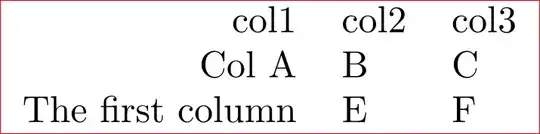
In order to create a new column based on existing ones, you have to define the new column somehow. This involves three steps:
- defining how the new column should be defined (i.e. define its content):
create one use
- tell
pgfplotstable that it should be part of the output (and at which position) : columns key
- modify the appearance options of the new column:
column/<name>/.style={...}

\documentclass{standalone}
\usepackage{pgfplotstable}
\begin{document}

\pgfplotstabletypeset[
  col sep=comma,
  columns/col1/.style={string type,column type=r},
  columns/col2/.style={string type,column type=l},
  columns/col3/.style={string type,column type=l},
  columns/mixed/.style={string type,column type=l,column name={col2/col3}},
  columns={col1,mixed},
  create on use/mixed/.style={
    create col/assign/.code={%
        \edef\entry{\thisrow{col2}/\thisrow{col3}}%
        \pgfkeyslet{/pgfplots/table/create col/next content}\entry
    }
  },
  ]
{
    col1,col2,col3
    Col A,B,C
    The first column,E,F
}

\end{document}
The new lines are those which refer to mixed (which is my name for the new column).
The line columns={col1,mixed} tells pgfplotstable that which columns should be typeset (and in which order), i.e. it fulfills step (2).
The line columns/mixed/.style=... configures appearance options for column mixed (including its display name), i.e. it fulfills step (3).
Finally, the create on use/mixed/.style={...} statement defines how to create the new column (step (1). In our case, we provide a /.code fragment which uses two programming constructs to define the content: The line \edef\entry... means "define \entry to the expanded value in the braces (expanded def)". The \thisrow{colname} statement expands to the value of colname in the currently processed row (there is also \nextrow{colname} and \prevrow{colname} which operate in a similar way). Finally, \pgfkeyslet{.../next content}\entry writes the value of \entry into some value which is expected by the create col/assign method as output.