UPDATE
The functionalities implemented by the commands \HighBlock and \LowBlock whose code is given in that answer has been integrated in the version 6.14 of nicematrix (2023/02/18) with keys T and B for the command \Block.
\documentclass{article}
\usepackage{nicematrix}
\begin{document}
With the key \verb|T|
\begin{NiceTabular}{ccc}
\Block[T]{3-2}{\Huge A} & & 0 \
& & 0 \
& & 0 \
0 & 0 & 0
\end{NiceTabular}
\bigskip
With the key \verb|B|
\begin{NiceTabular}{ccc}
\Block[B]{3-2}{\Huge A} & & 0 \
& & 0 \
& & 0 \
0 & 0 & 0
\end{NiceTabular}
\end{document}
As usual with nicematrix, you need several compilations.
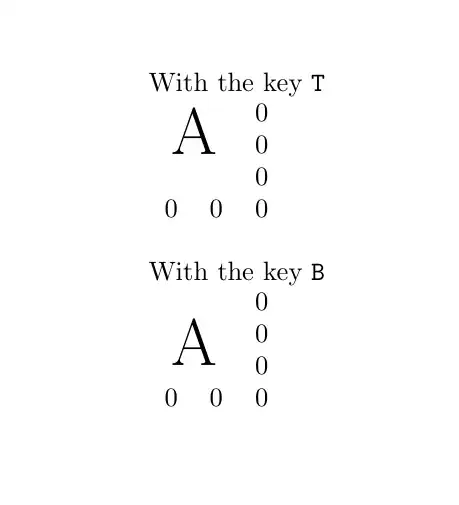
For those keys T and B the margin (above and below) is equal to the parameter inner ysep de PGF/Tikz. Here is an example with that parameter set to 0 pt.
\documentclass{article}
\usepackage{nicematrix}
\usepackage{tikz}
\begin{document}
\NiceMatrixOptions{hvlines,rules/color=gray!15}
\pgfset{inner sep = 0pt}
With the key \verb|T|
\begin{NiceTabular}{ccc}
\Block[T]{3-2}{\Huge A} & & 0 \
& & 0 \
& & 0 \
0 & 0 & 0
\end{NiceTabular}
\bigskip
With the key \verb|B|
\begin{NiceTabular}{ccc}
\Block[B]{3-2}{\Huge p} & & 0 \
& & 0 \
& & 0 \
0 & 0 & 0
\end{NiceTabular}
\end{document}

At this time, there is no option in the command \Block to set the vertical alignment. I will probably add that feature in a future version of nicematrix.
As for now, it's possible to define two commands \HighBlock and \LowBlock which do the job (without the options of the built-in command \Block...).
The code does not use any private command of the package nicematrix.
\documentclass{article}
\usepackage{nicematrix}
\begin{document}
\ExplSyntaxOn
\makeatletter
\NewDocumentCommand { \HighBlock } { m m }
  {
    \tl_gput_right:Nx \g_nicematrix_code_after_tl
      {
        __Alan_high_block:nnnn
          { \int_use:c { c@iRow } }
          { \int_use:c { c@jCol } }
          { #1 }
          { \exp_not:n { #2 } }
      }
  }
\cs_new_protected:Nn __Alan_high_block:nnnn
  {
    __Alan_analyze:w #3 \q_stop
    \pgfpicture
    \pgfrememberpicturepositiononpagetrue
    \pgf@relevantforpicturesizefalse
    __nicematrix_qpoint:n { row - #1 }
    \dim_set_eq:NN \l_tmpa_dim \pgf@y
    __nicematrix_qpoint:n { col - #2 }
    \dim_set_eq:NN \l_tmpb_dim \pgf@x
    __nicematrix_qpoint:n { col - \int_eval:n { #2 + \l_tmpb_int } }
    \pgftransformshift { \pgfpoint { \dim_eval:n { (\l_tmpb_dim + \pgf@x) / 2 } } { \l_tmpa_dim } }
    \pgfnode
      { rectangle }
      { north }
      { #4 }
      { }
      { }
    \endpgfpicture
  }
\NewDocumentCommand { \LowBlock } { m m }
  {
    \tl_gput_right:Nx \g_nicematrix_code_after_tl
      {
        __Alan_low_block:nnnn
          { \int_use:c { c@iRow } }
          { \int_use:c { c@jCol } }
          { #1 }
          { \exp_not:n { #2 } }
      }
  }
\cs_new_protected:Nn __Alan_low_block:nnnn
  {
    __Alan_analyze:w #3 \q_stop
    \pgfpicture
    \pgfrememberpicturepositiononpagetrue
    \pgf@relevantforpicturesizefalse
    __nicematrix_qpoint:n { row - \int_eval:n { #1 + \l_tmpa_int } }
    \dim_set_eq:NN \l_tmpa_dim \pgf@y
    __nicematrix_qpoint:n { col - #2 }
    \dim_set_eq:NN \l_tmpb_dim \pgf@x
    __nicematrix_qpoint:n { col - \int_eval:n { #2 + \l_tmpb_int } }
    \pgftransformshift { \pgfpoint { \dim_eval:n { (\l_tmpb_dim + \pgf@x) / 2 } } { \l_tmpa_dim } }
    \pgfnode
      { rectangle }
      { south }
      { #4 }
      { }
      { }
    \endpgfpicture
  }
\cs_new_protected:Npn __Alan_analyze:w #1 - #2 \q_stop
  {
    \int_set:Nn \l_tmpa_int { #1 }
    \int_set:Nn \l_tmpb_int { #2 }
  }
\makeatother
\ExplSyntaxOff
With \verb|\HighBlock{3-2}{\Huge A}|
\begin{NiceTabular}{ccc}
\HighBlock{3-2}{\Huge A} & & 0 \
& & 0 \
& & 0 \
0 & 0 & 0
\end{NiceTabular}
\bigskip
With \verb|\LowBlock{3-2}{\Huge A}|
\begin{NiceTabular}{ccc}
\LowBlock{3-2}{\Huge A} & & 0 \
& & 0 \
& & 0 \
0 & 0 & 0
\end{NiceTabular}
\end{document}
As usual with nicematrix, you need several compilations (because of the PGF/Tikz nodes).

This part is an answer to the question of Avi Vajpeyi in a comment. That version of the command \HighBlock typesets a paragraph in the block. The code does not use internals of nicematrix.
\documentclass{article}
\usepackage{nicematrix}
\begin{document}
\ExplSyntaxOn
\makeatletter
\NewDocumentCommand { \HighBlock } { O { } m m }
  {
    \HighBlockAux { #2 } { #3 }
    \Block [ #1 ] { #2 } { }
  }
\NewDocumentCommand { \HighBlockAux } { > { \SplitArgument { 1 } { - } } m m }
  {
    \tl_gput_right:Nx \g_nicematrix_code_after_tl
      {
        __Avi_high_block:nnnnn
          { \int_use:c { c@iRow } }  % row of first cell
          { \int_use:c { c@jCol } }  % col of first cell
          #1                         % { i } { j } where i/j is the number of rows/cols
          { \exp_not:n { #2 } }      % contents of the block
      }
  }
\cs_new_protected:Nn __Avi_high_block:nnnnn
  {
    \dim_zero_new:N \l__Avi_y_top_line_dim
    \dim_zero_new:N \l__Avi_left_dim
    \dim_zero_new:N \l__Avi_right_dim
    \dim_zero_new:N \l__Avi_width_block_dim
    %
    \pgfpicture
    \pgfrememberpicturepositiononpagetrue
    \pgf@relevantforpicturesizefalse
    \pgfpointanchor { nm - \NiceMatrixLastEnv - row - #1 - base } { center }
    \dim_set_eq:NN \l__Avi_y_top_line_dim \pgf@y

    \pgfpointanchor { nm - \NiceMatrixLastEnv - #2 } { center }
    \dim_set_eq:NN \l__Avi_left_dim \pgf@x

    \pgfpointanchor { nm - \NiceMatrixLastEnv - \int_eval:n { #2 + #4 } } { center }
    \dim_set_eq:NN \l__Avi_right_dim \pgf@x
    \pgftransformshift
      {
        \pgfpoint
          { \dim_eval:n { (\l__Avi_left_dim + \l__Avi_right_dim) / 2 } }
          { \l__Avi_y_top_line_dim }
      }
    \dim_set:Nn \l__Avi_width_block_dim
      { \l__Avi_right_dim - \l__Avi_left_dim - 2 \tabcolsep }
    \pgfnode
      { rectangle }
      { base }
      {
        \begin { minipage } [ t ] { \l__Avi_width_block_dim }
        #5
        \end { minipage }
      }
      { }
      { }
    \endpgfpicture
  }
\makeatother
\ExplSyntaxOff
\begin{NiceTabular}{ccccccccc}[hvlines]
\HighBlock{7-8}{The text is that block is automaticaly
wrapped to the size of the block (but no space
is created by the block itself!}
  &   &   &   &   &   &   &   & 1 \
  &   &   &   &   &   &   &   & 2 \
  &   &   &   &   &   &   &   & 3 \
  &   &   &   &   &   &   &   & 4 \
  &   &   &   &   &   &   &   & 5 \
  &   &   &   &   &   &   &   & 6 \
  &   &   &   &   &   &   &   & 7 \
1 & 2 & 3 & 4 & 5 & 6 & 7 & 8 & 0
\end{NiceTabular}
\end{document}


\Block{1-2}{A}... – F. Pantigny Feb 14 '22 at 21:15\Block{1-2}{\Huge A}), the row will be expanded in an undesirable way. Also, @f-pantigny, thank you for the amazing package! – Alan Feb 15 '22 at 14:16