It is not entirely clear what your experiments with \DeclareUnicodeCharacter have been so far, but the following works with pdflatex:
\documentclass{article}
\DeclareUnicodeCharacter{2225}{$\parallel$}
\usepackage{minted}
\begin{document}
$\parallel$ this works as expected
\begin{minted}{haskell}
parseOr :: Parser Operator
parseOr = Or <$> oneOf "v+∥"
\end{minted}
\end{document}
Result:

When you use ∥ outside of a string minted thinks that there is a syntax error and will display a red box around the character. You can switch this off by escaping to LaTeX before you print the symbol:
\documentclass{article}
\usepackage{minted}
\DeclareUnicodeCharacter{2225}{$\parallel$}
\begin{document}
$\parallel$ this works as expected
\begin{minted}[escapeinside=##]{haskell}
parseOr :: Parser Operator
parseOr = Or <$> oneOf "v+∥"
doSomething = doFirst #∥# doSecond
\end{minted}
\end{document}
The problem here is that you need to find a character that you don't use anywhere in your code and that is allowed for escapeinside (basically only standard ASCII).
An alternative is to switch off the error boxes altogether:
\documentclass{article}
\usepackage{minted}
\DeclareUnicodeCharacter{2225}{$\parallel$}
\makeatletter
\AtBeginEnvironment{minted}{\dontdofcolorbox}
\def\dontdofcolorbox{\renewcommand\fcolorbox[4][]{##4}}
\makeatother
\begin{document}
$\parallel$ this works as expected
\begin{minted}{haskell}
parseOr :: Parser Operator
parseOr = Or <$> oneOf "v+∥"
doSomething = doFirst ∥ doSecond
\end{minted}
\end{document}
Result in both cases:
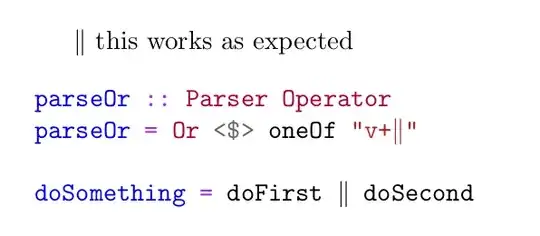
Source: Minted red box around greek characters.


albatrosstool)? – TeXnician Feb 27 '22 at 08:37